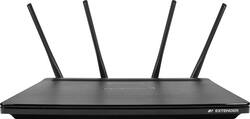
Amped Wireless - Athena-EX High Power AC2600 Wi-Fi Range Extender - Black
- Key Specs
- Wi-Fi Speed: 1733 megabits per second (The maximum rate at which data is transferred between a network device and wireless router.)
- Wireless Standard: Wireless-AC, Wireless-N (The wireless networking protocol used by the device. Each iteration of the protocol is based on the 802.11 standard developed by the Institute of Electrical and Electronics Engineers (IEEE) Standards Association. Denoted by letters following 802.11 (802.11a, 802.11ac, etc.), each version, published in alphabetical order, encompasses all previous versions.)
- Wi-Fi Range: 15000 Sq Ft (The device will provide a Wi-Fi connection to this approximate area.)
- Form Factor: Freestanding, Mountable (The size, arrangement, and physical configuration of the product.)
- Band Technology: Dual (Refers to the number of frequency bands used to wirelessly transmit an internet signal. For example, dual-band devices may use one 2.4 and one 5 GHz band, while tri-band devices may use one 2.4 and two 5 GHz bands. Multiple bands also provide more flexibility for designating connected devices to specific band use.)
- Frequency Band: 2.4 GHz, 5.0 GHz (Bands may be grouped into categories such as low- and high-band VHF (Very High Frequency), low- and high-band UHF (Ultra High Frequency), or certain frequency channels (measured in MHz or GHz). Generally, higher frequencies transmit information faster but have shorter range than lower frequencies.)
- Antenna Type: Detachable
- Number of LAN Ports: 4 (Number of devices able to be connected to the Local Area Network (LAN). LAN ports allow wired connections to other networking devices (wireless access points, range extenders, etc.) in order to share the internet connection received through a WAN port.)
- General
- Product Name: Athena-EX High Power AC2600 Wi-Fi Range Extender
- Brand: Amped Wireless
- Model Number: RE2600M
- Network
- Wi-Fi Range: 15000 Sq Ft (The device will provide a Wi-Fi connection to this approximate area.)
- Attached Antenna: true
- Minimum Frequency: 2400 megahertz (The lowest signal frequency that the device is able to amplify or transmit. The higher the frequency, the more data that can be transmitted and the more easily the signal is attenuated (weakened over distance/passing through buildings).)
- Maximum Frequency: 5 gigahertz (The highest signal frequency that the device is able to amplify or transmit. Generally, the higher the frequency, the more data that can be transmitted and the more likely the signal is attenuated (weakened over distance/passing through buildings).)
- Maximum Coverage Area: 15000 square feet
- Features
- App Compatible: false (The product can be connected to a program or software application on a mobile device, which then receives collected data from the product.)
- Ports
- Number Of USB Port(s): 2 (The total number of USB ports including all generations and versions.)
- Compatibility
- System Requirements: Wireless 802.11a/b/g/n or ac 2.4GHz or 5GHz Network Computer, tablet or smartphone with a web browser (The software that a product must have for it to be able to integrate with another product.)
- Dimensions
- Product Height: 1.6 inches (The out of box height of the item. Height is measured as the vertical distance from the bottom of the item to the top as it would be primarily used or placed.)
- Product Length: 6.7 inches (The out of box length of the item. Length is measured as the longest dimension of the item.)
- Product Width: 10.65 inches (The out of box width of the item. Width is measured as the horizontal distance from one side of the item to the other as it would be primarily used or placed.)
- Product Weight: 1.4 pounds (The out of box weight of the item.)
- Warranty
- Manufacturer's Warranty - Parts: 1 Year
- Manufacturer's Warranty - Labor: 1 Year
- Other
- UPC: 850535006356
Increase the coverage of your wireless network by using this Amped Wireless range extender, which provides up to 15,000 square feet of coverage. With cutting edge MU-MIMO technology and four high-gain antennas, this range extender eliminates dead spots and ensures you have a strong connection with up to 2.53Gbps speeds. With a built-in dual-core processor, this Amped Wireless range extender easily handles multiple connections.
- Up to 15,000 sq. ft. of coverage: Bring long range, reliable Wi-Fi to your entire home or office.
- Eliminate Wi-Fi dead spots: Amplify Wi-Fi to the max with 16 amplifiers and 4 high gain antennas.
- AC2600 Wi-Fi speeds + MU-MIMO: Move faster on all devices with speeds up to: 2.4 GHz 800 Mbps + 5 GHz 1733 Mbps.
- 4-Antenna technology: The advanced 4 antenna, 4 stream architecture strengthens connections & covers more ground.
- High power dual-core processor: Handles heavy traffic with ease, for the best Wi-Fi experience.
- Share files with USB3.0: Attach a USB drive to instantly share files, locally, at blazing-fast speeds (USB storage device not included).
- AirPlay®, AirPrint & Home Sharing: Compatible with all Apple networking features.
Whats Included
- Athena-EX High Power AC2600 Wireless Range Extender
- 4 x Detachable High Gain Dual Band Antennas
- Power Adapter (100-240v)
- Setup Guide
- CD: Owner's manual & Installation Video
Q: Will it work with netgear routers
A: Yes, the range extender is compatible with Netgear routers.
A: undefined
A: This extender is strictly for wifi. Your cellular phone uses a different spectrum and will not be impacted by this router.
A: Yes, this range extender can be used to improve the signal strength from your RV.
Q: i have a 9,500 sq ft home will it extend to my whole house since it says 15,000 sq ft range
A: Hello, The 15,000 SQFT coverage was a result in our testing environment but since WIFI is environmental results will vary so there is no way to determine the coverage you will get.
Q: Will the Athena-ex Ac2600 wi-fi range Extender work with a asus router to extend the wifi signal
A: This unit is designed to be universal. If other wifi devices connect to your router without difficulty, then so will this unit. It simply repeats what is sent. The speed will be slower than a direct connection, but in most cases that's not a big issue unless you intend to transfer large files on a regular basis.
Q: will this device connect back to the router by a CAT cable?
A: I am not sure how to edit my previous answer but even though they said no, it does work. It took a bit of configuring to make that happen but it wasn't too hard. The main things were to disable its DHCP server under the IP Settings Tab and assign it a static IP address on your local subnet, you also have to make sure the gateway is your main routers IP address. Fill out the home network settings with just a network name if you want to be able to select which channel it runs on. Selecting the channel has to be done there and it won't let you change that unless a home network name is filled in. Then you can configure the Extended networks, those will be the access points. I had a few issues along the way with some DHCP still getting assigned by the server in the re2600m after connecting but that was my fault for not making sure it cleared the old settings out. It wasn't hard and I am not explaining it best but it does work as an access point with a little configuration. The only issue I have noticed is that any internet related activites on the device itself, like checking for updates, or using the NTP protocol don't seem to work. Its like the device itself doesn't know there is internet access even though anything that connects to it has internet. Anyway sorry for the poor explanation. TLDR, YES it works with a little effort and the right configuration.


















