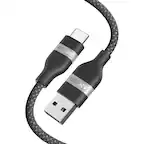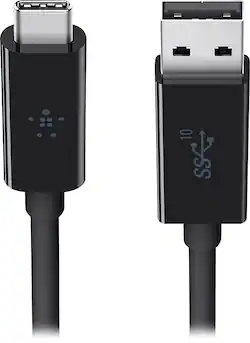
Belkin - 3.1 USB-A to USB-C Cable - 3ft USB Type A to Type C Cable for Fast Charging & Data Transfer - Black
- Key Specs
- Cable Length: 3 feet
- Connector Type (End 1): USB Type C
- Gender (End 1): Male
- Connector Type (End 2): USB Type A
- Gender (End 2): Male
- General
- Product Name: 3.1 USB-A to USB-C Cable - 3ft USB Type A to Type C Cable for Fast Charging & Data Transfer
- Brand: Belkin
- Model Number: F2CU029BT1M-BLK
- Color: Black
- Connectivity
- Cable Type: USB
- Cable Length: 3 feet
- Product Type: Cable
- Connector Type (End 1): USB Type C
- Gender (End 1): Male
- Connector Type (End 2): USB Type A
- Gender (End 2): Male
- Other
- UPC: 745883692309
Connect USB Type A devices to USB Type C devices with this Belkin F2CU029BT1M-BLK cable, which features 10 Gbps data transfer rates for efficient operation and a 3' length for flexible connectivity.
- Single Cable Solution: Our Thunderbolt 3.1 USB A to USB C charging cable supports data, power & video for your MacBook Pro, Galaxy Note or any other USB-C compatible device
- Latest Thunderbolt Technology: Giving you top-tier connectivity in a full-featured Belkin USB C charging cable with the latest Thunderbolt technology
- Lightning Speed Data Transfer: This 3.3ft/1m data transfer cable in black allows you to transfer data at up to 10Gbps with improved cables and connectors
- USB A to USB C: The Belkin USB-A to USB-C Charge Cable lets you charge your USB-C device as well as sync your photos, music and data to your existing laptop
- Compatible with Multiple Devices: Compatible with MacBook Pro, Dell XPS, Galaxy Note, Galaxy Tab, iMac, Google Pixel, Google Chromebook Pixel & More
Whats Included
- 3' USB Type A-to-USB Type C Cable
A: The data transfer rate is governed by the version of USB that is supported (e.g. 2.0, 3.0, 3.1), not the physical connector (e.g. type A, type B, type C). This particular cable is USB 3.1, but not all type C cables/ports support USB 3.1. To get 10 Gbps, both ports as well as the cable must support it (USB 3.1).
Q: will this cable work with occulus quest 2
A: Hi Dave. If your device supports USB-C, then it should work fine with the Belkin F2CU029 cable, since it works with most USB-C enabled devices.
A: Yes, will lose some the data transfer rate of the USB 3 but it will work
Q: Does this cable work for android auto?
A: YES! My wife was angry with Android Auto, and thought the software was terrible (bite your tongue iZombie/Apple-lovers), then I noticed what cable she was trying to use (Amazon Cheap-chic). I let her borrow my cable and, now, she loves it. The only problem is that she stole my cable and I had to buy a new one, haha. So, in short, not only does this work for android auto...you NEED this cable for android auto
A: Yes this is what I bought the cable for. To sync from new Apple devices to older Apple devices or windows running iTunes
Q: Can this cable be used to connect a monitor with USB C to a Windows PC with USB 3.0?
A: Hi, RobDaleC. Yes, you can use this cable to connect your USB-C enabled monitor to a Windows PC with USB 3.0. However, it can’t use the features of the USB 3.1 such as having a faster transfer rate.
A: For what it’s worth, this cable let me backup the iPad to iTunes using a computer with usb a ports.
A: Yes, navig8rmb. The Belkin F2CU029 cable is designed for charging and data transferring. As long as you're connecting from a standard USB-A device to a USB-C (also known as USB Type-C) enabled device, it should work fine.