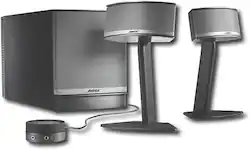
Bose - Companion® 5 Multimedia Speaker System (3-Piece) - Black
- Key Specs
- Volume Control: true
- Headphone Jack: true (The device features an interface that allows for the connection of headphones.)
- Standard Auxiliary Input: true
- Subwoofer Included: true
- General
- Product Name: Companion® 5 Multimedia Speaker System (3-Piece)
- Brand: Bose
- Model Number: COMPANION 5
- Compatibility
- Computer Compatibility: Universal
- Features
- Speaker Configuration: 2 magnetically shielded speakers and subwoofer
- Dimensions
- Speaker Depth: 3.8 inches
- Speaker Height: 2.5 inches
- Speaker Weight: 1.9 pounds
- Speaker Width: 5.8 inches
- Other
- UPC: 017817393249
With TruSpace® digital processing circuitry, this multimedia speaker system delivers 5.1 multichannel audio from just 2 speakers and the compact Acoustimass® module, providing an immersive movie-watching or game-playing experience on your computer.2px 17px;margin:
Q: Can you connect these to a sound card?
A: The Companion 5 system is specifically designed to bypass the sound card on your computer in order to produce more direct digital sound from your movies and games. When plugging in by USB, the Companion 5 essentially takes over and becomes the sound card for the computer. If you specifically want to connect it to an output from your sound-card, there is an analog 3.5mm aux input located on the volume control for this system which could be used. We do not recommend this setup as the USB digital interface, and the resulting quality, is a large part of what you are paying for on this system. Other Bose computer speaker systems such as our Companion 2 or Companion 20 speakers are designed to work with your computer’s sound card.
Q: How can I get the best sound from companion5 if I connect it with TV
A: Thank you for your question. The Companion 5 Multimedia Speaker System is designed for use with a computer connected via USB. When connected to a computer with a USB connection, the system can decode stereo and Dolby Digital 5.1 signals. To connect a different type of device, such as a TV, you would need to use the 3.5mm auxiliary audio input on the volume control pod. This is a stereo analog input and will not provide a Dolby Digital 5.1 signal. Either the RCA audio output on the back of your TV or the headphone output will work just fine when connected to the AUX input on the Companion 5.
A: Thanks for your question. A Recording device can be set independently of the Playback device within the Windows 7 Control Panel. If you open the Control Panel and select “Sound,” you’ll find two tabs; Playback, which should be set to “Bose USB Audio” and Recording, which can be set to the input of your choice. We hope this helps!
Q: Can you finagle a way to make a Bose Companion 5 Multimedia Speaker System a surround sound system?
A: While the Companion 5 is designed to create a Full 5.1 effect from two speakers and a sub, and does so remarkably when you are close to the system... I have found that there is no feasible way to "bridge" additional components with it. I have sought the answer to this very question myself, and after extensive research have found... The computer makes the Companion 5 the "Primary/Default" sound, and therefore overrides anything further. Adding auxiliary speakers from any device via 3.5mm jack has not worked either. I hope that this helps.
Q: Can I plug/play an iPod from an audio jack?
A: There is an AUX input on the Companion 5’s control pod next to the headphone jack. You can connect an iPod or any other device with a headphone output to this input. Thanks!
A: Thanks for the question. The Companion 5 Multimedia Speaker System can be connected to an auxiliary device, such as your television, using the 3.5mm AUX input located on the control pod. As long as you television has a headphone jack or an analog audio out, then this should be able to work.
Q: Can I use the bose companion 3 speakers seperately without the subwoofer?
A: No, this product cannot be used in that manner.
A: Yes, you can plug the Bose system into the headphone jack of the preamp.














