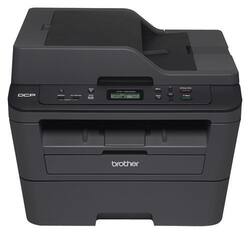
Brother - DCP-L2540DW Wireless -and-White All-In-One Printer - Black
- Key Specs
- Networking: Wired, Wireless
- ENERGY STAR Certified: false (Devices carrying the ENERGY STAR service mark, such as computer products and peripherals, kitchen appliances, and other products, generally use 20% to 30% less energy than required by federal standards.)
- Printer Type: All In One
- Duty Cycle: Up to 10,000 (The maximum number of pages per month that the device can produce without failing, as specified by the manufacturer.)
- Monochromatic/Color: Monochromatic
- General
- Product Name: DCP-L2540DW Wireless Black-and-White All-In-One Printer
- Brand: Brother
- Model Number: DCP-L2540DW
- Dimensions
- Product Height: 12.5 inches (The out of box height of the item. Height is measured as the vertical distance from the bottom of the item to the top as it would be primarily used or placed.)
- Product Width: 16.1 inches (The out of box width of the item. Width is measured as the horizontal distance from one side of the item to the other as it would be primarily used or placed.)
- Product Weight: 24.5 pounds (The out of box weight of the item.)
- Certifications Listings & Approvals
- EPEAT Qualified: false (The Electronic Product Environmental Assessment Tool (EPEAT) was designed to provide an environmental assessment tool for purchasers. In order to qualify for EPEAT, a product must meet all 23 required criteria.)
- Paper Info
- Automatic Document Feeder Capacity: 35 sheets
- Maximum Document Length: 14 inches
- Maximum Document Width: 8.5 inches
- Paper Handling: Letter, Legal , Executive, A4, A5, B5
- Supported Paper Sizes: Letter
- Features
- Automatic Reduction/Enlargement: true
- Ink
- Compatible Cartridges: Toner Cartridge & Drum Unit
- Ink Subscription Service Available: false (The printer monitors ink usage and alerts the subscription provider when levels are low. A purchased subscription provides refills of ink based on usage.)
- Scanner Info
- Duplex Scan Function: false
- Scanner Resolution: Up to 19200 x 19200 (Refers to the number of pixels/dots, both horizontally and vertically, of the image produced by the scanner. Generally, the higher the resolution, the sharper and cleaner the produced image.)
- Scanner Type: Other
- Fax Info
- Integrated Fax: false
- Performance
- Printer Resolution (Black): Up to 2400 x 600 (Refers to the number of pixels/dots, both horizontally and vertically, of the image produced by the printer in black ink. Generally, the higher the resolution, the sharper and cleaner the produced image.)
- Connectivity
- Minimum System Requirements: None
- Other
- UPC: 012502638858
With a 250-sheet lower paper tray and 1-sheet manual feed slot, this Brother DCP-L2540DW all-in-one printer makes it easy to print, copy and scan large documents. Automatic duplex printing lets you create 2-sided documents.
- Prints up to 30 ISO ppm* in black: To generate documents quickly.
- 3-in-1 functionality: Prints, copies and scans for multipurpose use.
- Built-in wireless LAN (802.11b/g/n): Ensures fast data transfer from a wireless connection. An Ethernet LAN provides a simple wired connection to your home or office network.
- Up to 2400 x 600 dpi resolution: For crisp prints.
- Flatbed ADF scanner: With Scan ID and other features allows you to reproduce multipage documents.
Whats Included
- 12,000-page drum (DR-630)
- 700-page starter toner cartridge
- AC power cord
- DCP-L2540DW Wireless All-In-One Printer
- Installation CD-ROM
- Owner's manual
Q: Is it possible to print directly from iPad and iPhone?
A: Yes! And it works very well from any app that uses AirPrint, even the picky Coupons.com app my wife uses. I love the Brother App for scanning. You can straighten the scan, scan multiple pages, choose to save as image or PDF. You can even send it to Evernote, iCloud, DropBox, email, etc. Can't express how easy it is and how happy I am with it. So this is great for printing and scanning from iOS. My family has used it with iPad Pro, iPhone 6 Plus and iPhone 6.
Q: Can I print from my mobile phone/device (Android)? If so, is there a recommended app for printing?
A: Yes, this model is compatible with Android devices and can use any of the following apps: AirPrint™, Google Cloud Print™, Brother™ iPrint&Scan, Cortado Workplace, and Wi-Fi Direct®.
Q: Does this scan to email a document?
A: Yes
A: Yes, it can print on envelopes and non-standard size paper. I use this option all the time to printer address labels. Just above the paper tray, there is a little flap that opens to reveal a slot for envelopes and labels. You adjust the sliders to accommodate the envelope, insert the envelope into the slot, set your software to print correctly on the envelope, and then choose the 'Manual Feed' option in your print dialog box. That's it.
Q: What accessories go with this? Is toner included?
A: Yes.. but a sample toner which may not be giving too many prints..
Q: does this scan via auto document feeder
A: Yes, it will only scan one sided in the document feeder, if you want. Two sided then you have to use the scanner.
Q: Will it auto scan both sides of any document?
A: No, the Brother - DCP-L2540DW Wireless Black-and-White All-In-One Printer does not have duplex scan feature.



















