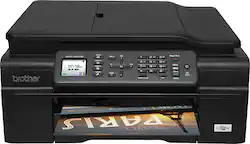
Brother - MFC-J475DW Wireless Inkjet All-in-One Printer - Black
- Key Specs
- Networking: Wireless
- Printer Type: All In One
- ISO Color Print Speed: 10 pages per minute (The number of color pages able to be printed per minute in the device's default single-side mode, as tested by the International Standards Organization (ISO).)
- ISO Mono Print Speed: 12 pages per minute (The number of black ink (grayscale) pages able to be printed per minute in the device's default single-side mode, as tested by the International Standards Organization (ISO).)
- Touch Screen: false (Touch-screen devices make navigating more intuitive. Using a touch-screen display, you can do things such as tap to select, hold and drag to move items, swipe to scroll, and pinch to zoom.)
- General
- Product Name: MFC-J475DW Wireless Inkjet All-in-One Printer
- Brand: Brother
- Display Screen: true
- Display Screen Size: 1.8 inches
- Model Number: MFC-J475DW
- Color: Black
- Dimensions
- Product Height: 7.1 inches (The out of box height of the item. Height is measured as the vertical distance from the bottom of the item to the top as it would be primarily used or placed.)
- Product Width: 16.1 inches (The out of box width of the item. Width is measured as the horizontal distance from one side of the item to the other as it would be primarily used or placed.)
- Product Weight: 19 pounds (The out of box weight of the item.)
- Features
- Automatic Document Feeder: true
- Photo Printing: true
- Automatic Reduction/Enlargement: true
- Automatic Two-Sided Printing: true
- Tray Capacity: 100
- Duty Cycle: Up to 2,500 (The maximum number of pages per month that the device can produce without failing, as specified by the manufacturer.)
- Certifications Listings & Approvals
- EPEAT Qualified: false (The Electronic Product Environmental Assessment Tool (EPEAT) was designed to provide an environmental assessment tool for purchasers. In order to qualify for EPEAT, a product must meet all 23 required criteria.)
- Scanner Info
- Scanner Type: Flatbed
- Scanner Resolution: Up to 2400 x 1200 (Refers to the number of pixels/dots, both horizontally and vertically, of the image produced by the scanner. Generally, the higher the resolution, the sharper and cleaner the produced image.)
- Fax Info
- Integrated Fax: true
- Ink
- Compatible Cartridges: LC101BK, LC101C, LC101M; LC101Y; LC103BK; LC103C; LC103M; LC103Y
- Ink Subscription Service Available: false (The printer monitors ink usage and alerts the subscription provider when levels are low. A purchased subscription provides refills of ink based on usage.)
- Memory
- Memory Card Slot: false
- Paper Info
- Automatic Document Feeder Capacity: 20 sheets
- Maximum Document Length: 14 inches
- Maximum Document Width: 8.5 inches
- Supported Paper Sizes: 8.5" x 14", 8.5" x 11"
- Paper Handling: Up to 100 sheets
- Performance
- Printer Resolution (Black): Up to 6000 x 1200 (Refers to the number of pixels/dots, both horizontally and vertically, of the image produced by the printer in black ink. Generally, the higher the resolution, the sharper and cleaner the produced image.)
- Printer Resolution (Color): Up to 6000 x 1200 (Refers to the number of pixels/dots, both horizontally and vertically, of the image produced by the printer in colored ink. Generally, the higher the resolution, the sharper and cleaner the produced image.)
- Copier Info
- Copier Resolution (Black): Up to 2400 x 1200 (Refers to the number of pixels/dots, both horizontally and vertically, of the image produced by the copier in black ink. Generally, the higher the resolution, the sharper and cleaner the produced image.)
- Copier Resolution (Color): Up to 2400 x 1200 (Refers to the number of pixels/dots, both horizontally and vertically, of the image produced by the copier in colored ink. Generally, the higher the resolution, the sharper and cleaner the produced image.)
- Connectivity
- Minimum System Requirements: PC: Windows Server 2003, 2003 x64, 2003 R2, 2003 Rs x64, 2008 or 2008 R2, XP, XP Professional X64, Vista or 7, Mac: OS X 10.6.x, 10.7.x or 10.8.x
- Other
- UPC: 012502635543
Brother MFC-J475DW Wireless Inkjet All-in-One Printer: Maximize the efficiency of your workspace with this all-in-one printer, which can print, copy, scan and fax documents for flexible functionality. You can either connect your computer using the printer's built-in Wi-Fi or print directly from your smartphone or tablet using one of the provided mobile printing apps.
- Inkjet printers are best for home or small business use: They offer excellent print quality for photos and documents and accept a variety of paper types and sizes.
- Wireless and mobile printing capability: Connect to your computer with built-in Wi-Fi. Plus, print from your smartphone, tablet and other mobile devices with Apple AirPrint, Google Cloud Print, Brother iPrint&Scan or Cortado Workplace.
- Capture and convert paper documents directly from compatible devices: Connect to the Internet and access the Brother Cloud app for versatile functionality.
- Up to 6000 x 1200 dpi (dots per inch) color resolution: High resolution for producing incredible quality and detail in documents and photos.
- 4 individual print cartridges are economical: Only replace ink cartridges (black, cyan, magenta and yellow) when a color runs out.
- Leave the printer unattended while faxing, scanning and copying: Complete jobs with ease using the 20-page automatic document feeder.
- 1.8" color LCD offers easy navigation: The Web Connect TouchScreen interface makes it easy to scan to or print from a variety of Web services, including Facebook, Picasa, Flickr, Google Drive, Evernote Box and Skydrive.
- 1 USB port for simple connectivity: 1 high-speed USB port offers a standard connection to your computer.
- More print, copy, scan and fax solutions: Print and copy 2-sided documents, scan to your e-mail, quickly fax from your PC and more.
- Inkjet printers are best for home or small business use: They offer excellent print quality for photos and documents and accept a variety of paper types and sizes.
- Wireless and mobile printing capability: Connect to your computer with built-in Wi-Fi. Plus, print from your smartphone, tablet and other mobile devices with Apple AirPrint, Google Cloud Print, Brother iPrint&Scan or Cortado Workplace.
- Capture and convert paper documents directly from compatible devices: Connect to the Internet and access the Brother Cloud app for versatile functionality.
- Up to 6000 x 1200 dpi (dots per inch) color resolution: High resolution for producing incredible quality and detail in documents and photos.
- 4 individual print cartridges are economical: Only replace ink cartridges (black, cyan, magenta and yellow) when a color runs out.
- Leave the printer unattended while faxing, scanning and copying: Complete jobs with ease using the 20-page automatic document feeder.
- 1.8" color LCD offers easy navigation: The Web Connect TouchScreen interface makes it easy to scan to or print from a variety of Web services, including Facebook, Picasa, Flickr, Google Drive, Evernote Box and Skydrive.
- 1 USB port for simple connectivity: 1 high-speed USB port offers a standard connection to your computer.
- More print, copy, scan and fax solutions: Print and copy 2-sided documents, scan to your e-mail, quickly fax from your PC and more.
Whats Included
- MFC-J475DW Wireless Inkjet All-in-One Printer
- Installation CD-ROM
- LC101 black/cyan/magenta/yellow ink cartridges
- Owner's manual
- Phone line cord
- MFC-J475DW Wireless Inkjet All-in-One Printer
- Installation CD-ROM
- LC101 black/cyan/magenta/yellow ink cartridges
- Owner's manual
- Phone line cord
Q: Does this printer really require all 4 ink cartridges ?
A: You must have all the ink cartridges installed and with enough ink to make it work, My wife has complained about this very same thing.
A: Yes it will work wirelessly and with a cable. I have mine hooked up with the cable to my desktop and wirelessly to my laptop.
Q: Ink catridges can be refilled?
A: I dont think you can refill, however, there are some cheaper refills available from aftermarket dealers. I purchased a dozen black refills for 10 dollars , they work just fine.
A: While the printer will print in black only, all of the cartridges do need to be inserted for printing.
Q: Is it a ink miser or guzzler?
A: I have had mine for several months and am still using start up cartridges that came with it.
Q: How do you change the copy setting from Best to Fast?
A: Try looking in the driver under print preference or advance settings.
Q: IS THIS PRINTER COMPATABLE WITH MAC YOSEMITE
A: Just purchased an iMac with Yosemite and the Brother's printer. Setup was a breeze. Followed the instructions to download software and drivers (because my new iMac didn't come with a cd drive) from the Brother's site. Also could print from my HP laptop wirelessly after installing the software through it's cd drive. (Have since purchased an Apple cd/dvd external drive for my new iMac....love it all!
Q: Is this printer compatible with Windows 8?
A: Yes I use this printer which works on Windows 8 and Windows 7














