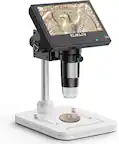
Celestron - Infiniview LCD Digital Microscope - Gray
- Key Specs
- Digital Zoom: true (The digital zoom takes the central portion of the high-resolution sensor's image to achieve the effect of a zoom. This means that the existing data is not enhanced or added to, merely displayed at a lower resolution, thereby giving an illusion of an enlarged image.)
- General
- Product Name: Infiniview LCD Digital Microscope
- Brand: Celestron
- Model Number: 44360
- Color: Gray
- Dimensions
- Product Width: 4.1 inches (The out of box width of the item. Width is measured as the horizontal distance from one side of the item to the other as it would be primarily used or placed.)
- Product Height: 8.9 inches (The out of box height of the item. Height is measured as the vertical distance from the bottom of the item to the top as it would be primarily used or placed.)
- Product Depth: 5.8 inches (The out of box depth of the item. Depth is measured as the distance from the front of the item to the back as it would be primarily used or placed.)
- Product Weight: 3.5 pounds (The out of box weight of the item.)
- Display
- Display Type: LCD
- Features
- Adjustable Stage: true
- Number of Knobs: 1
- Diaphragm: Disc (Controls the amount of light passing through the stage to the objective lens. Iris diaphragms are controlled with a lever that widens or narrows the light opening. Disc diaphragms, which have a number of different sized holes, are rotated to adjust the amount of light to the lens.)
- Head Incline: 45 degrees (Adjusting the inclination allows for more comfortable viewing.)
- Head Type: Monocular
- Rotatable Head: false
- Image Sensor: CMOS (The image sensor is the part in a digital camera that collects the image data let in by the aperture.)
- Handheld: false
- Illuminator Location: Top
- Integrated Digital Camera: true
- System Requirements: Windows XP or better, Windows: XP/Vista/7/8, Mac OS X 10.6 or 10.7 (The software that a product must have for it to be able to integrate with another product.)
- Image
- Magnification Highest Power: 160 times (Highest magnification of a microscope is determined by multiplying the max power of the eyepiece lens by the max power of the corresponding objective lens.)
- Magnification Lowest Power: 4 times (Lowest magnification of a microscope is determined by multiplying the min power of the eyepiece lens by the min power of the corresponding objective lens.)
- Digital Camera Megapixels: 5.0 megapixels (Each pixel in a digital camera sensor captures image data relative to the light the object reflects. The more megapixels (a million pixels), the more detail that can be captured.)
- Other
- Stage Diameter: 111 millimeters
- UPC: 050234443609
Capture photos and videos of specimens with this Celestron Infiniview 44360 LCD digital microscope, which features a 5.0MP digital camera with 10x magnification, so you can take crisp, detailed shots. The battery-powered design enables on-the-go use.
- Compatible with PC and Mac:
For wide-ranging use. - Up to 800x total magnification when connected to a computer:
Through a high-quality 15.8mm IR (infrared-reducing) cut-glass lens with 5 elements for observation of 3D specimens. Features 4x to 160x magnification in portable mode. - Built-in 5.0MP digital camera: With 10x magnification makes it easy to capture crisp photos and VGA footage at up to 30 fps.
- Flicker-control image stabilization:
Helps minimize vibration and camera shake for clear images. The shutter trigger located on the microscope's base prevents shaking during image capture. - 3.5" color TFT-LCD screen: With a 4:3 aspect ratio and 320 x 240 pixels resolution delivers clear visuals and allows easy viewing. The 4x digital zoom lets you hone in to observe precise details.
- Height-adjustable stage:
Accommodates a variety of specimen sizes. An illuminator with 8 white LEDs enhances visibility. - Celestron Capture Pro software:
Helps you take accurate measurements and features note-taking capability, so you can easily record your observations. - 800 mAh rechargeable lithium-ion battery:
Provides up to 2 hours of continuous use on a full charge for use in the classroom or out in the field. - microSD card slot:
Supports cards up to 32GB for storing photos and videos (cards not included). - USB 2.0 port:
Allows a simple connection to your computer, so you can easily download images and recharge the battery. - TV output:
Lets you view specimens on an external display (not included).
Whats Included
- Celestron Infiniview LCD Digital Microscope
- Lithium-ion battery
- AC adapter
- A/V cable, USB 2.0 cable
- Calibration ruler
- Software CD-ROM
Q: Can you see cells on this microscope?
A: InfiniView LCD Digital Microscope is a low magnification power microscope, mainly suited for examining specimens like coins, stamps, rocks, electronics, insects, and other 3D objects. Cell specimens on slides is not ideal for this microscope. Celestron's biological microscopes would be more suited to this type of viewing.
Q: Can microscope slides be used with this microscope? Thanks.
A: The Infiniview LCD Digital Microscope can be used for up-close viewing of traditional slides or 3-D specimens.
Q: Would this work for looking at arrowheads?
A: Yes, you can view arrowheads using the Infiniview LCD Digital Microscope.
Q: Can I use this microscope all by itself , not interested in connecting to a computer,
A: Yes, you can view objects directly on the microscope's LCD screen, and do not need to connect it to an external computer. Sincerely, Garrett at Celestron
Q: Does this come with software that can be downloaded online? My Macbook does not have a CD-ROM drive.
A: Yes, you can download the Portable Capture Pro Software in the Support and Downloads section of the InfiniView's LCD Digital Microscope's page. https://www.celestron.com/products/infiniview-lcd-digital-microscope
Q: Can image be shown on laptop qnd and smart TV like Samsung?
A: The InfiniView LCD Digital Microscope includes a AV cable to connect with an external monitor, projector, or TV screen. It can also connect to both Windows and Mac systems. Software is included.
Q: Will this work with Windows 10 & 11 thank you very much
A: The Infiniview microscope does work with Windows 10 and 11. The Portable capture Pro 3.0.1 software is backward compatible to Windows 7.
Q: I put a new SIM card in my microscope and it said “SIm Card Full” and won’t take photo. Why???
A: Please inspect if the SD card is in the “lock” position. It should be unlocked. Next, check to see if the SD card is in fact new and does not have images on it. If the issue remains, please contact Celestron Technical Support for other troubleshooting procedures. Their email address is: [email protected]