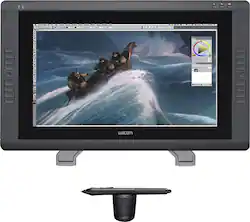
Wacom - Cintiq 22HD 21.5" Interactive Pen Display - Black
- Key Specs
- Refresh Rate: 60Hz (The number of frames per second the device can produce natively without enhancement. Higher rates help produce smooth, seamless pictures.)
- Maximum Resolution: 1920 x 1080 (Maximum resolution refers to the highest number of pixels that a screen can process and display. Higher resolution signals produce more detailed images.)
- Response Time: 14 milliseconds (The speed at which pixels can change colors is called response time. It is measured in milliseconds (ms).)
- Panel Type: TN (Technology that affects response time and image quality.)
- Screen Size: 21.5 inches (Size of the screen, measured diagonally from corner to corner.)
- General
- Product Name: Cintiq 22HD 21.5" Interactive Pen Display
- Brand: Wacom
- Operating System Compatibility: Mac
- Model Number: DTK2200
- Display
- Refresh Rate: 60Hz (The number of frames per second the device can produce natively without enhancement. Higher rates help produce smooth, seamless pictures.)
- Maximum Resolution: 1920 x 1080 (Maximum resolution refers to the highest number of pixels that a screen can process and display. Higher resolution signals produce more detailed images.)
- Native Resolution: 1920 x 1080 (Native resolution of a screen refers to its single, fixed resolution. Sometimes screens must scale an image up or down in order to fit the native resolution. This can cause a loss of resolution or detail.)
- Contrast Ratio: 550:1 (Measured difference between a displayed image's brightest whites and darkest blacks. The larger the first number, the more detail and color that can be displayed.)
- Response Time: 14 milliseconds (The speed at which pixels can change colors is called response time. It is measured in milliseconds (ms).)
- Display Type: LED
- Panel Type: TN (Technology that affects response time and image quality.)
- Aspect Ratio: 16:9 (The measurement of the width of a screen compared to the height of a screen, expressed as a ratio.)
- Curved Screen: true
- Brightness: 230 candela per square meter (A measure of the total light output.)
- Screen Size: 21.5 inches (Size of the screen, measured diagonally from corner to corner.)
- High Dynamic Range (HDR): false (An HDR-compatible 4K TV or other HDR-compatible product displays HDR video content when it's available from sources like 4K Ultra HD Blu-ray Discs and 4K streaming services.)
- Horizontal Viewing Angle: 170 degrees (The maximum angle at which the display can be viewed with acceptable visual performance from either side.)
- Touch Screen: false (Touch-screen devices make navigating more intuitive. Using a touch-screen display, you can do things such as tap to select, hold and drag to move items, swipe to scroll, and pinch to zoom.)
- Connectivity
- Number of DVI Inputs: 1 (The number of digital cables carrying analog (VGA) video signals that can be connected to the product.)
- Headphone Jack: false (The device features an interface that allows for the connection of headphones.)
- Compatibility
- Wall Mountable: true (The product is able to be secured to a wall. Some products are designed ready to mount, while others may require additional hardware/accessories for installation.)
- VESA Wall Mount Standard: 100mm x 100mm (VESA wall mount standards refer to the spacing of screw holes built into a TV in order to fit with standard TV wall mounts. These standards are implemented into most TVs and monitors.)
- Voice Assistant Built-in: No (A digital assistant built into the device that uses voice commands to answer questions and control smart devices.)
- Features
- Tiltable: true
- Adjustable Stand Height: false
- Anti-Glare: true (Product has features, such as a matte finish, that reduce the likelihood for screen glare.)
- Built-In Webcam: false
- Integrated Speaker(s): false
- Dimensions
- Product Height Without Stand: 15.7 inches
- Product Width: 25.6 inches (The out of box width of the item. Width is measured as the horizontal distance from one side of the item to the other as it would be primarily used or placed.)
- Product Depth Without Stand: 2.2 inches
- Product Weight: 18.7 pounds (The out of box weight of the item.)
- Stand Included: true
- Power
- Power Consumption: 0 watts
- Certifications Listings & Approvals
- ENERGY STAR Certified: false (Devices carrying the ENERGY STAR service mark, such as computer products and peripherals, kitchen appliances, and other products, generally use 20% to 30% less energy than required by federal standards.)
- EPEAT Qualified: false (The Electronic Product Environmental Assessment Tool (EPEAT) was designed to provide an environmental assessment tool for purchasers. In order to qualify for EPEAT, a product must meet all 23 required criteria.)
- Warranty
- Manufacturer's Warranty - Parts: 2 years
- Manufacturer's Warranty - Labor: 2 years
- Other
- UPC: 753218992024
With a 21.5" display, this Wacom Cintiq DTK2200 LCD monitor allows you to work naturally and intuitively on the screen via an electronic input pen with pressure- and tilt-sensitive technology, so you can write, draw and design with ease.

- Fast 14 ms response time: Allows pixels to change colors quickly to avoid streaking, blurring and ghosting.
- 21.5" LCD high-definition widescreen display: With pen input capability offers easy navigation and delivers intense detail and clarity. Laser-etched glass prevents glare for optimal viewing in bright light.
- 550:1 contrast ratio: Provides a high number of shades between black and white. This range enables accurate color reproduction when displaying images with extreme differences between light and dark for excellent picture quality.
- 230 cd/m² brightness: For a highly visible display and clear on-screen images.
- 1920 x 1080 maximum resolution in 16:9 format: Offers the highest number of pixels available for a full high-definition display.
- DVI-D with HDCP interface: Offers high-definition, digital connectivity.
- Electronic input pen: With 10 nibs utilizes EMR (Electo-Magnetic Resonance) technology, so you can sketch, paint, design and edit directly on the screen. Pressure- and tilt-sensitive pen technology replicates the use of conventional art tools.
- USB 2.0 port: Provides simple expansion capability.
- Time-saving ExpressKeys, Scroll Ring and Radial menus: Offer customizable, one-touch shortcuts for simple operation.
- PC and Mac compatible: For use with your existing computer.
Whats Included
- Adjustable display stand, electronic input pen, pen stand, 10 pen nibs and removal tool, installation CD, software download key
- DVI-I-to-DVI-D cable adapter, AC power adapter
- Owner's manual
- USB cable, power cable
- Wacom Cintiq 21.5" HD Interactive Pen Display
A: The Cintique is driven by the USB and HDMI/Display Port of the Mac, so it is in effect a display, but with touch screen input from the pen. So yes it would display the image from your application, that is how it works. If you mean to see it working as a second monitor for other purposes, such as when using Premier for editing, I would expect that could be set up in display preferences. Hope this helps. I have always been able to call Wacom support for tech questions, they're great.
Q: Is the product available in stores, so that I may try it out before purchasing?
A: No, this product is not setup anywhere in the store for you to test it out. Which sucks because it's a lot of money to spend when you have to buy it and then try it out before you are satisfied with it.
A: This product is compatible with PC and Mac. I use it on a Mac at work and I use it on my PC at home.
A: It would depend on what type of connection your Macbook has. The tablet uses a DVI connection. If your have a Mini-Display port/ Thunderbolt 1 or 2. We would recommend the iadaptDVI from Kanex.
A: Yes you can make animations with this. When you set it up and connect it to your laptop I will tell you you must have an adapter if you have a laptop. I have a Mac desktop and I went through three adapters before I found the correct one. In order to do animations with this you need to add the software to the Wacom it’s all in the set up They have a touch screen. You just need to make sure you get the one that states touch screen. I would recommend you do a live chat with a Wacom rep. They can tell you exactly the one for your needs
Q: Is there any kind of discount for current students? if so how do I use it when I make my purchase?
A: There was when I was an instructor at Art Center. Look at the Wacom website under Education Pricing to see how it works. Or check the book store at your college.
Q: Is the pen included, or do you purchase that separately?
A: The pen is included in this.






















