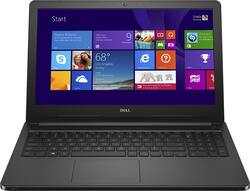
Dell - Inspiron 5000 Series 15.6" Laptop - Intel Core i7 - 6GB Memory - 1TB Hard Drive
- General
- Product Name: Inspiron 5000 Series 15.6" Laptop - Intel Core i7 - 6GB Memory - 1TB Hard Drive
- Brand: Dell
- Other
- UPC: 884116167617


- Microsoft Windows 8.1 operating system preinstalled: Upgrade to Windows 10 for free** - it's easy. Learn more about Windows 10 ›
- 15.6" display: TrueLife technology displays your media in crisp, lifelike detail. Typical 1366 x 768 HD resolution. Energy-efficient LED backlight.
- 5th Gen Intel® Core™ i7-5500U mobile processor: Ultra-low-voltage platform. Dual-core, four-way processing provides maximum high-efficiency power to go. Intel Turbo Boost Technology delivers dynamic extra power when you need it.
- 6GB system memory for dependable multitasking: Sufficient high-bandwidth RAM to smoothly run multiple applications and browser tabs all at once.
- 1TB hard drive for ample file storage space: Holds a significant collection of digital photos, music, HD videos and DVD-quality movies. 5400 rpm spindle speed for standard read/write times.
- Intel® HD graphics: On-processor graphics with shared video memory provide everyday image quality for Internet use, basic photo editing and casual gaming.
- Built-in stereo speakers: Enjoy high-quality sound across music, movies, voice and games.
- Weighs 5.31 lbs. and measures 0.95" thin: Balances portability and screen size, so you get a respectable amount of viewing space without the laptop being too cumbersome for practical portability. 4-cell battery.
- Bluetooth 4.0 interface syncs with compatible devices: Wirelessly transfer photos, music and other media between the laptop and your Bluetooth-enabled cell phone or MP3 player, or connect Bluetooth wireless accessories.
- 1 USB 3.0 port maximizes the latest high-speed devices: Also includes 2 USB 2.0 ports to connect more accessories and peripherals. The USB 3.0 port is backward-compatible with USB 2.0 devices (at 2.0 speeds).
- HDMI 1.4 output expands your viewing options: Connect to an HDTV or high-def monitor to set up two screens side by side or just see more of the big picture.
- Built-in media reader for simple photo transfer: Supports SD, SDHC and SDXC memory card formats.
- Next-Gen Intel® Wireless-AC connectivity: Connect to a Wireless-AC router for nearly 3x the speed, more capacity and wider coverage than Wireless-N. Backward-compatible with all other Wi-Fi networks and hotspots. Ethernet LAN port.
- Built-in HD webcam with microphone: Makes it easy to video chat with family and friends or teleconference with colleagues over Skype or other popular applications. 720p resolution.
- DVD/CD burner: Reads and writes to a variety of media formats.
- Basic software package included: Trial of Microsoft Office.
Whats Included
- Inspiron 5000 Series 15.6" Laptop - Intel Core i7 - 6GB Memory - 1TB Hard Drive
- 4-cell battery
- Owner's manual
Q: Windows 10
A: Yes it will.
Q: How long does the battery last?
A: The Dell - Inspiron 5000 Series 15.6" Laptop gets 7 hrs 33 min of battery life on a full charge.
Q: How good is the processing power?
A: It really depends on your purpose. If you are a heavy gamer then I would suggest going with something with an AMD A10 processor. The Intel i7 5500U is comparable to the AMD A10-7400P CPU. For strict work horse power the Intel beats the amd but for graphics and video the AMD completely schools the intel hands down. For more office stuff the Intel rocks.. Multitasking there is NOTHING better than an intel.. for graphics and gaming the AMD is in a different universe, insane compared to the 5500U. In practical terms with Adobe Creative Cloud... The AMD will get you there with things looking REALLY REALLY great. The Intel I7 5500U will get you there more consistently, able to have more power available and multitask much more evenly with multiple applications open and switching between in a real world use way. For graphics and gaming the I7 will get you there slower, dropped frames and much lower FPS. For heavy use of work related software... go with this machine but put 16 GB into it strictly because you can and multitasking is indecent. For gaming, much better graphics and pretty on the screen.. the AMD A10-7400P is much better. Intel i7 5500U -> Faster, multi-tasker.. gets the job done fast. AMD A10-7400P - Makes things look PRETTY and Sleak.. Gets you there a little slower but gets you there. I have used laptops with both CPU's so this review is from my own personal experience and not something I read somewhere or just a reword of some benchmark.
Q: Does this laptop have a DVD drive?
A: Yes, this laptop has a cd/dvd drive.
A: No it is not.
Q: Is the memory expandable from 6GB? How much?
A: You can upgrade to a maximum of 16 GB of DDR3L Ram.. Make note of the 'L' at the end.. L stands for Low Power. Regular DDR3 ram usesi1.5 volts DDR3L Ram uses 1.34 volts but is backwards compatible to DDR3 1.5v. What happens if you put DDR3 into DDR3L... NOTHING, the computer won't boot and gives a message to the extent there is no memory installed in computer. I put 16 GB into mine and it does NOT speed up the computer you just can do more at the same time and there is much less swapping to page files.
Q: Can you watch DVDs and play CDs on this?
A: Yes, you can watch DVDs and play CDs on this laptop.
Q: Can the hard drive be replaced to an SSD drive ?
A: I have been told by Dell chat support that this will support an SSD that is 2.5 inches. You should be able to upgrade the HDD yourself as it is easily located under the front cover on the bottom of the laptop. Remove two screws and use a flat head screw driver to pop off the cover and you see the RAM, Cmos Battery and HDD.














