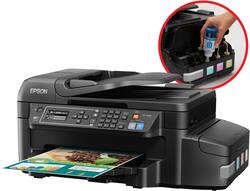
Epson - WorkForce ET-4550 EcoTank Wireless All-In-One Printer - Black
- Key Specs
- Networking: Wireless
- ENERGY STAR Certified: true (Devices carrying the ENERGY STAR service mark, such as computer products and peripherals, kitchen appliances, and other products, generally use 20% to 30% less energy than required by federal standards.)
- Printer Type: All In One
- ISO Color Print Speed: 7.3 pages per minute (The number of color pages able to be printed per minute in the device's default single-side mode, as tested by the International Standards Organization (ISO).)
- ISO Mono Print Speed: 13 pages per minute (The number of black ink (grayscale) pages able to be printed per minute in the device's default single-side mode, as tested by the International Standards Organization (ISO).)
- Touch Screen: true (Touch-screen devices make navigating more intuitive. Using a touch-screen display, you can do things such as tap to select, hold and drag to move items, swipe to scroll, and pinch to zoom.)
- General
- Brand: Epson
- Model Number: C11CE71201
- Product Name: WorkForce ET-4550 EcoTank Wireless All-In-One Printer
- Color: Black
- Display Screen: true
- Display Screen Size: 2.2 inches
- Dimensions
- Product Height: 9.5 inches (The out of box height of the item. Height is measured as the vertical distance from the bottom of the item to the top as it would be primarily used or placed.)
- Product Width: 20.3 inches (The out of box width of the item. Width is measured as the horizontal distance from one side of the item to the other as it would be primarily used or placed.)
- Product Weight: 16.3 pounds (The out of box weight of the item.)
- Features
- Automatic Document Feeder: true
- Photo Printing: false
- Automatic Reduction/Enlargement: true
- Automatic Two-Sided Printing: true
- Tray Capacity: 150
- Certifications Listings & Approvals
- EPEAT Qualified: false (The Electronic Product Environmental Assessment Tool (EPEAT) was designed to provide an environmental assessment tool for purchasers. In order to qualify for EPEAT, a product must meet all 23 required criteria.)
- Scanner Info
- Scanner Type: Flatbed
- Duplex Scan Function: false
- Scanner Resolution: Up to 1200 x 2400 (Refers to the number of pixels/dots, both horizontally and vertically, of the image produced by the scanner. Generally, the higher the resolution, the sharper and cleaner the produced image.)
- Fax Info
- Integrated Fax: true
- Ink
- Compatible Cartridges: T664 ink bottles
- Ink Subscription Service Available: false (The printer monitors ink usage and alerts the subscription provider when levels are low. A purchased subscription provides refills of ink based on usage.)
- Memory
- Memory Card Slot: false
- Paper Info
- Automatic Document Feeder Capacity: 100 sheets
- Maximum Document Length: 47.2 inches
- Maximum Document Width: 8.5 inches
- Supported Paper Sizes: 3.5" x 5", 4" x 6", 5" x 7", 8" x 10", letter, A4, A6, half letter, executive, custom (3.5" - 47.2" in length)
- Paper Feeder: Sheet fed
- Performance
- Printer Resolution (Black): Up to 4800 x 1200 (Refers to the number of pixels/dots, both horizontally and vertically, of the image produced by the printer in black ink. Generally, the higher the resolution, the sharper and cleaner the produced image.)
- Printer Resolution (Color): Up to 4800 x 1200 (Refers to the number of pixels/dots, both horizontally and vertically, of the image produced by the printer in colored ink. Generally, the higher the resolution, the sharper and cleaner the produced image.)
- Copier Info
- Copier Resolution (Black): Up to 600 x 600 (Refers to the number of pixels/dots, both horizontally and vertically, of the image produced by the copier in black ink. Generally, the higher the resolution, the sharper and cleaner the produced image.)
- Copier Resolution (Color): Up to 600 x 600 (Refers to the number of pixels/dots, both horizontally and vertically, of the image produced by the copier in colored ink. Generally, the higher the resolution, the sharper and cleaner the produced image.)
- Connectivity
- Minimum System Requirements: Mac OS with Internet access; Windows
- Other
- UPC: 010343920415
Epson WorkForce EcoTank All-in-One Printer: This wireless, all-in-one printer comes with up to 2 years of ink¹ and lets you print up to 11,000 black/8,500 color pages.² Plus, the replacement ink bottles are affordable and the printer features laser-quality black text.
- Cartridge-free printing: Comes with up to 2 years of ink in the box¹.
- Be sure you have the right cartridge: Enter your printer's model number into our Ink and Toner Finder to find compatible cartridges. Get started ›
- Unbeatable convenience: Includes enough ink to print up to 4,000 pages black/6,500 pages color².
- Easy-to-use replacement ink bottles instead of cartridges: Save up to 80% on ink with low-cost replacement bottles plus the easy-to-fill, supersized ink tanks³.
- Inkjet printers are best for home or small business use: They offer excellent print quality for photos and documents and accept a variety of paper types and sizes.
- Built-in Wireless and Wi-Fi Direct: Easily print from your iPad®, iPhone®, tablets, smartphones, laptops and more.*
- Apple® AirPrint enabled: For Apple iPad® and iPhone® printing.
- Up to 4800 x 1200 dpi (dots per inch) color resolution: High resolution for producing incredible quality and detail in documents and photos.
- 150-sheet input tray: Load paper less often.
- 2.2" mono graphic LCD: Provides clear viewing of your options and simple controls.
- Versatile paper handling: Auto 2-sided printing; plus a 30-page auto document feeder.
- Product protection you can count on: 2-year limited warranty with registration.⁴
- Customized paper handling: Use sheets between 3.5" and 47.2" in length to take advantage of odd-size sheets of paper.
Whats Included
- CD-ROM, power cord
- Cyan, magenta, yellow and black ink bottles
- Owner's manual
- WorkForce ET-4550 EcoTank Wireless All-In-One Printer
Q: Does this printer print photographs off your computer that you might take with your high DEF camera
A: The computer prints photos nicely Changed the setting on the computer print display to photo and it gives you Standard and High for print quality as an option. I printed both and didn't see much of a change in quality they looked the same and the quality seemed as I would have expected in a photo print, but thought I would have seen more of a change between standard and high quality. The surprise and I would say a disappointment was when I checked photo paper on the computer and when I clicked print a warning display came up and said there was a paper mismatch between computer and the printer. I had to manually change the type of paper on the printer. Never had to do that with the HP, the computer shared the information and the printer knew the paper type change. Shows the cheaper quality of the Epson printer and was surprised for the 499.00 price tag.
A: The ET-2550 does not have a fax, does not have an ADF for the scanner, and does not do auto duplex...for $299 The ET-3600 does not have an ADF' but has the rest and better print speed than the 2550...for $399. It also includes more ink. The ET-4550 has all of the above and includes more ink, it is also faster if you look at the specs...for $499
Q: Will you be able to send a fax
A: As long as you have a working phone line in your home or office, it has a fax function. Personally, I don't use the fax part of it, but it's there.
Q: how many pages can u print?
A: The printer comes with enough ink to print up to 11,000 black/8500 color pages.
Q: Can I print 4x6 recipe cards on it?
A: Yes !
A: Yes. Using Glossy paper will always require a minimal drying time before using--we're talking seconds here (10/15); the time it takes for the next print-job to land on top of the one just printed. I would not grab the print-job coming directly out of the printer immediately and think it will not smear. Just like pictures, the resolution is finite and clear--no smears, but give it a second to dry.
A: Yes, it has a Zoom option available from the control panel when in copy mode. Additionally, I am a Print Industry professional and am very pleased with my purchase and performance of this printer. It is easy to set up and use and if the ink tank system works like advertised over the life of the printer this unit will have one of the lowest total cost of ownership of any similar device on the market. Keep in mind on the zoom option the limitation of paper size. (you wont be able to enlarge a full size 8 1/2 x 11 with print edge to edge without loosing data.)
Q: Does this printer work well with transfer sheets?
A: This product is compatible with transfer sheets.

















![The text on the image reads:
17 F8 Home P End F10 PgUp it PgDn F12 Ies Del * 8 ( 9 ) 0 I I + = Backspace I o P : [ ] ] I / K L : : .. . Enter M V > . ? / Shift Alt <
The corrected text should be:
17 F8 Home PgUp it PgDn F10 F12 Ies Del * 8 ( 9 ) 0 I I + = Backspace I o P : [ ] ] I / K L : : .. . Enter M V > . ? / Shift Alt <
The corrected text groups the keys in a more organized manner, making it easier to read and understand.](https://pisces.bbystatic.com/image2/BestBuy_US/images/products/699c06f5-6aba-4ab2-bbf6-114986b58b2a.jpg;maxHeight=144;maxWidth=200?format=webp)




