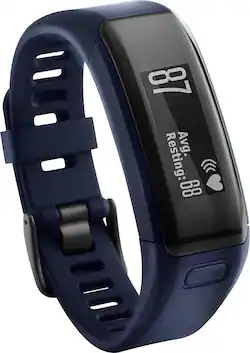
Garmin - Vivosmart HR Activity Tracker + Heart Rate - Blue
- Key Specs
- Touch Screen: true (Touch-screen devices make navigating more intuitive. Using a touch-screen display, you can do things such as tap to select, hold and drag to move items, swipe to scroll, and pinch to zoom.)
- Operating System Compatibility: Apple iOS
- App Compatible: true (The product can be connected to a program or software application on a mobile device, which then receives collected data from the product.)
- Global Positioning: Other (A system of satellites which enables a mobile receiver to determine its precise location based on signals received from satellites such as the US Global Positioning System (GPS), the Russian Global Navigation Satellite System (GLONASS), the European Global Navigation Satellite System (Galileo), or the Japanese Quasi-Zenith Satellite System (QZSS).)
- Metrics Measured: Steps taken
- Maximum Depth of Water Resistance: 164 feet (Measurement of the maximum depth of water in which the product is able to resist some degree of water penetration.)
- Band Material: Silicone
- General
- Product Name: Vivosmart HR Activity Tracker + Heart Rate
- Brand: Garmin
- Product Type: Activity tracker
- Form Factor: Wristwatch (The size, arrangement, and physical configuration of the product.)
- Model Number: 010-01955-08
- Design
- Band Type: Adjustable
- Band Color: Blue
- Clasp Type: Buckle
- Display
- Display Screen: true
- Touch Screen: true (Touch-screen devices make navigating more intuitive. Using a touch-screen display, you can do things such as tap to select, hold and drag to move items, swipe to scroll, and pinch to zoom.)
- Display Type: LCD
- Color Display: true
- Clock Display: true
- Backlit Display: true (Integrated lights allow for visibility of the display in low-light conditions.)
- Compatibility
- Operating System Compatibility: Apple iOS
- App Compatible: true (The product can be connected to a program or software application on a mobile device, which then receives collected data from the product.)
- Features
- Global Positioning: Other (A system of satellites which enables a mobile receiver to determine its precise location based on signals received from satellites such as the US Global Positioning System (GPS), the Russian Global Navigation Satellite System (GLONASS), the European Global Navigation Satellite System (Galileo), or the Japanese Quasi-Zenith Satellite System (QZSS).)
- Mobile Notifications: true
- Alert Type: Vibration, Visual
- Silent Alarm: true
- Activity
- Metrics Measured: Steps taken
- Multi-Sport Tracking: false
- Sensors: Accelerometer (Detects stimuli such as heat, light, sound, motion, or pressure and responds accordingly by operating a control or initiating a function of the device.)
- Performance
- Maximum Depth of Water Resistance: 164 feet (Measurement of the maximum depth of water in which the product is able to resist some degree of water penetration.)
- Dimensions
- Product Width: 1.6 inches (The out of box width of the item. Width is measured as the horizontal distance from one side of the item to the other as it would be primarily used or placed.)
- Product Length: 7.4 inches (The out of box length of the item. Length is measured as the longest dimension of the item.)
- Minimum Wrist Size: 5.4 inches
- Maximum Wrist Size: 7.3 inches
- Power
- Rechargeable: true
- Battery Strength Indicator: true
- Charging Interface(s): Other (The connection for transmitting power to charge the device.)
- Replaceable Battery: false
- Material
- Band Material: Silicone
- Other
- UPC: 753759150730
Garmin Vivosmart HR Activity Tracker: Measure your daily activity with this device that helps you to set and maintain aerobic fitness goals. Vibration alerts let you receive call, text and e-mail notifications from your phone.
- Monitor your day-to-day activity: Device tracks heart rate, calories burned, distance traveled, steps taken, stairs climbed and hours slept.
- Receive accurate calories-burned information: Heart rate monitor works from your wrist to collect precise calorie data.
- LCD: Makes reading information and alerts easy, even in sunlight.
- Enjoy worry-free workouts: Water-resistant design works through sweat and water up to 164' deep.
- Pair with your existing device: Compatible with both iOS and Android operating systems.
- Get cell phone notifications via your activity tracker: Vibrations alerts notify you of calls, texts, e-mails and meetings.
Whats Included
- Charging/data clip
- Owner's manual
- Vivosmart HR Activity Tracker + Heart Rate
Q: Does it track and record your sleeping?
A: Yes. You have to set your normal sleep timeframe into the settings & it will track your sleep. It doesn't track naps during the day though. I have an odd schedule right now so I usually sleep 4 hours when I get home from work & then another 2-3 hours before going back into work & it will track one of those times for sleep but not both for the same day. Ive included a screenshot of a normal nights sleep I got so you can see it.
Q: What about sea water and hot tub?
A: I don't know about sea water, but I do wear it in the pool when I'm swimming and it's fine. Even gives heart rate while swimming.
A: Yes, as an activity tracker it will always be measuring your steps, distance, floors climbed, active intensity, heart rate and calories burned which can be viewed at any time. You also have the option to record individual activities that can be synced separately for review later. -LB
A: It's actually measured from the wrist so no annoying chest band!
Q: How does this look and fit on a medium sized female wrist?
A: I am petite (5' 1", 120 lbs, small frame) and I felt it looked slightly too large on me - it was more obvious than, say, a large watch in my opinion. I was willing to overlook that, however the inaccuracy of the step counting (adding thousands of steps while a passenger in a car) made me return it.
Q: How do you charge the battery?
A: no extra cords needed. charging cable comes in the package.
Q: Can this be charged using a USB wall charger?
A: It comes with a USB charger. I have no problems charging from the wall
Q: Does The display show information vertically and horizontally
A: Yes, the vívosmart HR has options to change the orientation along with changing the screen based on the wrist it is being worn on. With the "Screen Orientation" option, you can select from a horizontal or vertical orientation. It also has an option called "Wrist Worn On", in the Device Settings, to customize which wrist the band is worn on. {CW}




















