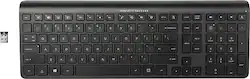
HP - K3500 Wireless Keyboard for Pavilion - Black
- Key Specs
- Lighting Type: None
- Form Factor: Full-size (The size, arrangement, and physical configuration of the product.)
- Connection Type: Wireless
- General
- Product Name: K3500 Wireless Keyboard for Pavilion
- Brand: HP
- Model Number: H6R56AA#ABA
- Color: Black
- Features
- Lighting Type: None
- Numeric Keypad: true
- Touchpad: false
- Keyboard Type: Keypad
- Palm Rest: false
- Spill Resistant: false (Designed to resist some degree of accidental liquid spill. The level of spill-resistance is indicated by the product manufacturer, but the degree of protection may not be guaranteed after normal wear of the product.)
- Foldable: false
- Functions
- Form Factor: Full-size (The size, arrangement, and physical configuration of the product.)
- Number Of Keys: 108
- Dedicated Macro Keys: false (Perform shortcuts of key sequences to carry out commands with a single key. Key sequences may include key strokes, mouse actions, and/or menu actions.)
- Adjustable Tilt Function: true
- Multimedia Keys: true
- Internet Keys: true
- Connectivity
- Connection Type: Wireless
- Wireless Connectivity: Radio Frequency (RF) (The manner in which a device sends data to another device over a short distance without the use of wires or cables.)
- Compatibility
- Operating System Compatibility: Windows
- Plug and Play Operation: true
- System Requirements: Microsoft Windows Vista / XP / 7 / 8 (The software that a product must have for it to be able to integrate with another product.)
- Power
- Battery Size: N/A (The battery size required for operation.)
- Number of Batteries Required: 2
- Battery Chemistry: Alkaline
- Batteries Included: true (Indicates whether the product comes with the required batteries for its operation.)
- Dimensions
- Product Height: 1 inches (The out of box height of the item. Height is measured as the vertical distance from the bottom of the item to the top as it would be primarily used or placed.)
- Product Width: 16.6 inches (The out of box width of the item. Width is measured as the horizontal distance from one side of the item to the other as it would be primarily used or placed.)
- Product Weight: 14.5 ounces (The out of box weight of the item.)
- Mouse
- Mouse Included: false
- Other
- UPC: 887758489291
Type documents with this HP wireless keyboard. It has Windows 8 shortcuts to save time completing tasks, and Link-5 wireless technology lets you connect up to five HP devices. This HP wireless keyboard has a range of 30 feet, so you can work from a distance and still control your laptop.
- Keyboard controls: Include keys for sleep, volume, mute and Windows 8.
- USB receiver: Provides reliable wireless connection.
- Windows compatible: For use with your existing computer.
Whats Included
- Keyboard
- Nano USB receiver
- Warranty card
Q: The caps lock and num lock keys are suppose to light up right?
A: Yes, the caps lock and num lock keys should light up when they are activated. If they are not doing so, it could be due to a defect, and we recommend you return the product.
A: FYI... I did end up buying the K3500 and it is NOT quiet! Yes, it is low profile, but it doesn't come close to the quitetness of the HP Elite Keyboard. The click sounds are the same level as a higher button keyboard. So, I'm disappointed. Will end up purchasing the Elite and just keeping this 3500 as a backup.
A: Good question. It can be used between 2 PCs. You will just have to remove the USB receiver and put it into whichever PC you want to use it with. I hope this helps.
Q: How do you change the batteries?
A: Flip it over horizontally. There will be a horizontal little bar at the top. take your fingers and push toward you while pushing forward with your thumbs at the bottom of the kb.
Q: will this keyboard work with a ASUS X555L?
A: Yes, this item will work with ASUS X555L
Q: Where is the Dash vs. Where is the hyphen?
A: The underline and hyphen are next to the 0 on the keyboard with all the other numbers, above the letters.
Q: is this compatible with a playstation 3
A: This is compatible.
















