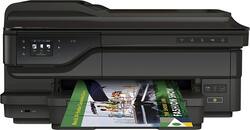
HP - Officejet 7612 Wireless Wide Format e-All-In-One Printer - Black
- Key Specs
- Networking: Wireless
- Printer Type: All In One
- ISO Color Print Speed: 8 pages per minute (The number of color pages able to be printed per minute in the device's default single-side mode, as tested by the International Standards Organization (ISO).)
- ISO Mono Print Speed: 15 pages per minute (The number of black ink (grayscale) pages able to be printed per minute in the device's default single-side mode, as tested by the International Standards Organization (ISO).)
- General
- Product Name: Officejet 7612 Wireless Wide Format e-All-In-One Printer
- Brand: HP
- Model Number: G1X85A#B1H
- Dimensions
- Product Height: 11.69 inches (The out of box height of the item. Height is measured as the vertical distance from the bottom of the item to the top as it would be primarily used or placed.)
- Product Width: 24.29 inches (The out of box width of the item. Width is measured as the horizontal distance from one side of the item to the other as it would be primarily used or placed.)
- Product Weight: 38.8 pounds (The out of box weight of the item.)
- Certifications Listings & Approvals
- EPEAT Qualified: false (The Electronic Product Environmental Assessment Tool (EPEAT) was designed to provide an environmental assessment tool for purchasers. In order to qualify for EPEAT, a product must meet all 23 required criteria.)
- Features
- Tray Capacity: 250
- Duty Cycle: Up to 12,000 (The maximum number of pages per month that the device can produce without failing, as specified by the manufacturer.)
- Scanner Info
- Scanner Type: Flatbed
- Scanner Resolution: Up to 1200 x 1200 (Refers to the number of pixels/dots, both horizontally and vertically, of the image produced by the scanner. Generally, the higher the resolution, the sharper and cleaner the produced image.)
- Ink
- Compatible Cartridges: HP 932, HP 932XL, HP 933, HP 933XL
- Ink Subscription Service Available: false (The printer monitors ink usage and alerts the subscription provider when levels are low. A purchased subscription provides refills of ink based on usage.)
- Memory
- Memory Card Slot: true
- Paper Info
- Automatic Document Feeder Capacity: 35 sheets
- Maximum Document Length: 44 inches
- Maximum Document Width: 13 inches
- Supported Paper Sizes: A4, Letter, B5, Tabloid, A3
- Paper Handling: 250-Sheet Tray loader, 35-Sheet, 75-Sheet
- Copier Info
- Maximum Number Of Copies: 99
- Copier Resolution (Black): Up to 4800 x 1200 (Refers to the number of pixels/dots, both horizontally and vertically, of the image produced by the copier in black ink. Generally, the higher the resolution, the sharper and cleaner the produced image.)
- Copier Resolution (Color): Up to 4800 x 1200 (Refers to the number of pixels/dots, both horizontally and vertically, of the image produced by the copier in colored ink. Generally, the higher the resolution, the sharper and cleaner the produced image.)
- Performance
- Printer Resolution (Black): Up to 4800 x 1200 (Refers to the number of pixels/dots, both horizontally and vertically, of the image produced by the printer in black ink. Generally, the higher the resolution, the sharper and cleaner the produced image.)
- Printer Resolution (Color): Up to 4800 x 1200 (Refers to the number of pixels/dots, both horizontally and vertically, of the image produced by the printer in colored ink. Generally, the higher the resolution, the sharper and cleaner the produced image.)
- Connectivity
- Minimum System Requirements: Windows 8, Windows 7, 2 GB HD, Windows Vista, Windows XP SP3 (32-bit): Intel Pentium II, Celeron or 233MHz processor, 750 MB HD, Mac OS X v10.6, OS X Lion, Linux, Mac OS X v 10.6; OS X Lion; OS X Mountain Lion; 1GB HD, CD-ROM/DVD or Internet, USB
- Other
- UPC: 888182658864
HP Officejet e-All-In-One Printer: Create flyers, brochures, marketing materials and more using this e-all-in-one printer, which allows borderless printing. You can also copy, scan and fax important business documents and photos and print directly from your mobile device.
- Inkjet printers are best for home or small business use: They offer excellent print quality for photos and documents and accept a variety of paper types and sizes.
- Wireless and mobile printing capability: Connect this printer to your home or office network with built-in Ethernet or wireless LAN. Plus, print from your mobile device with the free HP ePrint app or Apple® AirPrint.
- Up to 4800 x 1200 optimized dpi (dots per inch) color resolution: High resolution for producing incredible quality and detail in documents and photos. Up to 600 x 1200 dpi when printing black only.
- 4 individual print cartridges are economical: Only replace ink cartridges (black, cyan, magenta and yellow) when a color runs out.
- Large paper tray for your high-volume printing: Reload less often with the 250-sheet input tray. Leave the printer unattended while you print, fax, scan and copy multiple-page documents using the 35-sheet automatic document feeder.
- 2.7" LCD touch-screen control panel simplifies operation: Features a TouchSmart Frame, color graphic display, 6 buttons and an LED indicator light.
- 1 USB port for simple connectivity: 1 high-speed USB 2.0 port offers a standard connection to your PC or Mac.
- More print, copy, scan and fax solutions: Scan-to-PC, scan-to-memory-device and scan-to-e-mail features, plus ID copy, high-speed faxing and more.
- PC system requirements: Windows 7 or 8: 1.0GHz 32-bit (x86) or 64-bit (x64) processor; 2GB available hard drive space; Windows Vista: 800MHz 32-bit (x86) or 64-bit (x64) processor; 2GB available hard drive space.
- Mac system requirements: OS X v10.6, Lion or Mountain Lion; 1GB available hard drive space; CD-ROM/DVD-ROM drive or Internet connection; USB port.
Whats Included
- Officejet Wireless e-All-In-One Printer
- Black, cyan, magenta and yellow ink cartridges
- Power cord, phone cord
- 2-sided printing accessory, shopping card
- Setup poster, CD-ROM
Q: Is the Officejet 7612 compatible with windows 10
A: Yes it is compatible but you might have to update drivers from HP website
A: Yes, it will scan to PDF.
A: Yes, this HP printer will be able to print wirelessly from your Samsung tablet.
Q: How effective is this printer at enlarging a 4 x 6 photo to a 11 x 14? How about a scanned negative?
A: Yes it can...haven't tried a negative yet.
Q: Scan 11x17?
A: Up to 13 x 19...if you have a good cam you can produce some stunning photos.
Q: Will this make 8" x 10" photo prints?
A: Yes it can...photos with ease up to 13x19!!! Invest in a great cam and some photo editing and you on your way!!
Q: printer that has separate photo paper and a paper tray also
A: Good question. This printer does not have a separate paper tray for photo paper. The paper is put into the main paper tray and the tray is adjusted to fit the paper. For detailed specs, please visit the following link: http://www8.hp.com/h20195/v2/GetPDF.aspx/4AA5-2824EEBE.pdf I hope this helps.
Q: What weight cardstock will this printer handle?
A: Good question. This printer can handle up to 110 lb. cardstock. For paper handling details, please visit this link: http://support.hp.com/us-en/document/c03618348 I hope this helps.



















