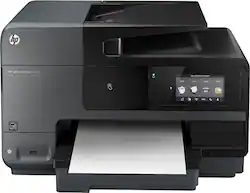
HP - Officejet Pro 8620 e-All-in-One Wireless Instant Ink Ready All-In-One Printer - Black
- Key Specs
- Networking: Wireless
- Printer Type: All In One
- ISO Color Print Speed: 16.5 pages per minute (The number of color pages able to be printed per minute in the device's default single-side mode, as tested by the International Standards Organization (ISO).)
- ISO Mono Print Speed: 16.5 pages per minute (The number of black ink (grayscale) pages able to be printed per minute in the device's default single-side mode, as tested by the International Standards Organization (ISO).)
- General
- Product Name: Officejet Pro 8620 e-All-in-One Wireless Instant Ink Ready All-In-One Printer
- Brand: HP
- Model Number: A7F65A#B1H
- Dimensions
- Product Height: 12.4 inches (The out of box height of the item. Height is measured as the vertical distance from the bottom of the item to the top as it would be primarily used or placed.)
- Product Width: 19.7 inches (The out of box width of the item. Width is measured as the horizontal distance from one side of the item to the other as it would be primarily used or placed.)
- Product Weight: 35 pounds (The out of box weight of the item.)
- Certifications Listings & Approvals
- EPEAT Qualified: false (The Electronic Product Environmental Assessment Tool (EPEAT) was designed to provide an environmental assessment tool for purchasers. In order to qualify for EPEAT, a product must meet all 23 required criteria.)
- Features
- Automatic Reduction/Enlargement: true
- Tray Capacity: 250
- Duty Cycle: Up to 30,000 (The maximum number of pages per month that the device can produce without failing, as specified by the manufacturer.)
- Scanner Info
- Scanner Type: Flatbed, Sheetfed
- Scanner Resolution: Up to 1200 x 1200 (Refers to the number of pixels/dots, both horizontally and vertically, of the image produced by the scanner. Generally, the higher the resolution, the sharper and cleaner the produced image.)
- Fax Info
- Integrated Fax: true
- Ink
- Compatible Cartridges: HP 950 Black, HP 951 Cyan, HP 951 Magenta, HP 951 Yellow, HP 950XL Black, HP 951XL Cyan, HP 951XL Magenta, HP 951XL Yellow
- Ink Subscription Service Available: true (The printer monitors ink usage and alerts the subscription provider when levels are low. A purchased subscription provides refills of ink based on usage.)
- Memory
- Memory Card Slot: false
- Paper Info
- Automatic Document Feeder Capacity: 50 sheets
- Maximum Document Length: 14 inches
- Maximum Document Width: 8.5 inches
- Supported Paper Sizes: Letter, legal, government legal, executive, statement, L, photo 2L, 3" x 5", 3.9" x 5.9", 5.1" x 7.1", 8" x 10", envelopes (#10, Monarch, 5.5bar), cards (3" x 5", 4" x 6", 5" x 8")
- Paper Handling: Up to 250 sheets
- Copier Info
- Maximum Number Of Copies: 99
- Copier Resolution (Black): Up to 1200 x 600 (Refers to the number of pixels/dots, both horizontally and vertically, of the image produced by the copier in black ink. Generally, the higher the resolution, the sharper and cleaner the produced image.)
- Copier Resolution (Color): Up to 1200 x 600 (Refers to the number of pixels/dots, both horizontally and vertically, of the image produced by the copier in colored ink. Generally, the higher the resolution, the sharper and cleaner the produced image.)
- Performance
- Printer Resolution (Black): Up to 1200 x 1200 (Refers to the number of pixels/dots, both horizontally and vertically, of the image produced by the printer in black ink. Generally, the higher the resolution, the sharper and cleaner the produced image.)
- Printer Resolution (Color): Up to 4800 x 1200 (Refers to the number of pixels/dots, both horizontally and vertically, of the image produced by the printer in colored ink. Generally, the higher the resolution, the sharper and cleaner the produced image.)
- Connectivity
- Minimum System Requirements: PC: Windows XP (32-bit, SP3): Intel Pentium II, Celeron or compatible 233MHz processor; 750MB hard drive; Internet Explorer 6; Windows Vista: 800MHz 32-bit (x86) or 64-bit (x64) processor; 2GB hard drive space; Internet Explorer
- Other
- UPC: 888182021514
HP Officejet Pro 8620 e-All-in-One Printer: Just connect this printer to your PC, Mac or mobile device to start completing office tasks in the comfort of your home. You can print, copy, scan and fax important business documents and photos for versatile productivity.
- Inkjet printers are best for home or small business use: They offer excellent print quality for photos and documents and accept a variety of paper types and sizes.
- Wireless and mobile printing capability: Connect this printer to your home or office network with built-in Ethernet or wireless LAN. Plus, print from your mobile device with the free HP ePrint app or Apple® AirPrint.
- Up to 4800 x 1200 optimized dpi (dots per inch) color resolution on HP Advanced Photo Paper (sold separately): High resolution for producing incredible quality and detail in documents and photos.
- 4 individual print cartridges are economical: Only replace ink cartridges (black, cyan, magenta and yellow) when a color runs out.
- Large paper trays for your high-volume printing: Reload less often with the 250-sheet input tray and 150-sheet output tray. Complete large printing, copying and scanning jobs easily with the 50-sheet automatic document feeder.
- 1 USB port for simple connectivity: 1 high-speed USB 2.0 port offers a standard connection to your computer.
- More print, copy, scan and fax solutions: Automatically print 2-sided documents, scan to e-mail, network folders and Cloud storage, fax color documents and images to and from color fax machines and more.
- HP Instant Ink: Original HP Ink ordered by your printer, delivered to your door. Plans start at $2.99/month.
- PC system requirements: Windows XP (32-bit, SP3): Intel® Pentium® II, Celeron® or compatible 233MHz processor; 750MB hard drive; Internet Explorer 6.
Whats Included
- Officejet Pro 8620 e-All-In-One Printer
- Automatic 2-sided printing accessory
- Officejet 950 black ink cartridge
- Officejet 951 cyan, magenta, yellow ink cartridges
- Power cord, phone cord
- Software and driver CD-ROMs
- Owner's manual
Q: Can you copy from a book (does the top lift to copy from books)?
A: The HP Officejet does not have a top that lifts up.
Q: will it print in black if out of the other colors?
A: For regular usage, this product is not designed to print using only the black cartridge when the color cartridges are out of ink. However, your printer is designed to let you print as long as possible when your cartridges start to run out of ink. When there is sufficient ink in the printhead, the printer will offer you the use of black ink only when one or more of the color cartridges are out of ink, and the use of color ink only when the black cartridge is out of ink. ? The amount that you can print using black or color ink only is limited, so have replacement ink cartridges available when you are printing with black or color ink only. ? When there is no longer sufficient ink to print you will get a message that one or more cartridges are depleted, and you will need to replace the depleted cartridges before you resume printing.
Q: can you set like 20 pages to scan at once? Or do you need to scan one page at a time?
A: The automatic document feeder (ADF) will hold up to 50 sheets. That means that you could scan a 50-page document and it would show up at the destination as one file, 50 pages in size. I have done 20+ page scans multiple times on mine and it handles them like a champ.
Q: Will the printer function if one ink cartridge in empty?
A: I have not had any luck printing in Gray Scale. I am out of yellow ink and the printer refuses to allow me to print in only black and white. I read a series of messages and complaints on HP Support Forum where customers are livid that HP requires customers to buy yellow ink to even print in black. From what I gather from these posts is HP is not the only printer manufacturer who has deigned their printers in this way, as Henry's initial past would indicate. I find it hard to believe that there is not a better design that does not require the purchase of color ink when only black is needed. I have not found any HP literature that warns customers of this fundamental issue. Surely, had I known that I could not use my printer at all if I were out of yellow ink I would have considered other options.
Q: This is a wireless printer, but can it also be directly connected to a desk top computer?
A: Yes. I actually have it connected to 2 computers. 1 wireless and the other with a usb.
A: I think it is best to use HP ink. My last printer HP 8500) I used Office Depot brand and the quality was not good. The prints had lines and the color faded in and out. I think it may have messed up my printer because although I switched back to HP ink, the prints were not nearly as good as they were before. Also when I changed the cartridges the a message appeared on the printer that HP would not be responsible for any damages that may be caused by foreign ink (other than HP).
Q: Can I print a single envelope with ease?
A: I print envelopes with my printer, however, you will need to load more that one envelope for the feeder to catch it.
Q: Is this printer compatible with various different computer brands?
A: Yes, HP, Dell, MS Surface Pro 3, Lenovo, ASUS, Xi3, Apple iOS DEVICES













