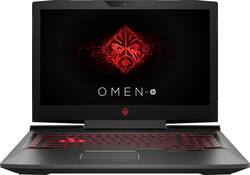
OMEN by HP 17.3" Laptop - Intel Core i7 - 12GB Memory - AMD Radeon RX 580 - 1TB Hard Drive - HP sandblasted hairline brushing and carbon fiber
- Key Specs
- Screen Type: Full HD Widescreen LED
- Screen Size: 17.3 inches (Size of the screen, measured diagonally from corner to corner.)
- Screen Resolution: 1920 x 1080 (Full HD) (Screens come in a range of resolutions (measured in pixels, horizontal x vertical). The higher the resolution, the greater the picture quality.)
- Touch Screen: false (Touch-screen devices make navigating more intuitive. Using a touch-screen display, you can do things such as tap to select, hold and drag to move items, swipe to scroll, and pinch to zoom.)
- Processor Model: Intel 7th Generation Core i7 (Your computer's processor is like its brain. Working in combination with system memory, the power of the processor determines the complexity of software you can run, how many programs you can have open at the same time, and how fast those programs will run. Most computers feature an AMD, Intel or Snapdragon processor.)
- Storage Type: HDD
- System Memory (RAM): 12 gigabytes (Random-access memory (RAM) is a computing device's short-term data storage, which allows active information to be accessed quickly. The size and type of RAM determines how efficiently the device can handle large amounts of information at one time. For example, gaming or video editing requires more RAM for optimal performance.)
- Backlit Keyboard: true (Integrated lights allow for visibility of the keys in low-light conditions.)
- General
- Product Name: OMEN by HP 17.3" Laptop - Intel Core i7 - 12GB Memory - AMD Radeon RX 580 - 1TB Hard Drive
- Brand: HP
- Model Number: 17-AN012DX
- Display
- Screen Type: Full HD Widescreen LED
- Screen Size: 17.3 inches (Size of the screen, measured diagonally from corner to corner.)
- Screen Resolution: 1920 x 1080 (Full HD) (Screens come in a range of resolutions (measured in pixels, horizontal x vertical). The higher the resolution, the greater the picture quality.)
- Touch Screen: false (Touch-screen devices make navigating more intuitive. Using a touch-screen display, you can do things such as tap to select, hold and drag to move items, swipe to scroll, and pinch to zoom.)
- Processor
- Processor Brand: Intel
- Processor Model: Intel 7th Generation Core i7 (Your computer's processor is like its brain. Working in combination with system memory, the power of the processor determines the complexity of software you can run, how many programs you can have open at the same time, and how fast those programs will run. Most computers feature an AMD, Intel or Snapdragon processor.)
- Processor Model Number: i7-7700HQ
- Storage
- Storage Type: HDD
- Hard Drive Capacity: 1000 gigabytes (The amount of data that can be stored on the device's mechanical hard drive. Hard disk drives (HDDs) typically have larger capacities than solid state drives (SSDs) but may have slower speeds.)
- Hard Drive RPM: 7200 revolutions per minute (A hard drive's data is stored on disks, or platters, that spin while transferring information to the host system. The higher the RPM, the faster the hard drive's performance.)
- Memory
- System Memory (RAM): 12 gigabytes (Random-access memory (RAM) is a computing device's short-term data storage, which allows active information to be accessed quickly. The size and type of RAM determines how efficiently the device can handle large amounts of information at one time. For example, gaming or video editing requires more RAM for optimal performance.)
- Type of Memory (RAM): DDR4 SDRAM (Each type of RAM delivers a different level of speed, bandwidth, energy efficiency and performance.)
- System Memory RAM Speed: 2133 megahertz (How fast the information-storing hardware operates. The faster the RAM, the faster memory can be transferred to other system components. Ultimately, faster RAM improves operational efficiency.)
- System Memory RAM Expandable To: 12 gigabytes (Adding more random-access memory (RAM) to a computer speeds up performance and improves efficiency. Upgrades to memory are limited by the number of expansion slots for additional RAM and existing RAM installed on the device.)
- Compatibility
- Operating System: Windows 10 (The operating system manages all software and hardware, including files, memory and connected devices. Most importantly, it lets you interact with your device and your programs in a visual way; otherwise, you'd be typing computer code to get anything done.)
- Connectivity
- Number of VGA Ports: 0 (VGA (Video Graphics Adapter or Video Graphics Array) is a display standard that transmits via analog signals. This type of interface is typically used to connect a computer to a display device such as a monitor, projector, or TV.)
- Power
- Battery Cells: 8-cell
- Features
- Backlit Keyboard: true (Integrated lights allow for visibility of the keys in low-light conditions.)
- Touchpad Type: Multi-touch
- Audio Technology: Bang & Olufsen Audio HP Audio Boost
- Speaker Type: Stereo speakers
- Dimensions
- Product Height: 1.3 inches (The out of box height of the item. Height is measured as the vertical distance from the bottom of the item to the top as it would be primarily used or placed.)
- Product Width: 16.6 inches (The out of box width of the item. Width is measured as the horizontal distance from one side of the item to the other as it would be primarily used or placed.)
- Product Depth: 12 inches (The out of box depth of the item. Depth is measured as the distance from the front of the item to the back as it would be primarily used or placed.)
- Certifications Listings & Approvals
- ENERGY STAR Certified: true (Devices carrying the ENERGY STAR service mark, such as computer products and peripherals, kitchen appliances, and other products, generally use 20% to 30% less energy than required by federal standards.)
- EPEAT Qualified: false (The Electronic Product Environmental Assessment Tool (EPEAT) was designed to provide an environmental assessment tool for purchasers. In order to qualify for EPEAT, a product must meet all 23 required criteria.)
- Included
- Included Software: HP Recovery Manager, HP Support Assistant, HP ePrint, Netflix, HP CoolSense, McAfee LiveSafe (30 days trial), HP 3D DriveGuard, Dropbox (25 GB Cloud Storage) (free for 1 year), HP Audio Switch, HP JumpStart, HP Orbit and HP OMEN Command Center
- Numeric Keypad: true
- Other
- UPC: 191628316250
Only at Best Buy
HP OMEN by HP Laptop: Play your way to victory with this HP Omen 17-inch laptop. Built around a formidable Intel Core i7 processor and 12GB of RAM, this machine supports memory-hungry programs and blazes through graphics-intense games. This HP Omen 17-inch laptop has an advanced red backlit keyboard with dedicated macro keys to make advanced moves easier.
- Windows 10 operating system: Windows 10 brings back the Start Menu from Windows 7 and introduces new features, like the Edge Web browser that lets you markup Web pages on your screen. Learn more ›
- 17.3" Full HD display: The 1920 x 1080 resolution boasts impressive color and clarity. IPS technology for wide viewing angles. Energy-efficient WLED backlight.
- 7th Gen Intel® Core™ i7-7700HQ mobile processor: Powerful quad-core processing performance. Intel Turbo Boost Technology delivers dynamic extra power when you need it, while increasing energy efficiency when you don't.
- 12GB system memory for full-power multitasking: Plenty of high-bandwidth RAM to smoothly run your games and photo- and video-editing applications, as well as multiple programs and browser tabs all at once.
- 1TB hard drive for ample file storage space: Holds a sizeable collection of digital photos, music, HD videos and DVD-quality movies. 7200 rpm spindle speed enables rapid read/write times for handling large files and complex applications.
- Cloud support lets you access your files anywhere: Store your photos, videos, documents and other files on Dropbox for secure access across multiple devices. Fees may apply.
- AMD Radeon RX 580 graphics: Backed by 8GB GDDR5 dedicated video memory for an ultrafast, advanced GPU to fuel your games.
- Windows Mixed Reality Ultra Ready: Push your gaming and VR exhilaration to the limit with Windows Mixed Reality Ultra. This PC is compatible with Windows Mixed Reality headsets.Learn more ›
- Weighs 8.22 lbs. and measures 1.3" thin: Compact power to go, so there's no need to compromise on visual real estate or gaming power to gain portability. 8-cell lithium-ion battery.
- Bluetooth interface syncs with compatible devices: Wirelessly transfer photos, music and other media between the desktop and your Bluetooth-enabled cell phone or MP3 player, or connect Bluetooth wireless accessories.
- 3 SuperSpeed 10Gbs USB 3.1 ports: Ultra-fast data connections to transfer large files rapidly.
- HDMI output expands your viewing options: Connect to an HDTV or high-def monitor to set up two screens side by side or just see more of the big picture.
- Thunderbolt port for connecting advanced monitors and external drives: This single interface supports both high-speed data and high-def video — plus power over cable for bus-powered devices — ideal for digital content creators.
- Next-generation wireless connectivity: Connects to your network or hotspots on all current Wi-Fi standards. Connect to a Wireless-AC router for speed nearly 3x faster than Wireless-N. The Gigabit Ethernet LAN port also plugs into wired networks.
- Built-in HD webcam with two microphones: Makes it easy to video chat with family and friends or teleconference with colleagues over Skype or other popular applications.
- Additional ports: Microphone input, headphone/microphone combo jack and mini DisplayPort.
Whats Included
- OMEN by HP 17-an012dx
- 8-cell battery
- Power adapter
A: You'll be happy with either. I'm not sure where the previous guy that answered got his numbers but they are wrong. If you look at any recent benchmarks, this comes down to the games. Most games the chips are neck and neck. Others favor one or the other. I will say this, your battery probably won't last as long with the RX580 as it would with the GTX1060. That is because it doesn't operate as cool so the fans run more frequently. My last laptop had an Nvidia chip and I pretty much always had it plugged in though so no deal breaker for me there. Might not be the same case for you. Other than that, the RX580 is the better choice in my opinion hands down. Most mobile 1060s are gutted down to 3GB (plus clocked lower) unless you shell out. This has a full 8GB of GDDR5 that you won't cap, 3GB you possibly could. Not to mention Vulcan and DX12 are the future. They will favor the RX580 meaning you will get better performance out of this long term. If you want some links I'll provide them below. I got this on sale for $900. Good luck finding a 1060 at that price with a 7700hq and 12GB of RAM. Keep in mind these are desktop chips in laptops so I wouldn't expect performance on par with their big brothers. Here it shows a list of 27 games running under both chips. This is a few months old. AMD drivers have improved since then. https://www.techspot.com/review/1393-radeon-rx-580-vs-geforce-gtx-1060/ There aren't a lot of benchmarks for the laptop RX580 yet but more will pop up if you want to wait it out. If you look at notebook check, under the mobile RX580 description page it lists this version just above the 1060 mobile. You'll find this under class 1 cards listed in the center. https://www.notebookcheck.net/AMD-Radeon-RX-580-Laptop-GPU.215184.0.html Lastly here on user benchmark, it shows the 1060 marginally ahead. Keep in mind with this site these benchmarks are utilizing different hardware across the board so they should be taken as so. If you want to spend a few hundred dollars extra for not even a 6% increase in performance you might get with a 1060 you might as well dish out more for a 1070. http://gpu.userbenchmark.com/Compare/AMD-RX-580-vs-Nvidia-GTX-1060-6GB/3923vs3639 So summed up this is a really good buy. When DX12 becomes more relevant you will find the RX580 to be the better choice honestly over the 1060. A 1070 isn't really a fair comparison as it's more on the higher end of the series. I have a 1070 in my desktop and I love it. With a laptop you always have to consider the future. Yes you could buy an alienware, spend way more than you need to, hope you are savvy enough to change out an MXM chip down the road, but not many people actually do that. There is a lot more to consider when changing a mobile GPU than just socket type. I'm not sure on temps yet. If I pull some I'll post them for you. I've played Rocket League so far for hours and the laptop barely gets warm. Maybe I'll try to push BF1, Overwatch, etc. and let you know. Good luck!
Q: Does the red logo on the lid lights up?
A: no it does not light up, the on thing that lights up is the keyboard and power button.
A: Yes it comes with a USB "C" port, it worked fine with my thunderbolt drive. It has two ram slots, 8+4 is the standard configuration, I have installed 2 x 16GB into it along with an NVME SSD...things runs great and temps stay below 80' under heavy gaming.
Q: Clueless mom trying to Christmas shop here. Will this run the new Star Wars Battlefront II well?
A: For sure. I believe this is the most powerful and future proof laptop for the money, but its huge and pretty heavy.
Q: How many Usb ports because i will be buying a gaming head set Xbox windows adapter and a wired mouse
A: It has 3 USB ports.
Q: How do you get the keyboard to light up
A: Hold FN AND press F4
A: Thanks for your answer. I should have mentioned i did do a google search with the model # and nothing is found.
A: You can add extra ssd, it allows you to add an m.2 which you can put in it an evo 960 for fast speeds.




















