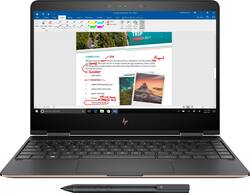
HP - Spectre x360 2-in-1 13.3" 4K Ultra HD Touch-Screen Laptop - Intel Core i7 - 16GB Memory - 512GB Solid State Drive - Dark ash silver
- Key Specs
- Screen Size: 13.3 inches (Size of the screen, measured diagonally from corner to corner.)
- Screen Resolution: 3840 x 2160 (4K) (Screens come in a range of resolutions (measured in pixels, horizontal x vertical). The higher the resolution, the greater the picture quality.)
- Touch Screen: true (Touch-screen devices make navigating more intuitive. Using a touch-screen display, you can do things such as tap to select, hold and drag to move items, swipe to scroll, and pinch to zoom.)
- Processor Model: Intel 7th Generation Core i7 (Your computer's processor is like its brain. Working in combination with system memory, the power of the processor determines the complexity of software you can run, how many programs you can have open at the same time, and how fast those programs will run. Most computers feature an AMD, Intel or Snapdragon processor.)
- CPU Base Clock Frequency: 2.7 gigahertz (Actual central processing unit (CPU) speed may vary by device configuration and design. The average rate at which the processor is able to execute tasks under normal operating conditions as asserted by the manufacturer.)
- Storage Type: SSD
- Total Storage Capacity: 512 gigabytes
- System Memory (RAM): 16 gigabytes (Random-access memory (RAM) is a computing device's short-term data storage, which allows active information to be accessed quickly. The size and type of RAM determines how efficiently the device can handle large amounts of information at one time. For example, gaming or video editing requires more RAM for optimal performance.)
- Graphics: Intel HD Graphics 620 (Often referred to as a "graphics processing unit" (GPU), this device is responsible for displaying image content and decoding/encoding video content in programs and games.)
- Display Connector(s): No external display connection (The number and type of connectors used to connect to an external display.)
- Battery Life (up to): 9.5 hours (Battery life will vary depending on the product configuration, product model, applications loaded on the product, power management setting of the product and the product features used by the customer. As with all batteries, the maximum capacity of this battery will decrease with time and usage.)
- 2-in-1 Design: false (A laptop and a tablet combined in one lightweight, portable device. Sometimes referred to as "convertible" or "hybrid" laptops, these devices deliver the processing power and keyboard of a laptop. When you're ready to play, either detach the screen or fold your 2-in-1 into tablet mode to comfortably watch movies, play games, read an e-book and more.)
- Backlit Keyboard: true (Integrated lights allow for visibility of the keys in low-light conditions.)
- General
- Brand: HP
- Model Number: 13-AC033DX
- Product Name: Spectre x360 2-in-1 13.3" 4K Ultra HD Touch-Screen Laptop - Intel Core i7 - 16GB Memory - 512GB Solid State Drive
- Color: Dark ash silver
- Year of Release: 2017
- Display
- Display Type: LED
- Screen Size: 13.3 inches (Size of the screen, measured diagonally from corner to corner.)
- Screen Resolution: 3840 x 2160 (4K) (Screens come in a range of resolutions (measured in pixels, horizontal x vertical). The higher the resolution, the greater the picture quality.)
- Touch Screen: true (Touch-screen devices make navigating more intuitive. Using a touch-screen display, you can do things such as tap to select, hold and drag to move items, swipe to scroll, and pinch to zoom.)
- Processor
- Processor Brand: Intel
- Processor Model: Intel 7th Generation Core i7 (Your computer's processor is like its brain. Working in combination with system memory, the power of the processor determines the complexity of software you can run, how many programs you can have open at the same time, and how fast those programs will run. Most computers feature an AMD, Intel or Snapdragon processor.)
- Processor Model Number: 7500U
- CPU Base Clock Frequency: 2.7 gigahertz (Actual central processing unit (CPU) speed may vary by device configuration and design. The average rate at which the processor is able to execute tasks under normal operating conditions as asserted by the manufacturer.)
- CPU Boost Clock Frequency: 3.5 gigahertz (Actual central processing unit (CPU) speed may vary by device configuration and design. The maximum rate at which the processor is able to execute tasks, typically only used for a short period of time as needed. This rate may temporarily boost the processor's performance, but may result in overheating, shutdown, or damage to equipment if sustained.)
- Storage
- Storage Type: SSD
- Total Storage Capacity: 512 gigabytes
- Solid State Drive Capacity: 512 gigabytes (The amount of data that can be stored on the device's solid state drive (SSD). SSD is a flash-based storage with faster speeds than a hard disk drive (HDD).)
- Memory
- System Memory (RAM): 16 gigabytes (Random-access memory (RAM) is a computing device's short-term data storage, which allows active information to be accessed quickly. The size and type of RAM determines how efficiently the device can handle large amounts of information at one time. For example, gaming or video editing requires more RAM for optimal performance.)
- Type of Memory (RAM): LPDDR3 (Each type of RAM delivers a different level of speed, bandwidth, energy efficiency and performance.)
- System Memory RAM Speed: 1600 megahertz (How fast the information-storing hardware operates. The faster the RAM, the faster memory can be transferred to other system components. Ultimately, faster RAM improves operational efficiency.)
- Graphics
- Graphics Type: Integrated (Dedicated graphics uses a separate graphics card for processing video images. Because it does not use memory from the system's RAM, there is no extra burden on the CPU and graphics are processed more efficiently. Integrated graphics shares system RAM to process video images.)
- GPU Brand: Intel
- Graphics: Intel HD Graphics 620 (Often referred to as a "graphics processing unit" (GPU), this device is responsible for displaying image content and decoding/encoding video content in programs and games.)
- GPU Video Memory (RAM): 8 gigabytes (Random-access memory (RAM) is a GPU’s, or graphics cards, short-term data storage, which allows active information to be accessed quickly. The size and type of RAM determines how efficiently the GPU can handle large amounts of information at one time. For example, larger amounts of RAM for gaming or video editing increases performance.)
- Compatibility
- Operating System: Windows 10 Home (The operating system manages all software and hardware, including files, memory and connected devices. Most importantly, it lets you interact with your device and your programs in a visual way; otherwise, you'd be typing computer code to get anything done.)
- Voice Assistant Built-in: No (A digital assistant built into the device that uses voice commands to answer questions and control smart devices.)
- Connectivity
- Display Connector(s): No external display connection (The number and type of connectors used to connect to an external display.)
- Number of HDMI Outputs (Total): 1
- Number of DisplayPort Outputs (Total): 0
- USB Ports: 4 x USB-C 3.1 (The number and type of USB ports the product has.)
- Number of USB Ports (Total): 4
- Cooling
- CPU Cooling System: Air
- Power
- Battery Life (up to): 9.5 hours (Battery life will vary depending on the product configuration, product model, applications loaded on the product, power management setting of the product and the product features used by the customer. As with all batteries, the maximum capacity of this battery will decrease with time and usage.)
- Battery Cells: 3-cell
- Camera
- Front-Facing Camera: true
- Features
- 2-in-1 Design: false (A laptop and a tablet combined in one lightweight, portable device. Sometimes referred to as "convertible" or "hybrid" laptops, these devices deliver the processing power and keyboard of a laptop. When you're ready to play, either detach the screen or fold your 2-in-1 into tablet mode to comfortably watch movies, play games, read an e-book and more.)
- Backlit Keyboard: true (Integrated lights allow for visibility of the keys in low-light conditions.)
- Touchpad Type: Multi-touch, with gesture support
- Media Card Reader: false (A hardware device that allows for access to data on a memory card and enables the transfer of its files to a computer. These devices may have one or multiple slots for various types of memory cards, and may be integrated into the computer or available as an external device.)
- Audio Technology: Bang & Olufsen Audio
- Cable Lock Slot: Kensington Security Slot (K-Slot)
- Stylus Dock: None
- Dimensions
- Product Height: 0.55 inches (The out of box height of the item. Height is measured as the vertical distance from the bottom of the item to the top as it would be primarily used or placed.)
- Product Width: 12.07 inches (The out of box width of the item. Width is measured as the horizontal distance from one side of the item to the other as it would be primarily used or placed.)
- Product Depth: 8.58 inches (The out of box depth of the item. Depth is measured as the distance from the front of the item to the back as it would be primarily used or placed.)
- Product Weight: 2.89 pounds (The out of box weight of the item.)
- Certifications Listings & Approvals
- ENERGY STAR Certified: true (Devices carrying the ENERGY STAR service mark, such as computer products and peripherals, kitchen appliances, and other products, generally use 20% to 30% less energy than required by federal standards.)
- EPEAT Qualified: true (The Electronic Product Environmental Assessment Tool (EPEAT) was designed to provide an environmental assessment tool for purchasers. In order to qualify for EPEAT, a product must meet all 23 required criteria.)
- EPEAT Level: Silver (The Electronic Product Environmental Assessment Tool (EPEAT) was designed to provide an environmental assessment tool for purchasers. In order to qualify for EPEAT, a product must meet all 23 required criteria. Products are rated Bronze, Silver or Gold based on how many of 28 optional criteria they meet (below 50%, 50%, 75%).)
- Included
- Included Software: HP ePrint, HP Support Assistant, HP Jumpstart, Netflix, HP Recovery Manager, HP Orbit, McAfee LiveSafe (30 days trial)
- Optical Drive Type: None (An optical disk drive (ODD) uses a laser light to read data from or write data to an optical disc. These discs include CDs, DVDs, and Blu-ray Discs. This allows you to play music or watch movies using prerecorded discs.)
- Numeric Keypad: false
- Stylus Included: false
- Other
- UPC: 190781388111

Write or sketch easily on the screen of this HP Spectre laptop. Its digital pen and Windows Ink software let you create art by hand, and its Intel Core i7 chip and 16GB of RAM ensure speedy processing while multitasking. This 13.3-inch HP Spectre laptop includes a 512GB solid-state drive to hold all your files.

- Windows 10 operating system: Windows 10 brings back the Start Menu from Windows 7 and introduces new features, such as Edge Web browser that lets you mark up Web pages on your screen. Learn more ›
- Built for Windows Ink: Enjoy Ink driven experiences in apps like Office, Messenger, and Microsoft Edge, as well as apps from brands like Adobe. Windows Ink is integrated with Illustrator to bring you an intuitive pen experience.
- 13.3" Ultra HD TrueLife touch screen for hands-on control: Natural finger-touch navigation makes the most of Windows 10. The 4K (3840 x 2160) resolution boasts impressive color and clarity. Energy-efficient LED backlight.
- 7th Gen Intel® Core™ i7-7500U processor: Smart dual-core, four-way processing performance for HD-quality computing.
- 16GB of system memory for dependable multitasking: High-bandwidth DDR3 RAM to smoothly run your graphics-heavy PC games and video-editing applications, as well as numerous programs and browser tabs all at once.
- 512GB solid state drive (SSD): While offering less storage space than a hard drive, a flash-based SSD has no moving parts, resulting in faster start-up times and data access, no noise, and reduced heat production and power draw on the battery.
- 360° flip-and-fold design: Offers versatile functionality with laptop, audience, tabletop, presentation and tablet modes.
- Intel® HD Graphics 620: On-processor graphics with 4162 total video memory provide everyday image quality for Internet use, video streaming and casual gaming.
- Weighs 2.9 lbs. and measures 0.6" thin overall: Ultraportable design, featuring a smaller screen size and omitting the DVD/CD drive to achieve the compact form factor.
- Up to 9 hours and 30 minutes of batterry life: Long operation time with the built-in battery.
- Bluetooth interface synchronizes with compatible devices: Wirelessly transfer photos, music and other media between the laptop or tablet and your Bluetooth-enabled cell phone or MP3 player, or connect Bluetooth wireless accessories.
- 3 USB 3.0 ports maximize the latest high-speed devices: 2 USB 3.1 Type-C Gen 2 ports and 1 USB 3.1 Type-A Gen 1 port support sleep-and-charge and are backward-compatible with USB 2.0 devices
- Thunderbolt port for connecting advanced monitors and external drives: This single interface supports both high-speed data and high-definition video - plus power over cable for bus-powered devices - ideal for digital content creators.
- Wireless-AC connectivity (2x2): Built-in high-speed wireless LAN connects to your network or hotspots using all current Wi-Fi standards in both laptop and tablet modes.
- Built-in HP TrueVision HD webcam with dual-array digital microphone: Makes it easy to video chat with family and friends or teleconference with colleagues over Skype or other popular applications.
- Ergonomic AccuType keyboard: Automatically deactivates in tablet mode to prevent unintended keystrokes. Intelligent touchpad is optimized for Windows 8 with simple scroll, zoom and rotate functions.
- Software package: Includes HP ePrint; HP Support Assistant; Netflix; HP Recovery Manager; McAfee® LiveSafe™ with a free 30-day trial.
- Log-in with a smile: With Windows Hello, you are the password. It can even remember multiple faces for different accounts.
- Additional ports: DisplayPort 1.2; Microphone-in/headphone-out combo jack in the laptop base.
- Windows 10 operating system: Windows 10 brings back the Start Menu from Windows 7 and introduces new features, such as Edge Web browser that lets you mark up Web pages on your screen. Learn more ›
- Built for Windows Ink: Enjoy Ink driven experiences in apps like Office, Messenger, and Microsoft Edge, as well as apps from brands like Adobe. Windows Ink is integrated with Illustrator to bring you an intuitive pen experience.
- 13.3" Ultra HD TrueLife touch screen for hands-on control: Natural finger-touch navigation makes the most of Windows 10. The 4K (3840 x 2160) resolution boasts impressive color and clarity. Energy-efficient LED backlight.
- 7th Gen Intel® Core™ i7-7500U processor: Smart dual-core, four-way processing performance for HD-quality computing.
- 16GB of system memory for dependable multitasking: High-bandwidth DDR3 RAM to smoothly run your graphics-heavy PC games and video-editing applications, as well as numerous programs and browser tabs all at once.
- 512GB solid state drive (SSD): While offering less storage space than a hard drive, a flash-based SSD has no moving parts, resulting in faster start-up times and data access, no noise, and reduced heat production and power draw on the battery.
- 360° flip-and-fold design: Offers versatile functionality with laptop, audience, tabletop, presentation and tablet modes.
- Intel® HD Graphics 620: On-processor graphics with 4162 total video memory provide everyday image quality for Internet use, video streaming and casual gaming.
- Weighs 2.9 lbs. and measures 0.6" thin overall: Ultraportable design, featuring a smaller screen size and omitting the DVD/CD drive to achieve the compact form factor.
- Up to 9 hours and 30 minutes of batterry life: Long operation time with the built-in battery.
- Bluetooth interface synchronizes with compatible devices: Wirelessly transfer photos, music and other media between the laptop or tablet and your Bluetooth-enabled cell phone or MP3 player, or connect Bluetooth wireless accessories.
- 3 USB 3.0 ports maximize the latest high-speed devices: 2 USB 3.1 Type-C Gen 2 ports and 1 USB 3.1 Type-A Gen 1 port support sleep-and-charge and are backward-compatible with USB 2.0 devices
- Thunderbolt port for connecting advanced monitors and external drives: This single interface supports both high-speed data and high-definition video - plus power over cable for bus-powered devices - ideal for digital content creators.
- Wireless-AC connectivity (2x2): Built-in high-speed wireless LAN connects to your network or hotspots using all current Wi-Fi standards in both laptop and tablet modes.
- Built-in HP TrueVision HD webcam with dual-array digital microphone: Makes it easy to video chat with family and friends or teleconference with colleagues over Skype or other popular applications.
- Ergonomic AccuType keyboard: Automatically deactivates in tablet mode to prevent unintended keystrokes. Intelligent touchpad is optimized for Windows 8 with simple scroll, zoom and rotate functions.
- Software package: Includes HP ePrint; HP Support Assistant; Netflix; HP Recovery Manager; McAfee® LiveSafe™ with a free 30-day trial.
- Log-in with a smile: With Windows Hello, you are the password. It can even remember multiple faces for different accounts.
- Additional ports: DisplayPort 1.2; Microphone-in/headphone-out combo jack in the laptop base.
Whats Included
- HP Spectre x360 2-in-1 13.3" 4K Ultra HD Touch-Screen Laptop - Intel Core i7 - 16GB Memory - 512GB Solid State Drive
- 3-cell lithium-ion polymer battery
- Power adapter
- Stylus pen
- HP Sleeve
- HP Spectre x360 2-in-1 13.3" 4K Ultra HD Touch-Screen Laptop - Intel Core i7 - 16GB Memory - 512GB Solid State Drive
- 3-cell lithium-ion polymer battery
- Power adapter
- Stylus pen
- HP Sleeve
Product Manuals
A: this is a bestbuy exclusive build, 4k is yet available on any other stores including HP's own web store. the hp website is outdated, i believe they are updating it now. "We'll be right back. We're working on some site improvements."
Q: How well does the pen work?
A: Quite a few 3rd party reviewers on Youtube state that the pen recognition on the Spectre x360 works even better than the Surface. So it seems quite well.
Q: Can anyone confirm if this 13.3" 4k model has the 620 or does it in fact have the iris 640??
A: I spent numerous hours on the phone with HP customer support to figure this out. It turned out that they might upgrade it to iris plus 640 soon, so they technically "teased" that on their website, but none of their employees knows for sure. Some didn't even know the difference between iris and HD... but the currently available model comes with intel HD 620
A: No. The memory RAM (not hard drive) is soldered on. Choose from the beginning how much ram you want.
A: Confirmed that the Anker 20100 external battery does NOT work with this laptop. Kind of bummer, because that was how I planned to deal with the low battery life. I have mine charged to 100% right now, and with the display at 75% it tells me I have 5 hours, 43 minutes left. Battery Saver bumps that up to 7 hours. It's the price we pay for this amazing 4K display.
A: Yes, using the thunderbolt 3.0 port you can. Youtube it.
A: The x360 4K has higher pixel density than the retina on the MacBook Pro and therefore has better resolution however the MacBook Pro has better color accuracy and a brighter display. Either screen is great for a 13 inch laptop. Sound quality goes to the MacBook but it's pretty close. What won me over the the x360 is the value per dollar, you can get a lot more for the same price.
Q: Does anyone know if the eraser on the Microsoft Surface pen is compatible with the x360?
A: Actually it is. My son has a Surface tablet and the eraser from the top of his pen worked on my laptop. He tested it. However, this model comes with a pen and the eraser system is a little button on the side of the pen near the bottom that you click to erase. I like it better than flipping the pen over all the time like my son has to do with his Surface tablet, but it may just be whatever your preference is.

















![The text on the image reads:
17 F8 Home P End F10 PgUp it PgDn F12 Ies Del * 8 ( 9 ) 0 I I + = Backspace I o P : [ ] ] I / K L : : .. . Enter M V > . ? / Shift Alt <
The corrected text should be:
17 F8 Home PgUp it PgDn F10 F12 Ies Del * 8 ( 9 ) 0 I I + = Backspace I o P : [ ] ] I / K L : : .. . Enter M V > . ? / Shift Alt <
The corrected text groups the keys in a more organized manner, making it easier to read and understand.](https://pisces.bbystatic.com/image2/BestBuy_US/images/products/699c06f5-6aba-4ab2-bbf6-114986b58b2a.jpg;maxHeight=144;maxWidth=200?format=webp)


