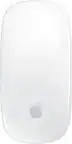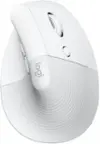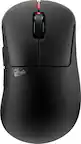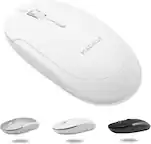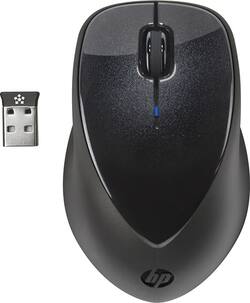
HP - X4000 Wireless Laser Mouse - Black
- Key Specs
- Maximum Sensitivity: 1600 dots per inch (Mouse sensitivity is measured in dots per inch (DPI). The higher the DPI, the more sensitive the mouse is and may be more useful for high-density pixel screens. Lower DPI typically means more precision and accuracy in mouse movement.)
- Number of Buttons (Total): 3
- General
- Brand: HP
- Model Number: A0X35AA#ABA
- Product Name: X4000 Wireless Laser Mouse
- Color: Black
- System Requirements: Microsoft Windows Vista / XP / 7 (The software that a product must have for it to be able to integrate with another product.)
- Features
- Mouse Type: Standard
- Performance
- Mouse Operation: Button(s)
- Handedness: Ambidextrous
- Tracking Method: Laser (There are several types of computer mice, optical and laser being among the most common. Optical mice detect less detail and provide more precise and accurate movement. Laser mice detect more detail and can be used on a wider variety of surfaces, but are more sensitive to small movements.)
- Maximum Sensitivity: 1600 dots per inch (Mouse sensitivity is measured in dots per inch (DPI). The higher the DPI, the more sensitive the mouse is and may be more useful for high-density pixel screens. Lower DPI typically means more precision and accuracy in mouse movement.)
- Number of Buttons (Total): 3
- Connectivity
- Wireless Connectivity: Radio Frequency (RF) (The manner in which a device sends data to another device over a short distance without the use of wires or cables.)
- Operating System Compatibility: Windows
- Plug and Play Operation: true
- Power
- Mouse Power Source: Battery-powered
- On/Off Switch: false
- Rechargeable Battery (Mouse): false
- Battery Size: AA (The battery size required for operation.)
- Number of Batteries Required: 2
- Batteries Included: true (Indicates whether the product comes with the required batteries for its operation.)
- Dimensions
- Product Height: 1.5 inches (The out of box height of the item. Height is measured as the vertical distance from the bottom of the item to the top as it would be primarily used or placed.)
- Product Width: 2.6 inches (The out of box width of the item. Width is measured as the horizontal distance from one side of the item to the other as it would be primarily used or placed.)
- Product Weight: 121.9 grams (The out of box weight of the item.)
- Other
- UPC: 886112004446
Access files on your computer with this HP wireless mouse. It has a 30-foot range, so you can work from anywhere in the room, and its laser sensor lets it handle almost any surface. This HP wireless mouse has a battery life of 30 months to reduce the need for replacements.
- Laser technology: This mouse uses a laser to detect movement with accuracy across a variety of surface types, including glass.
- 2.4GHz wireless connection: This mouse connects to your computer using a wireless USB receiver and works up to 33 feet away.
- 3 buttons: Provide access to frequently used commands and functions for powerful control.
- Maximum of 1600 dpi: Lets you find the perfect sensitivity.
- Compatible with most versions of Windows: Works with most PCs.
- Laser technology: This mouse uses a laser to detect movement with accuracy across a variety of surface types, including glass.
- 2.4GHz wireless connection: This mouse connects to your computer using a wireless USB receiver and works up to 33 feet away.
- 3 buttons: Provide access to frequently used commands and functions for powerful control.
- Maximum of 1600 dpi: Lets you find the perfect sensitivity.
- Compatible with most versions of Windows: Works with most PCs.
Whats Included
- 1 year limited warranty
- 2 x AA Batteries
- HP Wireless Mouse X4000 with Laser Sensor
- Software and Documentation
- 1 year limited warranty
- 2 x AA Batteries
- HP Wireless Mouse X4000 with Laser Sensor
- Software and Documentation
Product Manuals
Q: Is this compatible with Windows 10?
A: No, it is not compatible with Windows 10.
Q: Dose it have a sleep mode to save on batteries ?
A: It does have an on/off switch on the bottom.
Q: Is it compatible with any hp desktop computer?
A: This is compatible with all makes and models of computers. I have Toshiba and Dell laptops that it works well with, as well as a Lenovo Desktop. The only problem that you might encounter is what version of windows you are running. I have used it on XP, Windows 7, and Windows 8 with no difficulties.
Q: HP - X4000 Wireless Laser Mouse - Black
A: It comes with a mouse and a small piece that hooks into your USB port of your laptop, desktop or wherever you're using it. If it requires a battery you put that in if not turn the switch on should be on the bottom. Now if the piece is plugged into your device and Mouse is turned on lights should flash indicating it's on and set up is complete. How it works is some wireless technology in the piece that connects with the mouse even from a far distance
A: The top lifts off to access the battery compartment.
Q: Does this need a mouse pad?
A: According to the product info, it works on any flat surface, no mouse pad needed.
A: That blue ball is really a button, so I don't think that's the problem. It helps to use this mouse close to the dongle. I use mine right next to my laptop. If your dongle is insertet into a CPU on the floor, wires and such may be interfering.
Q: What is the purpose of the connnect button? Is it bluetooth?
A: undefined