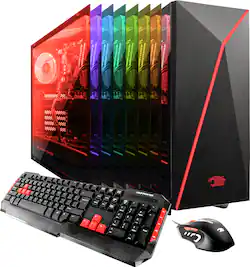
iBUYPOWER - Desktop - Intel Core i7 - 16GB Memory - NVIDIA GeForce GTX 1060 - 120GB Solid State Drive + 1TB Hard Drive - Black/Red
- Key Specs
- Processor Model: Intel 6th Generation Core i7 (Your computer's processor is like its brain. Working in combination with system memory, the power of the processor determines the complexity of software you can run, how many programs you can have open at the same time, and how fast those programs will run. Most computers feature an AMD, Intel or Snapdragon processor.)
- Storage Type: HDD, SSD
- System Memory (RAM): 16 gigabytes (Random-access memory (RAM) is a computing device's short-term data storage, which allows active information to be accessed quickly. The size and type of RAM determines how efficiently the device can handle large amounts of information at one time. For example, gaming or video editing requires more RAM for optimal performance.)
- General
- Product Name: Desktop - Intel Core i7 - 16GB Memory - NVIDIA GeForce GTX 1060 - 120GB Solid State Drive + 1TB Hard Drive
- Brand: iBUYPOWER
- Model Number: BB921
- Processor
- Processor Brand: Intel
- Processor Model: Intel 6th Generation Core i7 (Your computer's processor is like its brain. Working in combination with system memory, the power of the processor determines the complexity of software you can run, how many programs you can have open at the same time, and how fast those programs will run. Most computers feature an AMD, Intel or Snapdragon processor.)
- Processor Model Number: Intel Core i7
- Storage
- Storage Type: HDD, SSD
- Solid State Drive Capacity: 120 gigabytes (The amount of data that can be stored on the device's solid state drive (SSD). SSD is a flash-based storage with faster speeds than a hard disk drive (HDD).)
- Hard Drive Capacity: 1120 gigabytes (The amount of data that can be stored on the device's mechanical hard drive. Hard disk drives (HDDs) typically have larger capacities than solid state drives (SSDs) but may have slower speeds.)
- Memory
- System Memory (RAM): 16 gigabytes (Random-access memory (RAM) is a computing device's short-term data storage, which allows active information to be accessed quickly. The size and type of RAM determines how efficiently the device can handle large amounts of information at one time. For example, gaming or video editing requires more RAM for optimal performance.)
- Type of Memory (RAM): DDR4 SDRAM (Each type of RAM delivers a different level of speed, bandwidth, energy efficiency and performance.)
- System Memory RAM Speed: 2133 megahertz (How fast the information-storing hardware operates. The faster the RAM, the faster memory can be transferred to other system components. Ultimately, faster RAM improves operational efficiency.)
- Compatibility
- Operating System: Windows 10 (The operating system manages all software and hardware, including files, memory and connected devices. Most importantly, it lets you interact with your device and your programs in a visual way; otherwise, you'd be typing computer code to get anything done.)
- Operating System Architecture: 64-bit (An operating system (OS) manages computer hardware, software resources, and programs in conjunction with the system's processor. 64-bit operating systems can handle more data at once than 32-bit systems, resulting in faster speeds, more effiency, and overall improved performance.)
- Connectivity
- Number Of DVI Ports: 1
- Expansion
- Number Of Internal 3.5" Bays: 3
- Features
- Audio Technology: 7.1 channel surround
- Enclosure Type: Tower
- Size: Standard
- Dimensions
- Product Height: 17 inches (The out of box height of the item. Height is measured as the vertical distance from the bottom of the item to the top as it would be primarily used or placed.)
- Product Width: 7.9 inches (The out of box width of the item. Width is measured as the horizontal distance from one side of the item to the other as it would be primarily used or placed.)
- Product Depth: 17.5 inches (The out of box depth of the item. Depth is measured as the distance from the front of the item to the back as it would be primarily used or placed.)
- Certifications Listings & Approvals
- ENERGY STAR Certified: false (Devices carrying the ENERGY STAR service mark, such as computer products and peripherals, kitchen appliances, and other products, generally use 20% to 30% less energy than required by federal standards.)
- EPEAT Qualified: false (The Electronic Product Environmental Assessment Tool (EPEAT) was designed to provide an environmental assessment tool for purchasers. In order to qualify for EPEAT, a product must meet all 23 required criteria.)
- Other
- UPC: 848604022772
iBuyPower Desktop: Play hard with this iBUYPOWER gaming PC. With a 3.4GHz Intel i7 quad-core processor, 16GB of RAM and an NVIDIA GeForce 3GB graphics card, this machine can handle the most demanding adventures. This iBUYPOWER gaming PC has a 1TB SATA III hard drive and 120GB solid-state drive to provide ample file storage.
- Windows 10 operating system: Windows 10 brings back the Start Menu from Windows 7 and introduces new features, like the Edge Web browser that lets you markup Web pages on your screen. Learn more ›
- 6th Gen Intel® Core™ i7-6700 processor: Powerful quad-core processing performance.
- 16GB system memory for intense multitasking and gaming: Reams of high-bandwidth DDR4 RAM to smoothly run your graphics-heavy PC games and video-editing applications, as well as numerous programs and browser tabs all at once.
- 1TB hard drive and 120GB solid state drive (SSD) for a blend of storage space and speed: The hard drive provides ample storage, while the SSD delivers faster start-up times and data access.
- NVIDIA GeForce GTX 1060 graphics: Driven by 3GB dedicated video memory to quickly render high-quality images for videos and games.
- 4 USB 3.0 ports maximize the latest high-speed devices: Also includes 4 USB 2.0 ports to connect more accessories and peripherals. The USB 3.0 ports are backward-compatible with USB 2.0 devices (at 2.0 speeds).
- Wired network connectivity: Built-in Gigabit Ethernet LAN port plugs into wired networks.
Whats Included
- iBuyPower BB921
- Mouse
- Keyboard
Q: Does this computer connect to the Internet wirelessly? Or do I have to buy something for it?
A: It comes with a device that will let you connect wirelessly, it's a small, usb stick-looking thing. I would recommend using a cable anyway though, its just faster and easier.
A: i have the ares m2 keyboard and the zeus e2 mouse i dont know if or how to change the mouse lighting effects but heres how to change the keyboard effects- -HOLD THE (LEFT)Fn BUTTON AND PRESS THE PRINT SCREEN/Sys Rq BUTTON IT TURNS THE LIGHTS ON/OFF -HOLD THE (LEFT)Fn BUTTON AND PRESS THE SCROLL LOCK/THE BUTTON WITH THE SOLID BOX WITH ARROWS TO AND FROM A EMPTY BOX THAT LOOKS LIKE THEYRE SWITCHING PLACES(it is next to the print screen button) THIS CHANGES THE TYPE OF LIGHTING EFFECTS TEST THESE OUT AND YOULL SEE HOW TO DO IT BTW I FOUND THIS OUT BY LOOKING AT THE COVER OF THE BOX THE KEYBOARD CAME IN, THE BOTTOM LEFT OF THE COVER TELLS YOU THE BUTTON CONTROLS.
A: GOOD LUCK - YOU HAVE TO INSTALL THE MSI SOFTWARETHAT CAME WITH THE SYSTEM, BUT SINCE IT DOESSNOT HAVE A CD/DVD YOU'LL HAVE TO Add AN External one since there is no way to add an internal one and oh by the way don't be surprised if once you do you get the message out of hd space - I suggest that you take it to or contactgeek squad for help - ibuypower customer service and tech support are impossible to get in contact with
Q: Does it come with the keyboard and mouse?
A: Yes, the PC does come with a keyboard and mouse.
Q: Is there an Operating system included if so which one?
A: Hello NateEnglish, this model desktop PC will have Windows Microsoft 10 operating system included. If you have any other questions, please feel free to reach out to our tech support at 888-618-6040. Thanks!
A: You most likely inserted the HDMI cable wrong. Its proabably running on the intergrated graphics verses the GTX 1060, that comes with it.
Q: Can an extra SSD be added? Or can the one inside be replaced? What size does it need to be?
A: Don't know of any reason you couldn't replace the SSD or add another. There are two 2.5" mounts (one used by the existing SSD) and six SATA ports (two used for the SSD and the HDD, the other four are available.) To add another SSD, you would need an SATA data cable, an appropriate power cable (possibly a splitter) and a set of mounting screws. Replacing an SSD should be pretty easy, too. Basically just a matter of using an appropriate software tool to copy the contents of one disk to another, and then HOPING that Windows licensing doesn't screw you over because of the hardware change. The data transfer software often comes with the new SSD, or you can download a tool. The 120GB SSD that comes with the PC is a bit small, so I'd go for something bigger, like the Samsung 850 EVO 500GB, but there are lots of choices out there depending on your budget.
A: This computer runs ark very well. It will run most settings at epic with no problem. Just make sure you store your ark files on the larger drive as they will fill up the solid state dive quickly. The ram is enough for even the most alpha of bases.




















