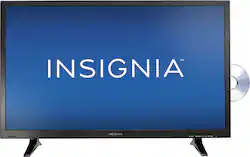
Insignia™ - 32" Class (31.5" Diag.) - LED - 720p - HDTV DVD Combo
- Key Specs
- Display Type: LED
- Screen Size Class: 32 inches (The group size measurement of a screen. This differs from a screen size measured diagonally from corner to corner.)
- Refresh Rate: 60Hz (The number of frames per second the device can produce natively without enhancement. Higher rates help produce smooth, seamless pictures.)
- General
- Product Name: 32" Class (31.5" Diag.) - LED - 720p - HDTV DVD Combo
- Brand: Insignia™
- Model Number: NS-32DD220NA16
- Dimensions
- Product Height With Stand: 19.3 inches
- Product Width: 29.1 inches (The out of box width of the item. Width is measured as the horizontal distance from one side of the item to the other as it would be primarily used or placed.)
- Product Depth With Stand: 7.1 inches
- Product Height Without Stand: 17.4 inches
- Product Depth Without Stand: 3.4 inches
- Product Weight With Stand: 10.7 pounds
- Product Weight Without Stand: 10.5 pounds
- Display
- Display Type: LED
- Screen Size: 31.5 inches (Size of the screen, measured diagonally from corner to corner.)
- Screen Size Class: 32 inches (The group size measurement of a screen. This differs from a screen size measured diagonally from corner to corner.)
- Curved Screen: false
- Refresh Rate: 60Hz (The number of frames per second the device can produce natively without enhancement. Higher rates help produce smooth, seamless pictures.)
- Brightness: 160 candela per square meter (A measure of the total light output.)
- Maximum Contrast Ratio (Native): 3000 (The difference between the brightest and the dimmest a screen panel can be. A higher contrast produces more in-depth images.)
- Language(s) Displayed: English, French, Spanish (The available language options for displayed text or captions.)
- Features
- V-Chip: true (Feature that blocks television programming if it has a content rating outside of the acceptable rating(s) configured by the user.)
- TV Tuner: Digital (The ATSC TV Tuner is a component built into conventional TV sets or other devices for receiving over-the-air broadcast TV without a cable/satellite box. Digital tuners may be purchased separately and connected to a device if it does not have one built in.)
- Connectivity
- RF Antenna Input: true (This input is used to connect devices such as antennas or cable boxes to a TV via a coaxial cable.)
- Number Of USB Port(s) (Total): 1 (The total number of USB ports including all generations and versions.)
- Headphone Jack: true (The device features an interface that allows for the connection of headphones.)
- Compatibility
- VESA Wall Mount Standard: 200mm x 100mm (VESA wall mount standards refer to the spacing of screw holes built into a TV in order to fit with standard TV wall mounts. These standards are implemented into most TVs and monitors.)
- Audio
- Speaker Output: 10 watts
- Number Of Speakers: 2
- Power
- ENERGY STAR Certified: false (Devices carrying the ENERGY STAR service mark, such as computer products and peripherals, kitchen appliances, and other products, generally use 20% to 30% less energy than required by federal standards.)
- EPEAT Qualified: false (The Electronic Product Environmental Assessment Tool (EPEAT) was designed to provide an environmental assessment tool for purchasers. In order to qualify for EPEAT, a product must meet all 23 required criteria.)
- Estimated Annual Operating Cost: 8 United States dollars (Predicted cost of operating the product under average conditions for one year.)
- Estimated Annual Electricity Use: 66 kilowatt hours (Predicted amount of electricity needed to operate the product under average conditions for one year.)
- Warranty
- Manufacturer's Warranty - Parts: 1 year limited
- Manufacturer's Warranty - Labor: 1 year limited
- Box Dimension
- Height: 22 inches
- Width: 33.4 inches
- Depth: 5.1 inches
- CubicDimension: 3747 inches
- Other
- UPC: 600603185168
Insignia NS-32DD220NA16 LED HDTV DVD Combo: With a built-in DVD player for movie nights, this HDTV can be the main fixture in the bedroom or small living room. It can also be hooked up to a PC as your main monitor, or even be used as a second one.
- 31-1/2" screen (measured diagonally from corner to corner): A good size for a small living room, bedroom or dorm room.
- LED TVs perform well in all lighting conditions: They also deliver plasma-like deep blacks and rich colors.
- 720p resolution for quality HD images: Watch broadcast TV and DVDs in high definition.
- 60Hz refresh rate: A 6.5ms response time for refreshing the picture helps reduce blurring during fast-motion scenes.
- Two 8W speakers: For good-quality TV sound.
- 3 HDMI inputs for your home theater connection: High-speed HDMI delivers an HD picture and digital surround sound in one convenient cable. HDMI cable sold separately.
- 1 USB input: Easily connect your digital camera, camcorder or other USB device.
- Easily watch DVDs: Play movies and other media with the built-in DVD player located on the side of the screen.
- Takes up minimal space: At only 3" deep, you can mount it easily on the wall or use the included stand for a user-friendly setup. Mounting kit sold separately.
- Share photos and videos with family and friends: Connect your PC to your TV for a larger screen display, or insert a disc into the built-in DVD player for viewing slideshows and home videos.
- 31-1/2" screen (measured diagonally from corner to corner): A good size for a small living room, bedroom or dorm room.
- LED TVs perform well in all lighting conditions: They also deliver plasma-like deep blacks and rich colors.
- 720p resolution for quality HD images: Watch broadcast TV and DVDs in high definition.
- 60Hz refresh rate: A 6.5ms response time for refreshing the picture helps reduce blurring during fast-motion scenes.
- Two 8W speakers: For good-quality TV sound.
- 3 HDMI inputs for your home theater connection: High-speed HDMI delivers an HD picture and digital surround sound in one convenient cable. HDMI cable sold separately.
- 1 USB input: Easily connect your digital camera, camcorder or other USB device.
- Easily watch DVDs: Play movies and other media with the built-in DVD player located on the side of the screen.
- Takes up minimal space: At only 3" deep, you can mount it easily on the wall or use the included stand for a user-friendly setup. Mounting kit sold separately.
- Share photos and videos with family and friends: Connect your PC to your TV for a larger screen display, or insert a disc into the built-in DVD player for viewing slideshows and home videos.
Whats Included
- 32" Class - LED - 720p - HDTV DVD Combo
- Stand
- Remote with 2 AAA batteries
- Power adapter
- 4 M4-type screws
- Quick-start guide
- 32" Class - LED - 720p - HDTV DVD Combo
- Stand
- Remote with 2 AAA batteries
- Power adapter
- 4 M4-type screws
- Quick-start guide
Q: For the love of god does it have apps?
A: No, my friend only "smart" tvs have apps. This is a 720 resolution tv with a built in dvd player only. No smart tv interface, but you can still connect to it with your computer, or streaming devices like roku or chromecast or apple tv thru the connection ports provided. ( which will get you all the apps you need ) hope this helps, when you search, click the button on the left that says "smart tv interface" and it will show you models that have apps built in.
Q: Does this DVD Combo play Blu-ray DVD's?
A: No, it doesn't. It's a good buy though. Reasonably priced and easy to use.
Q: Is there difficulty switching input from DVD to TV (and visa-versa)?
A: The TV will automatically change to the DVD input when a disc is inserted, just as you stated. To change back to her cable she would need to press the input button once to bring up the input selection screen. Then use the arrows and enter button to select the correct input. The TV has auto input sensing, which is a feature that only allows you to select an input that is receiving a signal. This means that when you pull up the input selection screen, only two options should ever be highlighted, those being whatever input the cable is on, and the DVD.
A: Make sure you are inserting the DVD in the correct way. On ours, we have to put the DVD in with the label facing away from us, not towards us.
Q: does this tv have a QAM tuner
A: Yes it does.
Q: Where is the user manual for this product?
A: Mike, you can download the manual from http://www.insigniaproducts.com/product-search.html?query=32%22&mode=manuals&resultsPerPage=all
A: Mine is 22-1/4" outside to outside, and is 3-1/2" in from each corner. The foot is 7" deep and TV off desk is 1-7/8"














