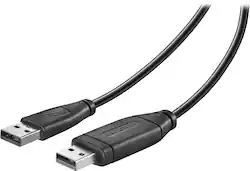
Insignia™ - 6' USB 2.0 Transfer Cable - Black
- Key Specs
- Cable Length: 0.5 feet
- Connector Type (End 1): USB-A
- Gender (End 1): Male
- Connector Type (End 2): USB-A
- Gender (End 2): Male
- In-Wall Rated: false
- General
- Brand: Insignia™
- Model Number: NS-PU965XF
- Product Name: 6' USB 2.0 Transfer Cable
- Color: Black
- Connectivity
- Cable Type: USB
- Cable Length: 0.5 feet
- Product Type: Cable
- Connector Type (End 1): USB-A
- Gender (End 1): Male
- Connector Type (End 2): USB-A
- Gender (End 2): Male
- Environmental
- In-Wall Rated: false
- Warranty
- Warranty - Parts: 1 year
- Warranty - Labor: 1 year
- Other
- UPC: 600603168017
This 6' Insignia™ NS-PU965XF USB 2.0 cable is designed for use with PC and Mac and features speeds up to 480 Mbps for efficient data transfer to and from devices.
- Compatible with PC and Mac: With Windows 2000, XP, Vista, 7 or 8 or Mac OS 10.5 or later operating systems for wide-ranging use.
- USB 2.0 interface: Allows easy connectivity.
- Auto run software: Launches directly from the cable without additional software to install.
- 480 Mbps data transfer rate: Enables quick data transmission.
- Compatible with PC and Mac: With Windows 2000, XP, Vista, 7 or 8 or Mac OS 10.5 or later operating systems for wide-ranging use.
- USB 2.0 interface: Allows easy connectivity.
- Auto run software: Launches directly from the cable without additional software to install.
- 480 Mbps data transfer rate: Enables quick data transmission.
Whats Included
- Insignia™ 6' USB 2.0 Transfer Cable
- Insignia™ 6' USB 2.0 Transfer Cable
Q: Which operating systems are compatible with this cable? Windows me/xp/7?
A: It is compatible with Windows 2000, XP, Vista, 7 or 8 or Mac OS 10.5 or later operating systems for wide-ranging use.
A: This cable is safe to use. Usb ports provide power from the computer because many USB devices are not powered. Because both computers provide power, problems are often encountered and the USB ports are damaged. This cable does not connect the power ports. If this cable is used to connect a unpowered device, the device simply will not work.
Q: Does it transfer everything?
A: It should. I transferred everything from XP to Windows 10.
A: Here is the link for the Quick Setup Guide https://files.bbystatic.com/Ocu1pKfivHXdZwL58204og%3D%3D/NS-PU965XF_NS-PU965XF-C_19-0753_QSG_V3_ENSP_Final_lr.pdf
A: I don't think so...this is a cable, loaded with its own software, to transfer files between computers...sounds like you need a regular cable to run data from your scanner to your Dell. There's other cables you should get for this, depending on the connections each has.
A: If you have both computers on open both screens up to something like documents so both screens look the same and some kind of file area opened. I find that you must have the correct side plugged into the old computer first, then wait a few seconds till a screen pops up. Then plug other end of cable to the new/receiving info computer and wait a few seconds and the transfer screen will pop up on that one too. If it seems to dissapear, look on your bottom or side bar and find it there. If all else fails. Get a large 32 or more gigabyte USB card and download/copy everything on it then download it in new computer.
Q: How many times can the easy transfer cable be used
A: This transfer cable does not require additional software to be used more than once. It can be used as many times as you would like.
Q: Is this compatible with Windows 10 and Vista?
A: Yes it is! I just recently performed that exact transfer..my old laptop used Vista and my new one uses Windows 10.