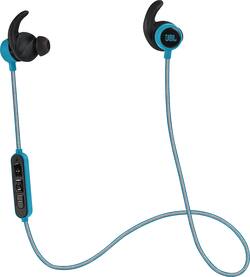
JBL - Reflect Mini BT In-Ear Wireless Sport Headphones - Teal
- Key Specs
- Connection Type: Wireless
- Wireless Connectivity: Bluetooth (The manner in which a device sends data to another device over a short distance without the use of wires or cables.)
- True Wireless: false (These headphones not only lack wires between the device and headphones, they also lack wires between the headphones themselves. (true wireless is really only possible with in-ear headphones))
- Water Resistant: true (Resists some degree of water penetration.)
- Built-In Microphone: true
- Headphone Fit: In-Ear
- Battery Life: 8 hours (Battery life will vary depending on the product configuration, product model, applications loaded on the product, power management setting of the product and the product features used by the customer. As with all batteries, the maximum capacity of this battery will decrease with time and usage.)
- General
- Product Name: Reflect Mini BT In-Ear Wireless Sport Headphones
- Brand: JBL
- Ear Cushions: true
- Model Number: JBLREFMINIBTTEL
- Audio
- Sound Isolating: false
- Minimum Frequency Response: 10000 hertz (Describes the maximum range of frequencies or musical tones a product can reproduce, from very low tones to very high treble tones. The minimum frequency or musical tone the speaker can reproduce. High treble tones have higher frequencies while low tones and deep bass have lower frequencies.)
- Maximum Frequency Response: 22 kilohertz (Describes the maximum range of frequencies or musical tones a product can reproduce, from very low tones to very high treble tones. The maximum frequency or musical tone the speaker can reproduce. High treble tones have higher frequencies while low tones and deep bass have lower frequencies.)
- Driver Size: 5.8 millimeters
- Connectivity
- Connection Type: Wireless
- Wireless Connectivity: Bluetooth (The manner in which a device sends data to another device over a short distance without the use of wires or cables.)
- True Wireless: false (These headphones not only lack wires between the device and headphones, they also lack wires between the headphones themselves. (true wireless is really only possible with in-ear headphones))
- Features
- Water Resistant: true (Resists some degree of water penetration.)
- Built-In Microphone: true
- Design
- Headphone Fit: In-Ear
- Style: Sports and Exercise
- Power
- Rechargeable: true
- Battery Life: 8 hours (Battery life will vary depending on the product configuration, product model, applications loaded on the product, power management setting of the product and the product features used by the customer. As with all batteries, the maximum capacity of this battery will decrease with time and usage.)
- Other
- UPC: 050036327961
Rock out while you work out with these JBL Reflect Mini JBLREFMINIBTTEL Bluetooth sport headphones, featuring IPX4 water and sweat resistance to withstand your most grueling workouts. The reflective cable enhances visibility to traffic while you run at night.
- Bluetooth wireless: Gives you freedom and mobility while you exercise.
- IPX4 sweat and water resistance: Lets you ramp up your workout without your headphones holding you back.
- Built-in microphone and in-line control: Provide hassle-free control over your cell phone or device.
- Reflective cable: Makes you more visible to traffic while walking or running at night.
Whats Included
- Reflect Mini Bluetooth Sport Headphones
- 2 sizes of ergonomic sport ear tips, 2 sizes of regular ear tips
- Owner's manual
A: I wouldn't recommend it - not designed for water use.
A: It does work with iPhones, however you cannot access Siri using the inline remote. The remote controls; volume, skip forward/back, pause/play, redial last number/end call, and power (to turn the wireless headphones on/off). If you regularly use Siri to dictate text messages, give commands (such as to place a call), or to search for things, your only alternative is to hold the home button on your iPhone itself and then say the command into the remote's microphone. Annoying, and easily remedied with a software update JBL!!!
A: Red light comes on during charging. Red light goes out when fully charged. Blue light flashes every few seconds when Bluetooth is connected.
Q: Since they are in ear instead of over the ear, do they stay in for working out and shooting baskets?
A: The REFLECT MINI BT is designed to use for workouts. This entails that the earphones will stay in your ear even through rigorous activities.
A: you need to anwser through the earphones, not directly from your phone. when you are going to anwser press the middle button on the earphones.
Q: How are these charged? Do I have to buy a separate charger?
A: They come with a USB charger. Fully charged I finished a century ride (100 miles) while listening to my favorite tunes. Btw, that's about 6 hours
A: This happened to me as well. They were dead for over a month and then one day they started working again. Despite the packaging, they are NOT sweatproof. Not even close. So I think what happened was that moisture got into the remote and it takes a long time for it to dry out. Mine have stopped working again and aren't even taking a charge.
Q: how do i tell the remaining charge left on my battery
A: Actually when you pair the headphones if you look on your phone where is shows your connected there is a tiny battery bar that shows how much battery is left
















