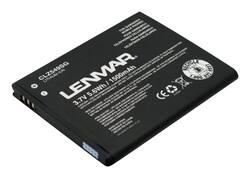
Lenmar - Lithium-Ion Battery for Samsung Stratosphere SCH-I405 Mobile Phones
- General
- Product Name: Lithium-Ion Battery for Samsung Stratosphere SCH-I405 Mobile Phones
- Brand: Lenmar
- Model Number: CLZ549SG
- Power
- Battery Size: 3.7V (The battery size required for operation.)
- Battery Chemistry: Lithium-ion
- Number Of Batteries Included: 1
- Voltage: 3.7 volts (Amount of power needed to support an electrical current.)
- Rechargeable: true
- Battery Type: Cell Phone Batteries
- Internal Or External: Internal
- Compatibility
- Replaces Battery Type(s): Samsung EB505165YZBSTD, EB505165YZBS, EB505165YZ
- Brand Compatibility: Samsung
- Model Compatibility: Samsung Stratosphere
- Features
- Overload Protection: true (Features intended to protect the product from damage and overheating caused by overload.)
- Warranty
- Manufacturer's Warranty - Parts: 1 year
- Manufacturer's Warranty - Labor: 1 year
- Other
- UPC: 029521851892
This Lenmar CLZ549SG replacement battery is designed for use with your Samsung Stratosphere SCH-I405 mobile phone and features 3.7V of power and a 1500 mAh capacity for long-lasting, reliable operation.
- Designed for use with Samsung Stratosphere SCH-I405 mobile phones: For an ideal fit.
- Lithium-ion battery: Features a 5.6 watt-hours rating for consistent power.
- 3.7V and 1500 mAh capacity: Ensure reliability and long battery life.
Whats Included
- Lenmar Lithium-Ion Battery
A: You should be able to remove the back cover using your thumbnail, or something like it. There should be a place along where the edge of the back cover meets the main part of the phone where there is a small gap. I think it is at the top. Just pry the back cover off, then, using your fingernail, lift the bottom of the battery out of the phone. There should be a note that says "remove battery" to show you where to lift. Then, put the new battery in your phone in the same orientation that the old one was in. Line up the battery contacts with the matching contacts on the phone and press the battery into place. It should be easy, or you might have it inserted incorrectly. Once it's in, snap the back cover in place by lining it up, and gently pressing it together around the edges.



















