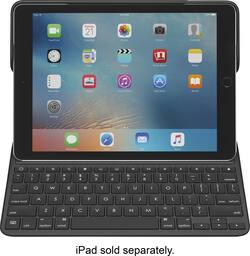
Logitech - CREATE Keyboard Case for Apple iPad Pro 9.7" - Black
- Key Specs
- Model Compatibility: Apple iPad Pro 9.7"
- Operating System Compatibility: Apple iOS
- Interface(s): Other (Refers to the types of connections that devices use to interact and communicate with each other.)
- Illuminated: true
- General
- Product Name: CREATE Keyboard Case for Apple iPad Pro 9.7"
- Brand: Logitech
- Model Number: 920-008131
- Color: Black
- Compatibility
- Brand Compatibility: Apple
- Model Compatibility: Apple iPad Pro 9.7"
- Operating System Compatibility: Apple iOS
- Maximum Compatible Display Size: 9.7 inches
- Connectivity
- Wireless: false
- Interface(s): Other (Refers to the types of connections that devices use to interact and communicate with each other.)
- Features
- Touchpad: false
- Adjustable Tilt: false
- Illuminated: true
- Included
- Number Of Keys: 78
- Palm Rest Included: false (null)
- Dimensions
- Product Height: 12.4 inches (The out of box height of the item. Height is measured as the vertical distance from the bottom of the item to the top as it would be primarily used or placed.)
- Product Width: 9.05 inches (The out of box width of the item. Width is measured as the horizontal distance from one side of the item to the other as it would be primarily used or placed.)
- Product Depth: 0.78 inches (The out of box depth of the item. Depth is measured as the distance from the front of the item to the back as it would be primarily used or placed.)
- Product Weight: 25.6 ounces (The out of box weight of the item.)
- Warranty
- Manufacturer's Warranty - Parts: 1 year
- Manufacturer's Warranty - Labor: 1 year
- Other
- UPC: 097855122285
Turn your tablet into a laptop with this Logitech Smart Connect keyboard for iPad Pro. Skip the Bluetooth pairing, and simply set your iPad Pro in typing position to set up instant pairing with the keyboard. Backlit for easy viewing, this Logitech Smart Connect keyboard offers a full 9-inch QWERTY setup, so you can work or correspond wherever you are.
- Compatible with iPad Pro® 9.7": Designed in partnership with Apple® to perfectly fit and complement your iPad.
- Apple Smart Connector: When placed in Type Mode, iPad instantly charges and pairs with keyboard via Apple Smart Connector. So it never needs batteries or Bluetooth.
- Backlit keys and iOS Shortcuts: For typing in low light. Enjoy a premium laptop-like typing experience with comfortable, well-spaced, full-sized keys.
- 3 use modes with integrated keyboard: Type, View, Protect. Enjoy the simplicity of this all-in-one folio.
- Durable front and back protection with spill proof, easy-to-clean fabric: Keep your iPad protected from bumps, spills, and scratches.
- Apple Pencil® Holder: Slide your Apple Pencil into the holder – where it won’t get lost, or in the way.
Whats Included
- CREATE Backlit Keyboard Case with Smart Connector
- Documentation
A: I thought the same thing when buying my keyboard case. I didn't want to have to buy a separate case and I really think the Logitech is the best of both worlds. The keyboard shortcuts are also nice (I don't think the Apple one has them–they are similar to what you'd find on a Macbook Pro/Air). Fortunately, I haven't dropped my iPad so I can't say how protective it actually is, but I would venture to guess that it would withstand a modest fall. I paired mine with a glass screen protector just in case. Hope this helps!
Q: My keyboard seems to have locked up. How can I unlock it? I have only had it for about 2 months
A: Barb, is the lock key engaged? The upper right corner of the keyboard has a key with a padlock picture on it. Try pressing it.
Q: Can this be used on a 5th generation iPad ? The model number to my iPad is A1822.
A: This product did not work with my A1822 iPad. I had to order another keyboard. Hope this helps.
A: I upgraded too and had no problem at all; I have an iPad Pro 9.7. My problem was with 10.1; I tried to write an email in Spanish and translated word by word everything wrong to a whole mess, it was not easy to fix it but the keyboard had nothing to do with it.
Q: WHAT IS THE PRICE FOR THE IPRO TABLET AND KEYBOARD TOGETHER
A: Depends which capacity and wi-fi or cellular iPad you want. Add $149.00 plus tax for the keyboard.
A: I have noticed no reduction in battery power when using this keyboard
Q: How do you charge the keyboard?
A: No charge necessary, uses SMART connection from iPad Pro
A: No scratches on mine used it two weeks














