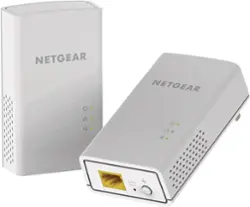
NETGEAR - Powerline AC1200 Gigabit Ethernet Adapter (2-pack) - White
- Key Specs
- Wireless Standard: AC (The wireless networking protocol used by the device. Each iteration of the protocol is based on the 802.11 standard developed by the Institute of Electrical and Electronics Engineers (IEEE) Standards Association. Denoted by letters following 802.11 (802.11a, 802.11ac, etc.), each version, published in alphabetical order, encompasses all previous versions.)
- Adapter Type: Wired
- Form Factor: Plug in (The size, arrangement, and physical configuration of the product.)
- Frequency: Not Applicable (A measurement of the electromagnetic radio waves a device emits.)
- Wireless Networking Standard: Wi-Fi 5 (The wireless networking standard used by the device. Each iteration of the standard developed by the Wi-Fi Alliance corresponds to an existing IEEE 802.11 protocol; for example, standard 802.11ac (or AC) is termed Wi-Fi 5. Refers specifically to the standard the device is designed to use, but ultimately determines product interoperability and backward compatibility including previous versions.)
- General
- Brand: NETGEAR
- Model Number: PL1200-100PAS
- Product Name: Powerline AC1200 Gigabit Ethernet Adapter (2-pack)
- Color: White
- Security
- Data Encryption: true
- Network
- Attached Antenna: false
- Wireless Networking Standard: Wi-Fi 5 (The wireless networking standard used by the device. Each iteration of the standard developed by the Wi-Fi Alliance corresponds to an existing IEEE 802.11 protocol; for example, standard 802.11ac (or AC) is termed Wi-Fi 5. Refers specifically to the standard the device is designed to use, but ultimately determines product interoperability and backward compatibility including previous versions.)
- Ports
- Number Of Ports: 1
- Compatibility
- System Requirements: RJ-45 Ethernet port (The software that a product must have for it to be able to integrate with another product.)
- Dimensions
- Product Height: 4.5 inches (The out of box height of the item. Height is measured as the vertical distance from the bottom of the item to the top as it would be primarily used or placed.)
- Product Length: 1.18 inches (The out of box length of the item. Length is measured as the longest dimension of the item.)
- Product Width: 2.2 inches (The out of box width of the item. Width is measured as the horizontal distance from one side of the item to the other as it would be primarily used or placed.)
- Product Weight: 0.25 pounds (The out of box weight of the item.)
- Warranty
- Warranty - Parts: 1 year
- Warranty - Labor: 1 year
- Other
- UPC: 606449106787
NETGEAR Powerline adapters are ideal for deliver high-speed wired and wireless Internet to every room in the home using existing electrical wiring for all your gaming and streaming activities. It's simple to set up - just plug it in and start playing.
- Faster Speeds: Extremely fast speed - up to 1.2Gbps.
- Latest Technology: Gigabit speeds through your electrical outlets for improved coverage.
- Wide Coverage: Multiple data streams (MIMO) with beamforming technology offer improved coverage throughout the home.
- Easy Set-Up: Setup in minutes, no need to configure or install software.
- Energy-saving: Automatically powers down when not in use.
- Push-and-Secure: Encrypts powerline network connections with the touch of a button.
- Reliable and Expandable Network: Connect multiple adapters(up to 16) to expand your gigabit wired or WiFi network reliably.
- Faster Speeds: Extremely fast speed - up to 1.2Gbps.
- Latest Technology: Gigabit speeds through your electrical outlets for improved coverage.
- Wide Coverage: Multiple data streams (MIMO) with beamforming technology offer improved coverage throughout the home.
- Easy Set-Up: Setup in minutes, no need to configure or install software.
- Energy-saving: Automatically powers down when not in use.
- Push-and-Secure: Encrypts powerline network connections with the touch of a button.
- Reliable and Expandable Network: Connect multiple adapters(up to 16) to expand your gigabit wired or WiFi network reliably.
Whats Included
- 2x Ethernet cable (6.5')
- 2x Powerline 1200 Adapter (PL1200)
- Quick start guide
- 2x Ethernet cable (6.5')
- 2x Powerline 1200 Adapter (PL1200)
- Quick start guide
Q: Would it be beneficial to have Powerline adapter as well as wifi range extender?
A: Just get the adapter. The range extender splits your signal. It's a waste of time money and will just frustrate you more. The adapter is an answer to your prayers. Just make sure plug both ends into wall socket NOT surge protector. Hope this helps.
Q: Will I have to plug this into my router?
A: you plug one cord into the router. It makes all the wiring in your home the router. Never could use my older computer in the end of my house. now its like i have it hooked to a modem. LOVE IT
A: You will need the wifi extender version. The standard powerline adapter is wired only.
Q: How far does it gets the signal
A: This can extend coverage by up to 5,832 sq. ft.
A: Yes, same signal, different manufacturers
A: Most homes have two phase wiring. If they are on the same phase, you will get the best results. You don't want to plug into surge strips, extensions, UPS devices, etc. If you have them on separate phases, they still may work but at reduced transfer rates. From Netgear: Can powerline be used in homes across multiple phases? Yes, but you will either suffer a noticeable loss in performance, or if the signal is too low the units will not be able to communicate.
Q: My house has plaster walls.Will the powerline 1200 help get better signal thru-out the house ?
A: It does not send a signal. It is for Ethernet cabling.
A: Hello Terry, the red blinking light means that there is something interfering with the communication between your 2 devices. There may be something like a surge protector or some other device with a motor in the near by area. The devices should be plugged into wall outlets, but in my case I didn't have a wall outlet close enough to my router, so I had to plug the device into the surge protector. It still works fine, but I believe mine blinks from green to red because I have one of them plugged into the surge protector. The red color indicates that the link rate at is < 50 mb/s or less, and when it is green, the link rate is > 80 mb/s . As I previously mentioned, the blinking red light has not negatively affected my streaming TV service, but you may be able to try moving your device to a different outlet and see if the red blinking light can be eliminated. Good luck