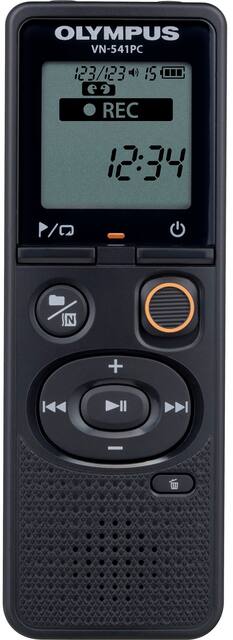
Olympus - Digital Voice Recorder - Black
- General
- Product Name: Digital Voice Recorder
- Brand: Olympus
- Model Number: V405281BU000
- Color: Black
- Other
- Product Width: 1 1/2 inches (The out of box width of the item. Width is measured as the horizontal distance from one side of the item to the other as it would be primarily used or placed.)
- Product Height: 4 3/10 inches (The out of box height of the item. Height is measured as the vertical distance from the bottom of the item to the top as it would be primarily used or placed.)
- Product Length: 0.8 inches (The out of box length of the item. Length is measured as the longest dimension of the item.)
- Product Weight: 0.15 ounces (The out of box weight of the item.)
- Memory Card Compatibility: microSD (The type of memory card(s) recommended for use with the product.)
- Display Type: LCD
- Microphone Input: true (The device features an input for connecting an external microphone.)
- Batteries Included: true (Indicates whether the product comes with the required batteries for its operation.)
- Headphone Jack: true (The device features an interface that allows for the connection of headphones.)
- Maximum Recording Time: 2080 hours
- Battery Chemistry: Alkaline
- Battery Size: N/A (The battery size required for operation.)
- Number of Batteries Required: 2
- Integrated Microphone: true
- Computer Compatibility: None
- Internal Memory: 4 gigabytes (Data storage capacity for built-in memory circuits.)
- Integrated Speaker(s): true
- Memory Card Slot: true
- Supported File Formats: WMA
- USB Connectivity: true
- Recording Type: Voice recorders
- 1-Touch Recording: true
- Number Of Recording Modes: 4
- Calendar Search Function: false
- Voice-Activated Recording: false
- Operation: Digital
- Safety Lock: true
- Battery Indicator Light: true
- UPC: 050332191105
Intuitive and quick dictation or recordings � the Olympus VN-541PC is ideal for all everyday situations. Thanks to its ergonomic design, the digital notetaker allows practical, one-handed operation. Simple functions, operations and screen display make voice recording easy.
- Integrated Microphone: Integrated mic to capture sound seamlessly without any distortions
- With Built-in Speaker: Built-in speaker to produce the recorded audio with clarity
- Portable Digital Voice Recorder: Offers easy portability in a purse, briefcase or backpack
- Display Screen: Includes 1.4" LCD display screen for a better user experience
- Long Play Recording Mode: Use the long play recording mode for those long sessions where time is critical even for resetting a recorder
- Up to 2080 hours of recording time: For reliable recording capacity
- Flash Memory: 4 GB flash memory will suffice in storing all your critical recordings
Whats Included
- Olympus VN-541PC 4GB Digital Voice Recorder
- Micro USB cable
- Owner's manual
Product Manuals
Q: How many hours will one set of batteries last?
A: I've used it in class, an hour a day, three days a week for 3 weeks now, and its still good. So at least 10 hours.
Q: Can I pause whilst in recording mode? I am trying to eliminate long gaps of silence. Thank you!
A: The VN-541PC does not have a PAUSE function while recording
A: The VN-541pC does not have Charging functionality. The USB cable is used to download the recordings to you PC. You can download the instruction manual at this link. https://learnandsupport.getolympus.com/sites/default/files/media/files/2018/04/VN541PC_EN_U01.pdf
A: Yes, you can. It's easy to do from the recorder or from your PC when they're connected.
A: It comes with the necessary cable.
Q: Does this have a plug-into-the-wall acccessory option? I think it's called ac adapter?
A: No, it is %100 battery Dependant.
Q: When recording my voice with this device how do I record from where I left off?
A: You can't. While my WS-853 has a Pause function, this doesn't. But, depending upon your needs, this isn't a big obstacle. I yesterday had to make 3 separate recordings, but was able to transcribe them all in Dragon, and it successively combined the text from each one into the same transcription window. So the separate files weren't a handicap.





















