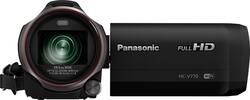
Panasonic - HC-V770 HD Flash Memory Camcorder - Black
- Key Specs
- Effective Pixels: 6.03 megapixels (The actual number of pixels which make up the viewable image.)
- Standardized Video Resolution: Full HD (1080p) (An approximated measurement of the product’s video resolution. This may not be the exact resolution of the product, which may be slightly more or less when using a pixel-by-pixel measurement.)
- General
- Product Name: HC-V770 HD Flash Memory Camcorder
- Brand: Panasonic
- Model Number: HCV770K
- Color: Black
- Imaging
- Image Sensor Type: CMOS (CCD and CMOS are the two main technologies used in image sensors. CCD, the older of the two types, turns analog light signals into digital pixels. This conversion happens without distortion, resulting in high-quality images. Newer CMOS sensors use transistors at each pixel to move electrical charges. CMOS sensors are typically less expensive, but also require more light to create distortion-free images.)
- Image Resolution (Display): 6528 x 3672 (Refers to the number of pixels, both horizontally and vertically, used to either capture an image or display it. The higher the resolution the finer the image details.)
- Digital Zoom: 1500x (A digital zoom is accomplished electronically, with no adjustment of the camera's optics, and no optical resolution gained in the process. The existing data is not enhanced or added to, merely displayed at a lower resolution, thereby giving an illusion of an enlarged image.)
- Optical Zoom: 20x (The optical zoom uses a combination of lenses that magnify the image prior to it being registered at high resolution by the imaging sensor.)
- Image Stabilization: Hybrid (This feature helps reduce image/video blur or distortion that may occur from unsteady motion.)
- 360 Degree Capture: false (The capability of the product to record an image incorporating a 360 degree point of view.)
- Low Light/High Sensitivity: true (High sensitivity digital imaging devices are designed to work in low light conditions to produce a high dynamic range image.)
- Image File Format(s): JPEG (Standardized software format(s) of storing digital images. The type of format chosen for capturing and compressing the image can determine quality, level of detail, and storage space required.)
- Focus
- Auto/Manual Focus: Automatic/manual
- Focus Modes: Automatic/manual
- Exposure Control
- Minimum Aperture: f/1.8 (The smallest opening of a lens, typically expressed in f-numbers. The larger the number, the smaller the aperture and the less light that can enter the lens. A smaller aperture creates a larger depth of field, which keeps both foreground and background in focus.)
- Maximum Aperture: f/3.6 (The limit to how wide a lens can be open, typically expressed in f-numbers. The smaller the number, the larger the aperture and the more light that can enter the lens. A larger aperture creates a shallower depth of field, helpful for keeping subjects in focus and blurring background details.)
- Maximum Focal Length: 81.6 millimeters (The maximum distance between the lens and the image sensor that allows the subject to be in focus. The greater the focal length, the smaller the area of scene captured.)
- White Balance Modes: Cloudy, Sunlight, Indoor (Settings that calibrates how the color white is rendered in an image/video, reducing the appearance of unnatural contrasts caused by various light sources.)
- Effective Pixels: 6.03 megapixels (The actual number of pixels which make up the viewable image.)
- Lens
- Minimum Focal Length: 4.08 millimeters (The minimum distance between the lens and the image sensor that allows the subject to be in focus. The shorter the focal length, the greater the area of scene captured.)
- Display
- Display Type: LCD
- Screen Size: 3 inches (Size of the screen, measured diagonally from corner to corner.)
- Aspect Ratio: 16:9 (The measurement of the width of a screen compared to the height of a screen, expressed as a ratio.)
- Touch Screen: true (Touch-screen devices make navigating more intuitive. Using a touch-screen display, you can do things such as tap to select, hold and drag to move items, swipe to scroll, and pinch to zoom.)
- Varying Angle Screen: true (The camera's screen can be flipped out and adjusted to rotate, tilt, and/or swivel.)
- Video
- Standardized Video Resolution: Full HD (1080p) (An approximated measurement of the product’s video resolution. This may not be the exact resolution of the product, which may be slightly more or less when using a pixel-by-pixel measurement.)
- Maximum Video Frame Rate: Up to 60 fps (The maximum frequency at which consecutive images can be captured by a video recording device.)
- HDR Mode: true (HDR Mode uses multiple photos taken at different exposures to add more dynamic range to photographs. HDR technology displays content with greater contrast between bright and dark, resulting in clearer and more lifelike images.)
- Slow Motion Recording: true
- Video Encoding Formats: AVCHD (The process of preparing the video for output, where the digital video is encoded to meet proper formats and specifications for recording and playback with the use of a compatible device.)
- Storage
- Number of Memory Card Slots: 1
- Compatibility
- Tripod/Monopod Mountable: false (A support function that allows the device to be mounted to monopods and tripods for leveling and stability.)
- Memory Card Compatibility: Secure Digital, Secure Digital High Capacity (SDHC), Secure Digital Extended Capacity (SDXC) (The type of memory card(s) recommended for use with the product.)
- Features
- Face Detection: true (A function that automatically detects human faces and then sets focus and appropriate exposure to capture them.)
- Action Camera: false
- Integrated Speaker(s): true
- Night Recording: true (The ability to capture and record video in low-light conditions, typically via infrared light or intensifier tubes that amplify existing light to illuminate the scene.)
- Wind Noise Reduction: true (If you take a lot of outside videos, in windy conditions, you'll need to make sure you have wind noise reduction on your camcorder. It does just what it says it does, cuts down the noise of the wind as it hits the microphone.)
- Special Effects: Miniature, 8mm Movie, Silent Movie (Image effects accomplished through software applied to images. These can change noise level, gradient, and other aspects of your image.)
- Connectivity
- Wireless Connectivity: WiFi (The manner in which a device sends data to another device over a short distance without the use of wires or cables.)
- Output(s): 3.5mm audio, HDMI, USB 2.0
- Microphone Type: Built-in (zoom)
- Microphone Input: true (The device features an input for connecting an external microphone.)
- Headphone Jack: true (The device features an interface that allows for the connection of headphones.)
- Number of USB Port(s): 1
- Power
- Rechargeable Battery: true
- AC Adapter Compatible: true (The device is able to be charged using an external power adapter which meets input and output voltages specified by the manufacturer.)
- Removable Battery: true
- Battery Model: VW-PWPK (The model number of the battery necessary for operation of the device.)
- Battery Size: Battery pack (The battery size required for operation.)
- Included
- Batteries Included: true (Indicates whether the product comes with the required batteries for its operation.)
- AC Adapter Included: true (An external power adapter is included for operation.)
- Memory Card Included: false (Indicates whether a memory card is included.)
- Remote Control Included: false
- Dimensions
- Product Height: 2.9 inches (The out of box height of the item. Height is measured as the vertical distance from the bottom of the item to the top as it would be primarily used or placed.)
- Product Width: 2.6 inches (The out of box width of the item. Width is measured as the horizontal distance from one side of the item to the other as it would be primarily used or placed.)
- Product Depth: 5.5 inches (The out of box depth of the item. Depth is measured as the distance from the front of the item to the back as it would be primarily used or placed.)
- Product Weight: 0.78 pounds (The out of box weight of the item.)
- Filter Diameter: 49 millimeters
- Other
- UPC: 885170229303
Capture clear shots by using this Panasonic Camcorder with HDR that reduces bright spots and enhances dark areas. Connect your smartphone's video camera by using Wi-Fi for picture-in-picture video, and reduce sound distortion with the Wind Shield Zoom Microphone for high-quality recording. This Panasonic Camcorder uses Level Shot Function to suppress distortion and tilting to minimize blurred, slanted videos.
- 20x optical/1500x digital zoom:
Motorized drive zoom lens brings you up close to distant objects and scenes. - 3" color touch-screen LCD display:
Gives you a clear view of the action you're recording or reviewing. - BSI MOS sensor:
Offers stunning detail and clarity with both video and still images. - Crystal Engine PRO+ image processor:
Delivers vivid and accurate coloring for natural, lifelike images. - Zoom lens:
With instant autofocus to eliminate blurry images. - Optical image stabilizer:
Minimizes shake and vibration distortion to keep footage steady. - Night mode:
For full-color shooting in low-light conditions. - Digital still photo mode:
Captures images at 9 selectable resolutions (1920 x 1080, 4736 x 2664, 6528 x 3672, 5472 x 3648, and more). - Built-in surround microphone:
With zoom and wind noise reduction features. - SD card slot:
Supports SD Memory Card, SDXC Memory Card and SDHC Memory Card. - HDMI and USB 2.0 interfaces:
For high-speed video transfer. USB streaming capability allows the camcorder to function as a webcam. - Panasonic HD Writer AE 5.2 software:
For professional-quality editing and titling.
Whats Included
- HD Flash Memory Camcorder
- 3.6V, 1940 mAh rechargeable battery pack
- AC adapter, DC cable, HDMI cable, USB cable
- Shoe adapter
- Owner's manual
Q: can this camcorder be set up with smartphone or other device to be remote controlled (zoom)
A: Please see the specs for Link2Cell below: http://help.panasonic.ca/viewing/ALL/HC-WX970PP/OI/sqw0239/sqw0239.pdf#page=145
A: Not sure what you did or did not do, but the included cables let you download directly to PC or Mac. I've done both, more than once. No problems. I normally don't do the cable method however, as my laptops both have a card reader and I either use that, or recently I have been using 3.0 card reader and it is really fast!!! Your camera should have come with both the charging cable and another shorter USB type cable, that one you plug into the camera, wait a moment, and your computer should show it in the explorer or what ever that you have. On my laptops (1 PC and 1 Mac) it also shows up as an icon on the desktop. Just a guess, but I am assuming that either you missed seeing the cable when you opened the box, or it was not in there. Accidents like that happen in manufacturing fairly often, so it is a real possibility. But if you don't have it or can't find it, then either contact Panasonic and get one, or just find another generic one; just make sure that it has a standard USB type plug on one end, and the tiny USB type on the other end, and you should be good to go!!!
A: You can live stream with this unit using the clean HDMI output. You will need a capture card for this purpose.
A: It is easily mounted on a screw in type connector on a tripod.
A: Yes. You can attached a mic to this camera. Wireless Senheiser is our preferred brand.
A: Definitely. The battery that comes with the camera when fully charged will typically be good for 90 minutes of filming.
Q: Can I transfer video from Camcorder to my IPhone and how?
A: The camera is a Wi-Fi hotspot. All you have to do is install the app and connect to the camera.
Q: How long is the battery life and long of continues recording before it turns off?
A: The battery that comes with the camera gives you 90 minutes but you can buy one that gives you 3 hours. I have shot events that were well over an hour long and have never had it turn off. It does tend to divide a long shoot into half hour videos but there is absolutely no gap between videos. As long as they play end to end, nobody would even know that they weren't a single video.

















