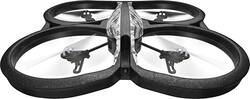
Parrot - AR.Drone 2.0 Elite Quadricopter - Black
- Key Specs
- Integrated Camera: false
- Effects: Other
- Gyro Stabilization: false
- General
- Product Name: AR.Drone 2.0 Elite Quadricopter
- Brand: Parrot
- Recommended Minimum Age: 12 years
- Recommended Maximum Age: 14 years
- Model Number: 43763BBR
- Color: Black
- Features
- Toy Type: Helicopter
- Indoor Or Outdoor Use: Indoor, Outdoor (Indicates the appropriate environment product was designed to be used in.)
- Integrated Camera: false
- Effects: Other
- Directional Controls: Backward, Down, Forward, Left, Right, Up
- Gyro Stabilization: false
- Power
- Rechargeable: true
- Charging Interface(s): Other (The connection for transmitting power to charge the device.)
- Charging Time: 90 minutes
- Number Of Controller Batteries Required: 0
- Controller Batteries Included: true
- Dimensions
- Product Weight: 0.93 pounds (The out of box weight of the item.)
- Other
- UPC: 738516437637
Parrot AR.Drone 2.0 Elite Edition Drone: Get a bird's-eye view of your surroundings through the onboard camera while you record HD video and take photos from above. Plan your flight's destination ahead of time by choosing a point on the map that you want your drone to fly to.
Fly Responsibly:
Before takeoff, update all software and firmware, and read the instructions thoroughly.
See the FAA website for requirements and information about flying a drone safely: https://www.faa.gov/uas/getting_started/fly_for_fun/. Additional state or local requirements may apply. Check your local jurisdiction. The following websites may help you make informed decisions about flying your drone: www.knowbeforeyoufly.org and www.modelaircraft.org.
- Real-time, first-person view of your flight: Free to download on compatible Android and iOS smartphones and tablets, the AR.FreeFlight app lets you climb aboard your drone virtually to see the flight through the eye of the onboard camera.
- Record Full HD videos and wide-angle photos with the onboard camera: The 720p HD camera can record at 30 fps and has a 92° wide-angle lens. Automatic stabilization features help keep shots steady.
- Simple flight control from your compatible smartphone or tablet: The AR.FreeFlight app also puts you in the cockpit, with display functions like auto return home, takeoff and land, directional and camera controls — even a button for flips.
- Connect to AR.Drone Academy to share your stats with other pilots: Keep track of all your sessions and share photos, videos and data with other AR.Drone pilots and instantly on social media.
- Plot your flight's destination: Pull up the map and choose a point, set the altitude and speed, and then click GO to start your drone's flight to your chosen point.
- Durable materials protect against damage: The expanded polypropylene (EPP) hull and fiber-charged nylon plastic parts are strong and resilient.
- Control the drone from up to 165' away: The removable lithium-polymer battery provides up to 12 minutes of flight time per charge. The display indicates battery status in flight.
Whats Included
- Indoor protective EPP hull, outdoor aerodynamic EPP hull, fast lipo battery charger, battery, stickers, target, double-sided tape
- Parrot AR.Drone 2.0 Elite Quadricopter
Q: is a remote control included with this, or is it sold separately?
A: No remote needed - you use an app.
Q: Camera?
A: There is a very good hd camera integrated.
Q: How long does the battery charge last?
A: its comes with 1000ma battery run 8 to 12 mins, i ordered separate battery 2500ma so now its running upto 25mins
Q: What is the maximum distance of flight? The control is by wi-fi?
A: Yes, the drone is controlled using WiFi via a smart phone or tablet. The drone can fly to the limit of the WiFi signal, which ranges from 150-200 feet.
Q: Is this drone able to be flown with an IPhone 6Plus IOS 11.1.2?????
A: it works no problem. i use an iphone 6 with the OS 11.2.5 and and iPad Mini 2 with the same OS and it works.
Q: Please tell me, does this drone has camera??? In specifications say INTEGRATED CAMERA - NOT????
A: Yes, this drone has a camera.
Q: Can drones fly miles ,or only 200 feet or so?
A: The Parrot AR Drone 2.0 is limited by the range of Wi-Fi between the drone and your phone/tablet. 200 ft is usually possible, but I might keep it within 150 ft to be safe. It will do its best to hover in place if connection is lost. If you are unable to re-establish the connection, it will just keep hovering until the battery gets too low, then it will automatically land itself. Hovering is not perfect, and it can drift a bit so don't risk going too high when you're around a lot of trees or a lake or anything else that could be hazardous to land on. This is a great mid-range beginner drone that's easy to fly and record video with, but if you're looking for serious range or better video quality (the Parrot's is just okay) then you'll need to spend more and get something like a DJI Phantom. There is some third-party software out there that can work in conjunction with the Parrot's optional GPS module to program a flight path where you don't need to be in range of the unit, but making this work is tricky and not for a beginner. It's also NOT supported by the company, and you assume all risks in doing this. It can produce some great video, though.
Q: How far away from the remote can the drone go?
A: This truly depends on your phone, I’ve noticed when I connect it with my iPad i can fly it farther than my Samsung phone. It warns you when it’s too far.