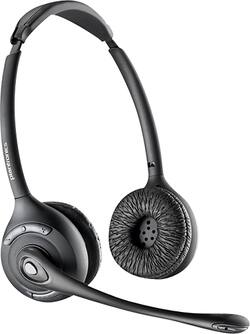
Plantronics - CS500 Wireless Headset System - Black
- Key Specs
- Connection Type: Wireless
- Wireless Connectivity: Bluetooth (The manner in which a device sends data to another device over a short distance without the use of wires or cables.)
- True Wireless: false (These headphones not only lack wires between the device and headphones, they also lack wires between the headphones themselves. (true wireless is really only possible with in-ear headphones))
- Built-In Microphone: true
- Carrying Case: true
- Headphone Fit: On-Ear
- Battery Life: 7 hours (Battery life will vary depending on the product configuration, product model, applications loaded on the product, power management setting of the product and the product features used by the customer. As with all batteries, the maximum capacity of this battery will decrease with time and usage.)
- General
- Product Name: CS500 Wireless Headset System
- Brand: Plantronics
- Model Number: PL-CS520
- Audio
- Sound Isolating: true
- Connectivity
- Connection Type: Wireless
- Wireless Connectivity: Bluetooth (The manner in which a device sends data to another device over a short distance without the use of wires or cables.)
- True Wireless: false (These headphones not only lack wires between the device and headphones, they also lack wires between the headphones themselves. (true wireless is really only possible with in-ear headphones))
- Bluetooth Version: 4.0 (The Bluetooth specification formalized by the Bluetooth Special Interest Group. All versions of the Bluetooth standard are backwards compatible with previous versions.)
- Features
- Built-In Microphone: true
- Carrying Case: true
- Body Metrics Measured: Not Applicable
- Bone Conducting Technology: false
- Maximum Talk Time: 13 hours
- Design
- Headphone Fit: On-Ear
- Style: Pro
- Power
- Rechargeable: true
- Battery Life: 7 hours (Battery life will vary depending on the product configuration, product model, applications loaded on the product, power management setting of the product and the product features used by the customer. As with all batteries, the maximum capacity of this battery will decrease with time and usage.)
- Charging Accessory Included: Cable
- Other
- UPC: 017229134751
Chat with clients and customers with this Plantronics wireless headset system. A built-in microphone supports distortion-free conversations, and the padded ear pieces keep your ears comfortable during long gaming or work sessions. This Plantronics wireless headset system is Bluetooth compatible so you can take important phone calls from up to 350 feet away from your device.
- Compatible with most desk telephones: For wireless communication.
- DECT technology: Offers clear calls with reduced interference.
- 350' wireless range: Allows enhanced mobility without interrupting your call.
- Headset controls: For one-touch operation of volume, mute, flash and call answer/end functions.
- Adaptive power system: Optimizes wireless range and talk time.
Whats Included
- Plantronics CS500 Wireless Headset System
Product Manuals
A: Hello! Yes, the CS520 is compatible with an Avaya 9611G desk phone. If you would like to have remote control feature to answer/end calls from the headset itself, you would need an APV-63 EHS cable (PN: 38734-11). Please note not all phones support EHS and APV-63 is designed for some Avaya phones including the 9166G. If you have any further questions, feel free to contact our Customer Care Team at: 1-888-363-0726.
A: Hello! No, this model does not include a wind screen for the microphone boom. For more information on how this unit works: https://goo.gl/71c7yv. Our Customer Care Team is available at: https://www.plantronics.com/us/en/support/contact if you have other questions!
Q: Will this headset work with a iPhone XR ?
A: Hi Cary! No, the CS500's work with DECT Technology. You would need a Bluetooth headset in order to be compatible with an iPhone or Android phone. If you have any further questions, feel free to contact our Customer Care Team at: 1-855-765-7878
Q: does this model work with polycom phones?
A: Hi Carm! This model is compatible with several Polycom Phones. To confirm compatibility you can access our compatibility guide available on our website: https://compatibility.plantronics.com/deskphone and select the exact model of phone that you have, or you can contact our Customer Care Team at: 1-855-765-7878
Q: will this work with a Cisco phone?
A: Hi! Our CS500's are compatible with many Cisco phones. In this case we would need the exact model of your Cisco phone to confirm compatibility. You can also access our Compatibility Guide available on our website: https://compatibility.plantronics.com/deskphone. If you have any further questions, feel free to contact our Customer Care Team at: 1-855-765-7878
A: Hi! If the AT&T phone belongs to the 2900 series then it should work with the CS520. In order to be able to answer calls from the headset you would need a handset lifter (HL10). If you require further assistance, feel free to contact our Customer Care Team at: 1-855-765-7878.
Q: Is this compatible with the Cisco 8841 office phones.
A: Hi Dallas! Yes, this wireless headset system is compatible with that phone to talk and listen through phone calls. If you'd like to have call remote control feature to answer/end calls by just pressing a button on the actual headset, you'll need an APC-43 EHS cable, which is the one your phone supports. Please note If you're using the key expansion module 7914 cable 85638-01 or 40287-05 (Europe) from Plantronics is required. Callmanger needs to be at version 4.1(3) or greater. Phone firmware needs to be 8.3(3) or greater. Wireless headset hookswitch control must be enabled at the callmanger level. We hope you will find this information useful. If you have any questions, feel free to contact our Customer Care Team at: 1-888-363-0726
A: Hi there! The CS520 was designed for office desk phones; However, there is a way to make it PC compatible, just by getting the APU-75 cable which provide USB connectivity to the charging cradle. As long as the APU-75 is selected as default under sound settings (playback devices and recording devices), you should be able to listen and talk through conference calls. As for having Remote Call Control, most likely you won't be able to answer/end/mute calls directly through the headset. Some programs/soft phones provide this feature by default, and some have been integrated and certified to provide this feature by installing our Hub Software on the PC. In this case, Verto Communicator is not listed: https://bit.ly/3lIEaja. If you have any further questions, feel free to contact our Customer Care Team at: 1-855-765-7878



















