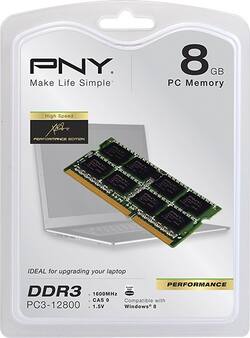
PNY - 8GB 1.6GHz PC3-12800 DDR3 Laptop Memory - Multi
- Key Specs
- Type of Memory (RAM): PC3-12800 DDR3
- Speed: 1600 megahertz
- General
- Product Name: 8GB 1.6GHz PC3-12800 DDR3 Laptop Memory
- Brand: PNY
- Model Number: MN8192SD3-1600
- Compatibility
- Type of Memory (RAM): PC3-12800 DDR3
- Speed
- Speed: 1600 megahertz
- Other
- UPC: 751492567082
With an operating speed of 1.6GHz, this PNY MN8192SD3-1600 8GB PC3-12800 DDR3 laptop memory boosts performance to help ensure your computer operates at an optimal level and multitasks efficiently.
- 8GB of memory: To boost performance.
- 1.6GHz operating speed: For optimal multitasking capability.
- 204-pin PC3-12800 DDR3 connection: Enables efficient system operation.
Whats Included
- PNY 8GB 1.6GHz PC3-12800 DDR3 Laptop Memory
- Owner's manual
A: Laptop memory is not as hard as u would think. Geek squad charges a good buck to do that so if you don't mind spending 60-80 bucks on them doing it for you go ahead. One chip is on the back side of the laptop its the real easy one. The other is under the keyboard most of the time. The screws for taking it out are on the underside to. Watch how and where they come out because the use a few short and a few long take them out and it will snap out from up top where you open it The memory is right under there.
Q: Put new ram and it won't work
A: Dell has specific RAM requirements and you will have to look it up. PNY, CORSAIR, and Kingston are good sites to check. You type in your exact model Dell and it will tell you which module to buy. if you know you bought the right one then either the RAM isn't sitting right in the clip or it's bad RAM. Also make sure you are not putting too much RAM in (there are limits per motherboard so check your manual. Even if the manual says it takes up to 8GB RAM, you might not be able to put it all one one stick - you would need two 4GB etc).
Q: Is this applicable for a Macbook from early 2011? It's a 4GB currently.
A: I have the MacBook pro, from 2012, with an Intel I5 processor and it works great. Bumped it all the way to 16GB.
Q: this works on a mac mini 2010, thanks..
A: undefined
Q: Is this a single stick 8GB ram or 2X4GB
A: One piece
Q: Hi. Will this work for my HP 15-d035dx laptop? Thanks.
A: Hello, This is not the correct memory for your system. This computer uses LV (Low Voltage 1.35V) memory only. PNY Brand Champion
A: Yes, I did the same thing.
Q: Will this work in a Compaq Presario CQ62-410US ?
A: You need to check your computers capabilities. Mine will only handle 4 Gigs so it was too much. Make sure of your specs first!




















