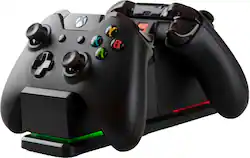
PowerA - Dual Charging Station for Xbox - Black
- Key Specs
- Brand Compatibility: Xbox One
- Model Compatibility: Xbox One
- General
- Product Name: Dual Charging Station for Xbox
- Brand: PowerA
- Number Of Devices Charged Simultaneously: 2
- Model Number: CPFA114326-02
- Color: Black
- Power
- Charging Method: Wired
- Auto Shut-Off: false (Feature automatically turns off the product.)
- Compatibility
- Compatible Platform(s): Xbox One
- Brand Compatibility: Xbox One
- Model Compatibility: Xbox One
- Features
- Overload Protection: false (Features intended to protect the product from damage and overheating caused by overload.)
- Foldable Wall Plug: false
- Certifications Listings & Approvals
- ENERGY STAR Certified: false (Devices carrying the ENERGY STAR service mark, such as computer products and peripherals, kitchen appliances, and other products, generally use 20% to 30% less energy than required by federal standards.)
- Dimensions
- Product Height: 3.04 inches (The out of box height of the item. Height is measured as the vertical distance from the bottom of the item to the top as it would be primarily used or placed.)
- Product Length: 7.87 inches (The out of box length of the item. Length is measured as the longest dimension of the item.)
- Product Width: 2.42 inches (The out of box width of the item. Width is measured as the horizontal distance from one side of the item to the other as it would be primarily used or placed.)
- Product Weight: 0.49 pounds (The out of box weight of the item.)
- Other
- UPC: 617885013935
Officially licensed by Xbox, the Xbox One Charging Station eliminates the cost of replacement batteries. Keep your Xbox One wireless controllers* fully-charged and ready to game! Controller battery level is indicated on the screen, so there's no need to take your eyes off the action. Each Charging Station includes 2 charge-through battery doors and 2 rechargeable battery packs equipped with hours of gameplay. To charge, simply click controller down on the Charging Station and view LED light bars indicating charge level. When fully charged, click up to store. Focus on the game and not on the charge.
Whats Included
- Charging Station
- 2 Xbox One Battery Doors
- 2 Rechargeable Batteries
- AC Adapter
Q: Why does the charging dock flash red, even when my controller is not on it, I need answers.
A: It sounds like there is a defect in the charger if your controller is not on it. Now if the controller was on it and it was flashing I would say that the battery pack is dead and won’t hold a charge and you need a new rechargeable battery pack.
Q: How long does it take to charge the battery's
A: It charges my controllers in 1.5 to 2 hours.
A: I believe if I remember right when I read the instructions (yes I actually read them) it did say it is a trickle charger and does shut off when charged but even if I am wrong just watch and when the light is green (charged) click the base and it becomes a stand and does not charge anymore
A: My 15 year old says it lasts all day. From my observation, "all day" means ALL DAY!!!. He might stop for 30 minutes to eat.
Q: Does it work with the Elite Controllers?
A: Yes it works with them although the paddles must be removed to charge the controller on the stand.
A: Sounds like you need new rechargeable batteries. They don't last forever and do eventually stop taking a proper charge.
A: It’s about 4 feet long.