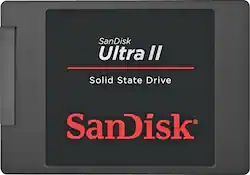
SanDisk - Ultra II 480GB Internal SATA Solid State Drive
- Key Specs
- Storage Drive Type: SSD (Traditional, mechanical hard disk drives are the most common type of storage because they're relatively inexpensive and offer huge capacities. However, they also generate both noise and heat. Solid state drives, also known as SSDs, are many times faster than hard disk drives and have no moving parts to wear out, but typically offer less capacity for the same price.)
- Interface(s): SATA (Refers to the types of connections that devices use to interact and communicate with each other.)
- General
- Product Name: Ultra II 480GB Internal SATA Solid State Drive
- Brand: SanDisk
- Model Number: SDSSDHII-480G-G25
- Performance
- Storage Drive Type: SSD (Traditional, mechanical hard disk drives are the most common type of storage because they're relatively inexpensive and offer huge capacities. However, they also generate both noise and heat. Solid state drives, also known as SSDs, are many times faster than hard disk drives and have no moving parts to wear out, but typically offer less capacity for the same price.)
- Compatibility
- Internal Or External: Internal
- Interface(s): SATA (Refers to the types of connections that devices use to interact and communicate with each other.)
- Minimum System Requirements: PC, Mac or Linux
- Features
- Security Features: None
- Data Encryption: false
- Usage: Everyday computing
- Dimensions
- Product Height: 2.75 inches (The out of box height of the item. Height is measured as the vertical distance from the bottom of the item to the top as it would be primarily used or placed.)
- Product Width: 3.96 inches (The out of box width of the item. Width is measured as the horizontal distance from one side of the item to the other as it would be primarily used or placed.)
- Product Weight: 1.92 ounces (The out of box weight of the item.)
- Other
- UPC: 619659112165
Boost your computer's performance with this 480GB SanDisk Ultra II internal solid state drive, which features nCache technology and a SATA III interface. The enhanced battery life and shock resistance provide efficiency and durability.
- 480GB storage capacity: Provides ample space for photos, documents, music and more.
- SATA III interface: For connecting to your computer.
- nCache 2.0 technology: Organizes data for enhanced efficiency.
- Enhances battery life: Increasing time between charging for laptops.
- No-wait boot up and shut down: Eliminates waiting time, so you can get right to work.
- Shock-resistant construction: Keeps your data safe, even if you drop your computer.
- Compatible with laptops and desktops: To enhance performance of your existing setup.
Whats Included
- Ultra II 480GB Internal SATA Solid State Drive
Q: can this be installed in a toshiba satellite?
A: This product is a standard 7mm height, 2.5 inch SATA drive. Anywhere a 2.5 inch HDD with SATA connector is used, this drive will replace it. There is no setup other than to clone the HDD onto the SSD. You can use a SATA-to-USB adapter to plug it into the existing computer and clone the contents of the HDD on to the SSD, through the USB port. ONce it is cloned, you remove the back cover and swap the drives. You will need cloning software on the computer. There are open source clone utilities available. I used Paragon Hard Disk Manager (bought online) and it worked flawlessly.
A: I am getting about 540 MB/s read and 495 MB/s write. Testing with CrystalDiskMark and confirming with SanDisk SSD tools
Q: Will this work on a Mid 2014 Mac book pro 13 inch model?
A: No, it will not. The Mid-2014 MBP 13" uses a smaller SSD module.
A: SSD Drives will improve any PC performance by 10x. Better than adding RAM. SanDisk is an excellent brand and high quality for the price. Will fit all PC desktops and laptops and most Mac's.
Q: Can I use this as a secondary drive or do I need to completely remove my 1TB HDD?
A: I currently have mine installed and strictly use them for all other apps, Steam and Origin games. All you need to do is open up the computer case, install it by connecting it to your motherboard Sata port. I would suggest ports 1-6 or 0-5 if that is what they have. Once installed you may have to finalize the SSD to be able to use it. I would also say to uninstall any games and the Steam app from your computer main drive first. When that is done, just install Steam on that drive (SSD) by clicking on browse button when it asks where to install. Then, reinstall all your games because if you don't it will look for the games in the wrong place and cause nothing but frustration. That should be all that you need to do. Hope this helps.
Q: Will this work with my MacBook Air 13" mid 2012
A: I have one in a Mac Mini late 2012 model and it boots in 18 seconds
Q: Will this drive work on a mid 2012 macbook pro?
A: I'm betting it will....I put one in a 2009 and a 2010 MacBook Pro. Remember to take the little posts of the sides of your old hard drive and put them into the SSD you are putting in. It keeps the SSD from banging around in the space. Good luck
Q: Will this drive work on 2011 Apple Macbook Pro?
A: yes it will work in a mac