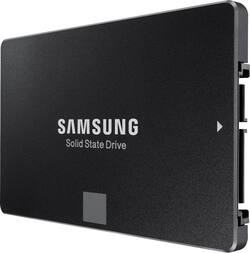
Samsung - 850 EVO 1TB Internal SATA III Solid State Drive
- Key Specs
- Storage Drive Type: SSD (Traditional, mechanical hard disk drives are the most common type of storage because they're relatively inexpensive and offer huge capacities. However, they also generate both noise and heat. Solid state drives, also known as SSDs, are many times faster than hard disk drives and have no moving parts to wear out, but typically offer less capacity for the same price.)
- Interface(s): SATA (Refers to the types of connections that devices use to interact and communicate with each other.)
- General
- Product Name: 850 EVO 1TB Internal SATA III Solid State Drive
- Brand: Samsung
- Model Number: MZ-75E1T0B/AM
- Performance
- Storage Drive Type: SSD (Traditional, mechanical hard disk drives are the most common type of storage because they're relatively inexpensive and offer huge capacities. However, they also generate both noise and heat. Solid state drives, also known as SSDs, are many times faster than hard disk drives and have no moving parts to wear out, but typically offer less capacity for the same price.)
- Compatibility
- Internal Or External: Internal
- Interface(s): SATA (Refers to the types of connections that devices use to interact and communicate with each other.)
- Dimensions
- Product Height: 0.27 inches (The out of box height of the item. Height is measured as the vertical distance from the bottom of the item to the top as it would be primarily used or placed.)
- Product Width: 2.76 inches (The out of box width of the item. Width is measured as the horizontal distance from one side of the item to the other as it would be primarily used or placed.)
- Included
- Included Software: Samsung Magician, One-stop Install Navigator
- Other
- UPC: 887276086156
This Samsung 850 EVO MZ-75E1T0B/AM solid state drive features 3D V-NAND technology to provide enhanced performance while taking up minimal space in your compatible Windows computer. The 1TB capacity provides plenty of space for media and more.
- 1TB capacity: Provides plenty of room to store important files.
- Serial ATA III interface: Makes it easy to install the solid state drive in your compatible Windows netbook or other computer.
- TurboWrite technology: Offers read speeds up to 540MB/sec. and write speeds up to 520MB/sec. for rapid data transfers.
- 3D V-NAND technology: Stacks 32 cell layers vertically for efficient performance in a compact design.
- Samsung Magician software with RAPID mode: Lets you utilize PC memory as high-speed cache storage.
- AES 256-bit encryption: Enables you to keep stored data secure. Complies with TCG Opal 2.0 and is compatible with Microsoft eDrive IEEE1667.
- Device Sleep for Windows: Helps conserve energy.
- One-stop Install Navigator software: Lets you easily transfer data and applications from your existing drive.
- Compatible with PC: For use with your existing computer.
Whats Included
- 850 EVO 1TB Internal SATA III Solid State Drive
- Owner's manual
Q: What is the purpose of an Evo SSD?
A: An SSD is a blazing fast drive for your computer. Replacing your mechanical hard drive with a solid state drive will make your computer faster in almost every way - seriously you will be amazed at how an ssd can revitalize an old machine. Specifically, the difference between an SSD and a mechanical hard drive is akin to the difference between a MP3 file and a old record player. A mechanical drive works like a vinyl record. When you need to access something on the drive, it spins up like a record and there is a tiny needle that reeds the data on the drive. That means if you need to read several files on different parts of the disk, the needle has to move back and forth on the disk to read those files. That takes time. An SSD, on the other hand, stores files directly into flash memory. This means that there's no mechanical movement required to access files. Consequently, flash drives are much much faster than mechanical drives. If you get one of these SSDs you won't be sorry! Your computer will boot up in a matter of seconds and copying/transferring files is a breeze!
Q: Is this Samsung - 850 EVO 1TB model: MZ-75E1T0B/AM compatible in my macbook pro mid 2012 13"?
A: I think so because my MacBook Pro was built around the same time. Apparently there was a defective SATA cable in machines built around that time. I changed out the SATA cable and the hard drive and entered a whole new world of speed.
A: You must purchase a SATA/USB cable to transfer your old drive into the SSD. This SSD comes with the tranfer software and it works great.
A: It's a little bit complicated. Sorisso is correct, the Samsung EVO is compatable with your laptop, however I do not believe it will work out of the box. You will likely need an adapter from Toshiba. The SSD that came built into your Toshiba laptop is a 1.8inch drive with a miniature SATA connector. Toshiba used a cable that has a Standard size SATA connection on one end to connect to the R700 systemboard, and the mini 1.8 inch connector on the other end to connect the 1.8 inch SSD. This Samsung SSD is a standard 2.5 inch drive with a standard size SATA port. In order to connect it to your Toshiba laptop you will need a new cable from Toshiba that has standard size SATA connectors on both ends. (Basically the cable from a model of R700 laptop that shipped with a standard laptop HDD instead of the 1.8 inch SSD). See this Toshiba Support Forum page where people are discussing this cable issue - https://forum.toshiba.eu/showthread.php?62313-Portege-R700-155-SSD-Connector-question.
Q: Will this work on my late 2012 MacBook Pro?
A: Yes it will work fine I just put one in mine.
A: It comes with software. it is easy. HOWEVER, make sure you can access your BIOS, and rearrange the boot order. If you don't, you might brick your PC like I did and spend several days trying to figure out what went wrong.
Q: Is this ssd working with desktop pc?
A: I have one installed on my Desktop PC and it's working just fine. I have SATA2 so I don't get the max performance from it but it is working very well for me. No complaints here.
A: Since that series can ship with either an SSD or a platter drive (and thus has a 2.5" drive mount in it), it is almost certainly compatible.














