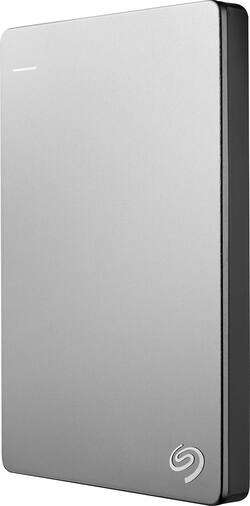
Seagate - Backup Plus Slim for Mac 1TB External USB 3.0 Portable Hard Drive - Silver/Black
- Key Specs
- Storage Drive Type: HDD (Traditional, mechanical hard disk drives are the most common type of storage because they're relatively inexpensive and offer huge capacities. However, they also generate both noise and heat. Solid state drives, also known as SSDs, are many times faster than hard disk drives and have no moving parts to wear out, but typically offer less capacity for the same price.)
- Rotational Speed: 5400 revolutions per minute (The rate at which the hard drive spins its platters. The higher the rotational speed, the faster the drive can read and write data.)
- Interface(s): USB 2.0, USB 3.0 (Refers to the types of connections that devices use to interact and communicate with each other.)
- General
- Product Name: Backup Plus Slim for Mac 1TB External USB 3.0 Portable Hard Drive
- Brand: Seagate
- Model Number: STDS1000100
- Performance
- Storage Drive Type: HDD (Traditional, mechanical hard disk drives are the most common type of storage because they're relatively inexpensive and offer huge capacities. However, they also generate both noise and heat. Solid state drives, also known as SSDs, are many times faster than hard disk drives and have no moving parts to wear out, but typically offer less capacity for the same price.)
- Rotational Speed: 5400 revolutions per minute (The rate at which the hard drive spins its platters. The higher the rotational speed, the faster the drive can read and write data.)
- Compatibility
- Internal Or External: External
- External Hard Drive Type: Portable (Physical characteristics of the hard drive, including size, weight and how you connect to your device.)
- Interface(s): USB 2.0, USB 3.0 (Refers to the types of connections that devices use to interact and communicate with each other.)
- Minimum System Requirements: Windows® 7 or higher, or Mac OS® X 10.9 or higher operating system, SuperSpeed USB 3.0 port (required for USB 3.0 transfer speeds or backwards compatible with USB 2.0 ports at USB 2.0 transfer speeds)
- Power
- Power Source: USB port
- Dimensions
- Product Height: 4.5 inches (The out of box height of the item. Height is measured as the vertical distance from the bottom of the item to the top as it would be primarily used or placed.)
- Product Width: 3 inches (The out of box width of the item. Width is measured as the horizontal distance from one side of the item to the other as it would be primarily used or placed.)
- Product Weight: 5.6 ounces (The out of box weight of the item.)
- Included
- Included Software: Seagate backup software, NTFS driver for Mac, 2-month complimentary membership to Adobe Creative Cloud Photography Plan
- Other
- UPC: 763649052914
The Save feature of this 1TB Seagate Backup Plus Slim for Mac STDS1000100 external hard drive allows you to easily back up digital content from your favorite social networks. The slim, metal design makes it simple to transport the hard drive.
- 1TB storage capacity: Provides ample space for your music, movies and other files.
- USB 3.0 interface: Backward compatible with USB 2.0 for simple connection to your computer.
- Data transfer rates up to 4.8 Gbps via USB 3.0: For quick response when updating files.
- Seagate Dashboard: Back up your photos, videos and movies, including those you've shared on Facebook, Flickr and YouTube, so you can easily manage your favorite media wherever you are.
- Time Machine compatible: Back up your entire system directly to the drive.
- Formatted for Mac: For flexible installation options. Downloadable HFS+ driver for Windows lets you use the hard drive interchangeably between PC and Mac computers for flexible use (installation required).
Whats Included
- Seagate Backup Plus Slim for Mac 1TB External USB 3.0 Portable Hard Drive
- 1.5' USB 3.0 cable
- Owner's manual
Q: Why can't I find the simple "Backup" button?
A: A mac uses the built-in Time Machine system to backup the computer. Simply open Time Machine in the system preferences app and select the Time Machines settings. Once there, turn on Time Machine and set up a backup drive after the seagate drive is plugged into the computer. It should work from there and back up the computer periodically whenever the drive is connected to the computer. The first backup will be the largest because it does the whole operating system with its contents. Subsequent backups will be smaller and quicker. Hope this helps.
A: There's really no difference between USB 1.1, 2.0 and 3.0 connections, at least as far as the computer is concerned. They're all backwards compatible. My Macbook Pro is a 2011 model with USB 2.0 and it works just fine.
Q: How many photos will Seagate Mac 1TB hold? I have almost 7000 on my computer!
A: It depends on the resolution of the pictures......basically the better and more defined the picture quality, the higher the resolution. So for example, lets say each photo is 10MB. 1GB is 1024MB and 1TB is 1024GB. So, you could store close to 100 of your 10MB pics in 1GB of memory. Multiply that times 1000 and you have 100,000. There are some pre-loaded files on the drive that take up some space, so let's deduct 10,000 pictures. In this example, you would have the ability to store approx. 90,000 pictures at 10MB each. Hope this helps.
Q: My Mac is running Snow Leopard. Is this disk compatible with Snow Leopard?
A: I am currently running this external drive on my Mac with Snow Leopard 10.6.8 . It setup the time machine without any problems for me.
A: I have my Seagate connected to my iMac. It comes with the connecting cable you will need.
Q: Is this compatible with Mac OS X version 10.5.8?
A: Bought his to backup iMac 10.5.8; turns out info on the Box states: it is ONLY COMPATIBLE with 10.9 Or HIGHER. Apple person at Best Buy did not know this, either.
A: There is a downloaded driver that allows you to mount on both a PC and a Mac.
Q: I am buying this for mac. Does this hard drive require formating before use or it's plug in play?
A: No, just plug and play when using it on a mac. The box will tell you that it is already formatted for a mac. There are other boxes that have a windows sticker on it meaning, formatted for a window PC.



















