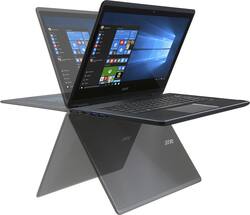
Acer - Aspire R14 2-in-1 14" Touch-Screen Laptop - Intel Core i5 - 8GB Memory - 256GB Solid State Drive - Black
- Key Specs
- Screen Size: 14 inches (Size of the screen, measured diagonally from corner to corner.)
- Screen Resolution: 1920 x 1080 (Full HD) (Screens come in a range of resolutions (measured in pixels, horizontal x vertical). The higher the resolution, the greater the picture quality.)
- Touch Screen: true (Touch-screen devices make navigating more intuitive. Using a touch-screen display, you can do things such as tap to select, hold and drag to move items, swipe to scroll, and pinch to zoom.)
- Processor Model: Intel 6th Generation Core i5 (Your computer's processor is like its brain. Working in combination with system memory, the power of the processor determines the complexity of software you can run, how many programs you can have open at the same time, and how fast those programs will run. Most computers feature an AMD, Intel or Snapdragon processor.)
- Storage Type: SSD
- Total Storage Capacity: 256 gigabytes
- System Memory (RAM): 8 gigabytes (Random-access memory (RAM) is a computing device's short-term data storage, which allows active information to be accessed quickly. The size and type of RAM determines how efficiently the device can handle large amounts of information at one time. For example, gaming or video editing requires more RAM for optimal performance.)
- 2-in-1 Design: true (A laptop and a tablet combined in one lightweight, portable device. Sometimes referred to as "convertible" or "hybrid" laptops, these devices deliver the processing power and keyboard of a laptop. When you're ready to play, either detach the screen or fold your 2-in-1 into tablet mode to comfortably watch movies, play games, read an e-book and more.)
- Backlit Keyboard: true (Integrated lights allow for visibility of the keys in low-light conditions.)
- General
- Product Name: Aspire R14 2-in-1 14" Touch-Screen Laptop - Intel Core i5 - 8GB Memory - 256GB Solid State Drive
- Brand: Acer
- Model Number: R5-471T-52EE
- Display
- Screen Size: 14 inches (Size of the screen, measured diagonally from corner to corner.)
- Screen Resolution: 1920 x 1080 (Full HD) (Screens come in a range of resolutions (measured in pixels, horizontal x vertical). The higher the resolution, the greater the picture quality.)
- Touch Screen: true (Touch-screen devices make navigating more intuitive. Using a touch-screen display, you can do things such as tap to select, hold and drag to move items, swipe to scroll, and pinch to zoom.)
- Processor
- Processor Brand: Intel
- Processor Model: Intel 6th Generation Core i5 (Your computer's processor is like its brain. Working in combination with system memory, the power of the processor determines the complexity of software you can run, how many programs you can have open at the same time, and how fast those programs will run. Most computers feature an AMD, Intel or Snapdragon processor.)
- Processor Model Number: 6200U
- Storage
- Storage Type: SSD
- Total Storage Capacity: 256 gigabytes
- Solid State Drive Capacity: 256 gigabytes (The amount of data that can be stored on the device's solid state drive (SSD). SSD is a flash-based storage with faster speeds than a hard disk drive (HDD).)
- Memory
- System Memory (RAM): 8 gigabytes (Random-access memory (RAM) is a computing device's short-term data storage, which allows active information to be accessed quickly. The size and type of RAM determines how efficiently the device can handle large amounts of information at one time. For example, gaming or video editing requires more RAM for optimal performance.)
- Type of Memory (RAM): LPDDR3 (Each type of RAM delivers a different level of speed, bandwidth, energy efficiency and performance.)
- Compatibility
- Operating System: Windows 10 (The operating system manages all software and hardware, including files, memory and connected devices. Most importantly, it lets you interact with your device and your programs in a visual way; otherwise, you'd be typing computer code to get anything done.)
- Power
- Battery Capacity: 3220 milliampere hours (The amount of energy stored in the battery.)
- Camera
- Front-Facing Camera: true
- Features
- 2-in-1 Design: true (A laptop and a tablet combined in one lightweight, portable device. Sometimes referred to as "convertible" or "hybrid" laptops, these devices deliver the processing power and keyboard of a laptop. When you're ready to play, either detach the screen or fold your 2-in-1 into tablet mode to comfortably watch movies, play games, read an e-book and more.)
- Backlit Keyboard: true (Integrated lights allow for visibility of the keys in low-light conditions.)
- Touchpad Type: Acer Precision Touchpad
- Media Card Reader: true (A hardware device that allows for access to data on a memory card and enables the transfer of its files to a computer. These devices may have one or multiple slots for various types of memory cards, and may be integrated into the computer or available as an external device.)
- Audio Technology: Acer TrueHarmony, Dolby Digital
- Speaker Type: Built-in stereo
- Dimensions
- Product Height: 0.73 inches (The out of box height of the item. Height is measured as the vertical distance from the bottom of the item to the top as it would be primarily used or placed.)
- Product Width: 13.54 inches (The out of box width of the item. Width is measured as the horizontal distance from one side of the item to the other as it would be primarily used or placed.)
- Product Depth: 9.65 inches (The out of box depth of the item. Depth is measured as the distance from the front of the item to the back as it would be primarily used or placed.)
- Certifications Listings & Approvals
- ENERGY STAR Certified: true (Devices carrying the ENERGY STAR service mark, such as computer products and peripherals, kitchen appliances, and other products, generally use 20% to 30% less energy than required by federal standards.)
- EPEAT Qualified: false (The Electronic Product Environmental Assessment Tool (EPEAT) was designed to provide an environmental assessment tool for purchasers. In order to qualify for EPEAT, a product must meet all 23 required criteria.)
- Other
- UPC: 888863517084

Only at Best Buy

Acer Aspire R14 2-in-1 Convertible Laptop: With this laptop's 360 Dual-Torque Hinge design, you can adjust between laptop, display, tent and tablet modes for comfortable viewing while you work, play or watch a movie. The 10-point multitouch screen offers simple navigation.
- Windows 10 operating system: Windows 10 brings back the Start Menu from Windows 7 and introduces new features, like the Edge Web browser that lets you markup Web pages on your screen. Learn more ›
- 6th Gen Intel® Core™ i5-6200U mobile processor: Ultra-low-voltage platform. Dual-core, four-way processing provides maximum high-efficiency power to go. Intel Turbo Boost Technology delivers dynamic extra power when you need it.
- 8GB system memory for advanced multitasking: Substantial high-bandwidth RAM to smoothly run your games and photo- and video-editing applications, as well as multiple programs and browser tabs all at once.
- 256GB solid state drive (SSD): While offering less storage space than a hard drive, a flash-based SSD has no moving parts, resulting in faster start-up times and data access, no noise, and reduced heat production and power draw on the battery.
- 360° convertible design: 360 Dual-Torque Hinge allows for flexible movement between laptop, display, tent and tablet modes.
- Intel® HD Graphics 520: On-processor graphics with shared video memory provide everyday image quality for Internet use, basic photo editing and casual gaming.
- Built-in stereo speakers: Dolby Digital provides rich, immersive sound your music, movies, streaming Web content and games. Acer TrueHarmony technology ensures optimal sound performance in any mode.
- Bluetooth 4.0 interface syncs with compatible devices: Wirelessly transfer photos, music and other media between the laptop and your Bluetooth-enabled cell phone or MP3 player, or connect Bluetooth wireless accessories.
- 2 USB 3.0 ports and 1 USB 3.1 Type C port maximize the latest high-speed devices: Also includes 1 USB 2.0 port to connect more accessories and peripherals. The USB 3.0 ports are backward-compatible with USB 2.0 devices (at 2.0 speeds).
- Built-in media reader for simple photo transfer: Supports SD memory card format.
- Next-generation wireless connectivity: Connects to your network or hotspots on all current Wi-Fi standards. Connect to a Wireless-AC router for speed nearly 3x faster than Wireless-N.
- Additional ports: Microphone-in/headphone-out combo jack.
Whats Included
- Aspire R14 2-in-1 14" Touch-Screen Laptop - Intel Core i5 - 8GB Memory - 256GB Solid State Drive
- 4-cell lithium-ion battery
- AC power adapter, power cord
- Owner's manual
Q: Confused to buy this Acer or the Lenovo Yogo Thinkpad
A: As someone who's owned both, I would say if you're not a huge high gfx gamer (on your laptop that is), then I would keep the $200 and get the Acer, which is the one I have now. The ThinkPad is awesome though, and if you don't care about price, then I would get the ThinkPad. ThinkPad is better spec wise and also it comes with a stylus! But I wanted to save $ and tried out both of them, but I found that I never play serious games on my laptop and that the Acer is fast so I had no complaints about it.
A: Top and Middle cover are made of metal, aluminum alloy. Bottom cover has a soft touch coating, similar to Dell.
Q: What is display's brightness ?
A: I found the default brightness settings very low and was even considering returning the laptop because of it. Luckily, I found out how to change it. Type in "Intel graphics" in the search area and open that control panel. Go to the "color settings" menu and change settings there. My screen is now glowing bright!!
A: It looks like some users have this problem (at least 3 that reviewed here, plus myself). It seems to be an issue with Windows 10 and Intel display drivers - Acer is not the only brand dealing with this; if you google this problem, you will find that over 600 plus people have searched for solutions for this problem with various brands of laptops. Mine has been shipped to Acer once and is on its way again for the the same problem your question asks. It renders the laptop useless as the screen shuts down and while it restarts, it disrupts your work, especially if you work online with skype or other conferencing software. I also had repeated blue screens and unexpected immediate shut downs, which had me lose work often and is not acceptable for any computer in this day and age.
A: Great close to 10 hours
Q: Does this laptop have a back lit keyboard?
A: Yes but is weird at least for me. You should turn it on by using Fn key and F9 or F10. Then as long as you have not restarted the computer I believe anytime you hit any key it will light up unless you turn it off by Fn+F9. I also had a Dell 7000 7353 which with any key stroke it will light up and no need to be turned on or off although you could turn it off if you wanted but by default was automatically on. I don't know if this was Acer's policy or not but when I called Acer and reminded them about this they said it needs to be replaced. When I compared mine to other Acers of the same model or the higher i7/512 model available at Best Buy, I noticed it is the same for those two as well. So it seems it is what it should be but I think a Bios revision should solve the issue unless they don't want to change it.
A: Windows 10 is running smoothly for me so far and I haven't had any issues with Graphics drivers crashing like I did with my ASUS and Dell (which were both running Windows 10).



















