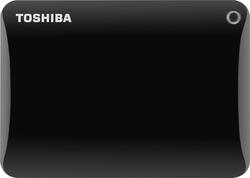
Toshiba - Canvio Connect II 2.5TB External USB 3.0 Portable Hard Drive - Black
- Key Specs
- Storage Drive Type: HDD (Traditional, mechanical hard disk drives are the most common type of storage because they're relatively inexpensive and offer huge capacities. However, they also generate both noise and heat. Solid state drives, also known as SSDs, are many times faster than hard disk drives and have no moving parts to wear out, but typically offer less capacity for the same price.)
- Interface(s): USB 3.0 (Refers to the types of connections that devices use to interact and communicate with each other.)
- General
- Product Name: Canvio Connect II 2.5TB External USB 3.0 Portable Hard Drive
- Brand: Toshiba
- Model Number: HDTC825XK3C1
- Performance
- Storage Drive Type: HDD (Traditional, mechanical hard disk drives are the most common type of storage because they're relatively inexpensive and offer huge capacities. However, they also generate both noise and heat. Solid state drives, also known as SSDs, are many times faster than hard disk drives and have no moving parts to wear out, but typically offer less capacity for the same price.)
- Compatibility
- Internal Or External: External
- External Hard Drive Type: Portable (Physical characteristics of the hard drive, including size, weight and how you connect to your device.)
- Interface(s): USB 3.0 (Refers to the types of connections that devices use to interact and communicate with each other.)
- Minimum System Requirements: PC: Windows 7, 8, 8.1 or 10; Mac: OS X 10.6.6, 10.7, 10.8 or 10.9; USB 2.0 or USB 3.0 port
- Features
- Security Features: Password Protection
- Usage: Backup
- Memory
- Cache Buffer Size: 8 megabytes (The data capacity of the cache buffer (or disk buffer) that acts as temporary memory for the drive. The cache holds the most recently and frequently used data to save the drive the extra step of pulling it from permanent storage every time it's needed, which helps increase the drive's overall speed.)
- Power
- Power Source: AC adapter
- Dimensions
- Product Height: 4.29 inches (The out of box height of the item. Height is measured as the vertical distance from the bottom of the item to the top as it would be primarily used or placed.)
- Product Width: 3.07 inches (The out of box width of the item. Width is measured as the horizontal distance from one side of the item to the other as it would be primarily used or placed.)
- Product Weight: 8.11 ounces (The out of box weight of the item.)
- Included
- Included Software: Time Machine® software, preloaded NTI Backup Now EZ software
- Other
- UPC: 889661047872
Store up to 2.5TB of media on this Toshiba Canvio Connect II HDTC825XK3C1 external hard drive, which features a USB 3.0 interface for simple connection and data transfer rates up to 5 Gbps.
- 2.5TB storage capacity: Provides ample room for your media collection.
- USB 3.0 interface: Allows one-connection setup and intuitive use. USB powered.
- Data transfer rates up to 5 Gbps: Ensure that information is transferred quickly, so you aren't left waiting.
- Automatic backups: Make certain that your digital files are protected. Password-protected data encryption keeps your backups secure.
- Pocket-size design: Offers easy portability.
- Compatible with Mac or PC: Lets you store and access files without reformatting.
Whats Included
- Canvio Connect II 2.5TB External USB 3.0 Portable Hard Drive
- USB 3.0 cable
- Owner's manual
Q: does this do incremental backups after the original full backup?
A: Yes. My MacBook prompts me to backup every few days but it does only the incremental after the first full backup.
A: Yes, this is compatible with Windows 10.
A: Yes, the harddrive is compatible with both Mac or PC.
Q: Toshiba - Canvio Connect II 2.5TB External USB 3.0 Portable Hard Drive - Black
A: Yes, you just don't get speed of USB 3.
Q: Which Canvios can be used with Vista? And are all backward compatible with USB 2.0?
A: Thanks for your question. The Canvio Connect II hard drives are all compatible with Windows Vista. They are also all compatible with USB 2.0 and USB 3.0.
Q: How do you format a 2T Drive? Do you need to install software?
A: The Toshiba drive comes pre-formatted and includes the software that you install to be able to do volume and/or files backups.....to the hard drive or to the cloud. Double-click on "Setup" to install the software (if Windows doesn't ask what you want to do when you plug in the drive).
Q: Will this work with my Samsung phone
A: How do you want to access it? I use mine via my computer for my Samsung Note 8 just like any other HD.
A: Test the drive to see if it is functioning correctly.














