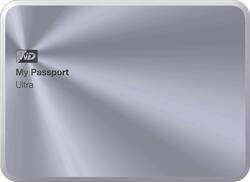
WD - My Passport Ultra Metal Edition 1TB External USB 3.0 Portable Hard Drive - Silver
- Key Specs
- Storage Capacity: 1000 gigabytes (Measured in megabytes (MB), gigabytes (GB) and terabytes (TB), this is the amount available for storing files, music, movies, photos and more. The total includes the capacity of the hard disk drive and solid state drive if both are included on the computer.)
- Storage Drive Type: HDD (Traditional, mechanical hard disk drives are the most common type of storage because they're relatively inexpensive and offer huge capacities. However, they also generate both noise and heat. Solid state drives, also known as SSDs, are many times faster than hard disk drives and have no moving parts to wear out, but typically offer less capacity for the same price.)
- Interface(s): USB 3.0 (Refers to the types of connections that devices use to interact and communicate with each other.)
- General
- Product Name: My Passport Ultra Metal Edition 1TB External USB 3.0 Portable Hard Drive
- Brand: WD
- Model Number: WDBTYH0010BSL-NESN
- Capacity
- Storage Capacity: 1000 gigabytes (Measured in megabytes (MB), gigabytes (GB) and terabytes (TB), this is the amount available for storing files, music, movies, photos and more. The total includes the capacity of the hard disk drive and solid state drive if both are included on the computer.)
- Performance
- Storage Drive Type: HDD (Traditional, mechanical hard disk drives are the most common type of storage because they're relatively inexpensive and offer huge capacities. However, they also generate both noise and heat. Solid state drives, also known as SSDs, are many times faster than hard disk drives and have no moving parts to wear out, but typically offer less capacity for the same price.)
- Compatibility
- Internal Or External: External
- External Hard Drive Type: Portable (Physical characteristics of the hard drive, including size, weight and how you connect to your device.)
- Interface(s): USB 3.0 (Refers to the types of connections that devices use to interact and communicate with each other.)
- Features
- Security Features: Password Protection
- Dimensions
- Product Height: 0.5 inches (The out of box height of the item. Height is measured as the vertical distance from the bottom of the item to the top as it would be primarily used or placed.)
- Product Width: 3.2 inches (The out of box width of the item. Width is measured as the horizontal distance from one side of the item to the other as it would be primarily used or placed.)
- Product Weight: 5.8 ounces (The out of box weight of the item.)
- Included
- Included Software: WD SmartWare Pro
- Other
- UPC: 718037826806
This WD My Passport Ultra Metal Edition 1TB external USB 3.0 portable hard drive features backward compatibility with USB 2.0 interfaces for wide-ranging utility. The password protection and 256-bit encryption capabilities offer security for your data.
- 1TB storage capacity: Provides ample space for your music, movies and other files.
- USB 3.0 interface: Features backward compatibility with USB 2.0 connections for use with a wide range of devices.
- Data transfer rates up to 5 Gbps via USB 3.0 and up to 480 Mbps via USB 2.0: For speedy data transfer.
- Password protection and 256-bit encryption: Provide security for your sensitive data.
- Automatic, local and Cloud backup: Offer a variety of backup options.
- Sleek, lightweight aluminum design: For easy portability.
- Compatible with PC: Including Windows XP, Vista, 7 or 8 for flexible use.
Whats Included
- WD My Passport Ultra Metal Edition 1TB External USB 3.0 Portable Hard Drive
- USB cable
- WD SmartWare Pro Software
- Owner's manual
A: It's easy to reformat for use with a Mac - right out of the box you can get information from the on-disk manual and it has information about how to reformat for a Mac. The reformat is quick.
Q: May I use half of the capacity of the HDD for "manual" backup and half for "sync" backup?
A: Yes you may! What you can do is go into the Disk Management utility in Windows (assuming that's what you're using) and you can shrink the current partition from the 1TB size to 500GB. Then you will have 500GB of free space where you can reformat it to be a new partition with a separate drive letter. Be sure to make the filesystem NTFS so it can take advantage of larger file sizes (FAT32 has a cap size of 4GB). From there you can do your manual backup to partition 1 and sync to partition 2 (you'll have to remember to specify where in the file sync program to go to your designated partition). Or what you can do is just do 2 directories. Call 1 just "backup" and another "sync" or something like that and point your file sync software to the "sync" directory. Hope that helps!
Q: Will this work for Windows 10?
A: Absolutely. I backed up a system on Windows 7, copied my Microsoft Outlook .PST and Office files onto the drive, and then migrated them to a new system that I bought with Windows 10.
Q: Will it work with my Playstation 4 an how.
A: PS4 does not yet allow for external hard drives to hold games or any system data. You can use it to store movies and music and the PS4 will play back that media. But as for extra storage for games, you'll have to upgrade the internal drive of the PS4, which is actually pretty easy to do if you're familiar with replacing internal hard drives in a computer. Sony is pretty open about it and they have their own write-up about what kind of drive to use and how to actually replace it: https://support.us.playstation.com/articles/en_US/KC_Article/Upgrade-PS4-HDD/?
Q: Can I use this with Xbox one?
A: Affirmative. Didn't think so either, so I switched my Passport from my Alien laptop to my Xbox-1 and it began holding games immediately.
Q: Does it have its own power supply?
A: Power supply is not an issue. It is powered through the USB when connected to your compyuter.




















