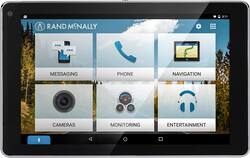
Rand McNally - OverDryve 7 Connected Car Tablet with GPS - Black
Model: OVERDRYVE 7
SKU: 5557700
This item is no longer available in new condition. See similar items below
- Key Specs
- Screen Size: 7 inches (Size of the screen, measured diagonally from corner to corner.)
- Screen Resolution: 1280 x 800 (Screens come in a range of resolutions (measured in pixels, horizontal x vertical). The higher the resolution, the greater the picture quality.)
- Processor Model: T40S (Your computer's processor is like its brain. Working in combination with system memory, the power of the processor determines the complexity of software you can run, how many programs you can have open at the same time, and how fast those programs will run. Most computers feature an AMD, Intel or Snapdragon processor.)
- Total Storage Capacity: 32 gigabytes
- Operating System: Android 5.1 Lollipop (The operating system manages all software and hardware, including files, memory and connected devices. Most importantly, it lets you interact with your device and your programs in a visual way; otherwise, you'd be typing computer code to get anything done.)
- Wireless Connectivity: Bluetooth, Wi-Fi (The manner in which a device sends data to another device over a short distance without the use of wires or cables.)
- Security Features: Password Protection
- General
- Product Name: OverDryve 7 Connected Car Tablet with GPS
- Brand: Rand McNally
- Model Number: OVERDRYVE 7
- Year of Release: 2016
- Color: Black
- Display
- Display Type: LCD
- Screen Type: IPS
- Screen Size: 7 inches (Size of the screen, measured diagonally from corner to corner.)
- Screen Resolution: 1280 x 800 (Screens come in a range of resolutions (measured in pixels, horizontal x vertical). The higher the resolution, the greater the picture quality.)
- Processor
- Processor Brand: MediaTek
- Processor Model: T40S (Your computer's processor is like its brain. Working in combination with system memory, the power of the processor determines the complexity of software you can run, how many programs you can have open at the same time, and how fast those programs will run. Most computers feature an AMD, Intel or Snapdragon processor.)
- Storage
- Total Storage Capacity: 32 gigabytes
- Memory
- System Memory (RAM): 1 gigabytes (Random-access memory (RAM) is a computing device's short-term data storage, which allows active information to be accessed quickly. The size and type of RAM determines how efficiently the device can handle large amounts of information at one time. For example, gaming or video editing requires more RAM for optimal performance.)
- Compatibility
- Operating System: Android 5.1 Lollipop (The operating system manages all software and hardware, including files, memory and connected devices. Most importantly, it lets you interact with your device and your programs in a visual way; otherwise, you'd be typing computer code to get anything done.)
- Operating System Compatibility: Android
- Connectivity
- Wireless Connectivity: Bluetooth, Wi-Fi (The manner in which a device sends data to another device over a short distance without the use of wires or cables.)
- Compatible Wireless Standard(s): Wireless-A, Wireless-B, Wireless-G (The wireless networking standard(s) the device is backwards compatible with. This includes networking protocols based on the IEEE 802.11 standard (alphabetically ascending) and the Wi-Fi Alliance standard (numerically ascending), both of which provide high-throughput wireless local area networks (WLANs). Devices designed to work with specific standard(s) will be backwards compatible with previous versions but may not run at optimal performance when using earlier iterations.)
- Headphone Jack: true (The device features an interface that allows for the connection of headphones.)
- GPS Enabled: true
- Interface(s): Micro-USB (Refers to the types of connections that devices use to interact and communicate with each other.)
- Power
- Charging Interface(s): Micro-USB (The connection for transmitting power to charge the device.)
- Battery Life (up to): 6 hours (Battery life will vary depending on the product configuration, product model, applications loaded on the product, power management setting of the product and the product features used by the customer. As with all batteries, the maximum capacity of this battery will decrease with time and usage.)
- Battery Capacity: 2800 milliampere hours (The amount of energy stored in the battery.)
- Camera
- Front-Facing Camera: true
- Front Facing Camera Megapixels: 2 megapixels (The more megapixels, the more detail that the camera facing the user can capture.)
- Rear-Facing Camera: true
- Rear Facing Camera Megapixels: 5 megapixels (The more megapixels, the more detail that the camera facing away from the user can capture.)
- Features
- Keyboard Included: false
- Security Features: Password Protection
- Stylus Dock: None
- Wake Word: Hey Siri, Okay Google (The term or phrase used to activate a device.)
- Dimensions
- Product Height: 7.1 inches (The out of box height of the item. Height is measured as the vertical distance from the bottom of the item to the top as it would be primarily used or placed.)
- Product Width: 4.5 inches (The out of box width of the item. Width is measured as the horizontal distance from one side of the item to the other as it would be primarily used or placed.)
- Product Depth: 0.6 inches (The out of box depth of the item. Depth is measured as the distance from the front of the item to the back as it would be primarily used or placed.)
- Product Weight: 12.8 ounces (The out of box weight of the item.)
- Included
- Stylus Included: false
- Other
- UPC: 070609015996
Make driving routines more enjoyable with this OverDryve car system. Its voice assistant capabilities let you read and send text messages by command and also play music in your car without taking your hands off the wheel. The built-in dash cam of this OverDryve car system lets you record trips and capture every moment on the road.
- Make the Road Your Only Focus: Make phone calls and text hands-free via Bluetooth.
- Voice Assistant: Integrates with your phone's built-in voice assistant (Siri, Google, etc.) so you can use voice commands to read and send text messages, place hands-free calls, and more.
- Play Your Favorite Media: Stream music, podcasts and audio books from apps on your phone or OverDryve, or download content and play from OverDryve.
- An Extra Set of Eyes: The built-in dash cam can help provide documentation of driving incidents as well as a video memento from the road.
- Plan Your Trips: Get where you're going with Rand McNally's award-winning, on-board navigation. Simply speak your destination and you're on your way.
- Your Favorite Apps: Download popular Android apps, games and more. Take OverDryve with you and use as a tablet when you're away from the car.
Whats Included
- Audio cable
- Power adapter
- Rand McNally OverDryve
- Screen protector
- Vehicle mounting kit
- Vehicle power charger