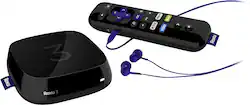
Roku - 3 Streaming Player - Black
- Key Specs
- Maximum Supported Resolution: 1080p
- Operating System Compatibility: Not Applicable
- Remote Control Included: true
- Media Card Slot: true
- General
- Product Name: 3 Streaming Player
- Brand: Roku
- TV Compatibility: Most HDTVs
- Model Number: 4230R
- Features
- Smart Capable: true (Smart, or smart-capable devices are able to connect directly to your home network in order to stream content from the Internet, run Internet-based apps, or connect to other smart devices.)
- Compatibility
- Compatible Wireless Standard(s): Wireless N (The wireless networking standard(s) the device is backwards compatible with. This includes networking protocols based on the IEEE 802.11 standard (alphabetically ascending) and the Wi-Fi Alliance standard (numerically ascending), both of which provide high-throughput wireless local area networks (WLANs). Devices designed to work with specific standard(s) will be backwards compatible with previous versions but may not run at optimal performance when using earlier iterations.)
- Playable Formats: MP4
- Media Card Compatibility: microSD
- Interface(s): USB 2.0 (Refers to the types of connections that devices use to interact and communicate with each other.)
- Audio
- Surround Sound Supported: Other (Surround sound systems use multiple audio channels and speakers to create an immersive sound experience for the listener. There are also various proprietary technologies that imitate this kind of sound via a device's built-in speakers or soundbar.)
- Other
- UPC: 829610000602
Discover new content and rediscover old favorites with this Roku 3 streaming player, which offers more than 2,000 channels and includes access to Netflix, Hulu Plus, HBO GO and more. A motion-control remote lets you enjoy fun-filled games with ease.

- Connects to most HDTVs: For easy streaming. HDMI output simplifies connection (HDMI cable not included).
- Access more than 2,000 streaming channels: Including Netflix, Hulu, Hulu Plus, HBO GO, Amazon Instant Video, Disney, Crackle, NHL, NBA and MLB and enjoy your favorite shows, movies, music and sports, whenever you want.
- Roku Search: Makes it easy to see current programming across a wide selection of channels (some channels require subscriptions, additional fees may apply).
- Voice search: Simply speak the name of the title, actor or director to locate content across channels.
- Roku Feed: Know when your favorite movies, shows and more are ready to stream, on what channel to find it and for how much.
- Enhanced motion-control remote: Allows you to game on. A headphone jack on the remove enables private listening, so you can watch or listen without disturbing others.
- Device remote capability: Enables you to use compatible mobile devices as remotes and browse and add new channels or send video, music and photos to your TV from your compatible phone or tablet.
- Up to 1080p high-definition resolution: Delivers vibrant, rich images for an enhanced entertainment experience.
- Support for select surround sound technology (via HDMI pass-through): Provides quality sound.
- 2x2 dual-band 802.11a/b/g/n Wi-Fi: Combines with efficient processing to ensure smooth performance. Ethernet port offers quick and easy wired network connection.
- microSD card slot: Offers access to media stored on compatible memory cards (not included).
Whats Included
- 3 Streaming Player
- In-ear headphones, power adapter
- Owner's manual
- Remote, 2 AA batteries
Q: do you have to pay monthly subscriptions
A: No monthly fees for the roku device itself. The only monthly fees would be associated with some of the channels for example, Netflix, etc. I've found many channels that are free and have no fees. For example, old movie channels, news channels, travel channels. Fees are only associated with the channel provider and not the roku device, per se.
Q: Do you need one for each TV / multiple rooms?
A: Yes. You need a Roku for each television - or, if it is just you, and you aren't using the other television at the moment, you can just move the Roku between televisions. Also, because of its small size and ease of portability, you can pack it with you if you go on trips and have internet access at the hotel, or wherever you are staying.
A: ROKU 3 has THREE main differences: --Voice Search: Press the search button, say an actor, movie, or TV show, and ROKU will search multiple platforms to find it. For example: If you search "Edward Norton" it will first bring up all of the TV shows and Movies it can find using Edward Norton as a reference; you then select what you would like to see, and ROKU will pull up said Movie or TV show on a bunch of different streaming services (Amazon TV, Netflix, M Go, HULU, etc.) you then select which service you'd like to watch it on, so if you have Netflix, you can watch it free, or basically buy it or pay-per-view it. --Point anywhere remote: Do just that, point it anywhere. It works like a bluetooth, as long as you're in the same room (or just outside the room, I don't know the range specs) the remote works. You don't have to point the remote AT the ROKU. --Headphone jack: Super cool, the ROKU 3 comes with a set of earbuds. You plug in your headphones to the remote and you can watch whatever you want silently. You have a volume control on the remote which leaves the TV volume unaffected. Great for watching late night or for watching stuff with explicit language around the kiddos. Also, as with anything newer, it will have a better processor in it and any bugs will be fixed, probably a better user interface, etc.
Q: How do we watch Local Channels Like ABC, CBS, NBC, PBS, FOX on Roku? Is there a cost for it?
A: You can pick up a HD antenna from Best Buy, (ClearStream) and hook it up to the splitter that your old cable provider hooked into normally located by your fuse panel. I have installed two of these antennas now, both in garage attics and they work amazing. You get all the major networks for free and in HD as well as some public access channels and a weather channel. This is the best solution if you cancel cable and stream your television shows. It's ridiculous to pay for basic cable when you can get those channels for free with the purchase of one of these antennas. I have used the long rang and the extra long range versions and both worked perfect. Cost range is from 75.00 to 110.00 depending if you can get them on sale.
Q: Does Robu 3 require you to provide a credit card number to use it?
A: NO! NO! NO! I refused to give my Credit Card (CC) #, especially since I was not purchasing anything (no HBO, no Netflix, no Amazon, etc.). So I called Roku's well hidden tele support # 888-600-7658. They told me that in order to avoid entering CC info when registering your new Roku device, go to their web site: ===> my.roku.com/signup/nocc ===> (the nocc stands for No Credit Card) When the signup process asks for your CC info, look at the bottom of that web page. There should be a link that says SKIP or Add Later. (I believe that happens after you enter the Roku activation code number to activate the new device). You can then complete the new device activation process without entering your CC info. The above info was on some sketchy notes that I wrote in a hurry when support was walking me thru the device activation process. Hope this helps. - Howie -
Q: I don't have WiFi or Netflix, so how would I connect and view using the roku 3
A: To take advantage of it, you will need high-speed internet, if you don't have WiFi, you would at least need a wired internet router off your Cable Modem, DSL or FIOS. You don't have to use Netflix, there are many other free channels off Roku, many even more low cost pay ones. If you do not have Internet, you in theory could watch and listen to recorded content off a USB Drive or SD Card, but Roku will require you to have Internet when you turn it on to register it and the first thing it will do is download the latest firmware and most popular applications. Also you will need internet to add more applications. There are apps that will allow you to stream content off your mobile phone/tablet/computer to the Roku over your wireless to the TV so that will be of little help to you. The Roku is a Internet and Home Network interface device for your TV. Without a network or internet, there is no point in getting it, you may be better off buying a DVD player. Just my personal opinion.
Q: How do you know latest versions of each roku when purchasing
A: go to the best buy web site look up roku. select the buyers reviews i found that they cover most questions. i found a roku. at the goodwill store for 25$ it did not have the box.so i looked it up by the model number and found that it was a roku 2.i set it up it works fine. the reviews i read said that their are roku 2 3 and 4. plus the roku stick .the most current one is roku 4 however the reviews state that its internal fan makes a lot of noise and it gets hot. so it seems that the newest is not always the best. hope this helps even though it may be a little late
A: Yes, this is the 2015 version of this product.




















