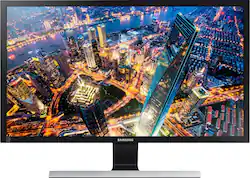
Samsung - UE590 Series 28" LED 4K UHD Monitor - Black
- Key Specs
- Refresh Rate: 60Hz (The number of frames per second the device can produce natively without enhancement. Higher rates help produce smooth, seamless pictures.)
- Maximum Resolution: 3840 x 2160 (Maximum resolution refers to the highest number of pixels that a screen can process and display. Higher resolution signals produce more detailed images.)
- Response Time: 1 milliseconds (The speed at which pixels can change colors is called response time. It is measured in milliseconds (ms).)
- Panel Type: VA (Technology that affects response time and image quality.)
- Synchronization Technology: FreeSync (AMD Adaptive Sync) (Generally, these technologies allow syncing between a computer/console game's frame rate and the device's refresh rate for a smoother display without tearing.)
- Screen Size: 28 inches (Size of the screen, measured diagonally from corner to corner.)
- General
- Product Name: UE590 Series 28" LED 4K UHD Monitor
- Brand: Samsung
- Operating System Compatibility: Mac, Windows
- Model Number: U28E590D
- Display
- Refresh Rate: 60Hz (The number of frames per second the device can produce natively without enhancement. Higher rates help produce smooth, seamless pictures.)
- Maximum Resolution: 3840 x 2160 (Maximum resolution refers to the highest number of pixels that a screen can process and display. Higher resolution signals produce more detailed images.)
- Native Resolution: 3840 x 2160 (Native resolution of a screen refers to its single, fixed resolution. Sometimes screens must scale an image up or down in order to fit the native resolution. This can cause a loss of resolution or detail.)
- Contrast Ratio: 1000:1 (Measured difference between a displayed image's brightest whites and darkest blacks. The larger the first number, the more detail and color that can be displayed.)
- Response Time: 1 milliseconds (The speed at which pixels can change colors is called response time. It is measured in milliseconds (ms).)
- Display Type: LED
- Panel Type: VA (Technology that affects response time and image quality.)
- Synchronization Technology: FreeSync (AMD Adaptive Sync) (Generally, these technologies allow syncing between a computer/console game's frame rate and the device's refresh rate for a smoother display without tearing.)
- Aspect Ratio: 16:9 (The measurement of the width of a screen compared to the height of a screen, expressed as a ratio.)
- Curved Screen: false
- Brightness: 370 candela per square meter (A measure of the total light output.)
- Screen Size: 28 inches (Size of the screen, measured diagonally from corner to corner.)
- Horizontal Viewing Angle: 170 degrees (The maximum angle at which the display can be viewed with acceptable visual performance from either side.)
- Vertical Viewing Angle: 160 degrees (The maximum angle at which the display can be viewed with acceptable visual performance from above or below.)
- Touch Screen: false (Touch-screen devices make navigating more intuitive. Using a touch-screen display, you can do things such as tap to select, hold and drag to move items, swipe to scroll, and pinch to zoom.)
- Connectivity
- Headphone Jack: true (The device features an interface that allows for the connection of headphones.)
- Compatibility
- Wall Mountable: true (The product is able to be secured to a wall. Some products are designed ready to mount, while others may require additional hardware/accessories for installation.)
- VESA Wall Mount Standard: 75mm x 75mm (VESA wall mount standards refer to the spacing of screw holes built into a TV in order to fit with standard TV wall mounts. These standards are implemented into most TVs and monitors.)
- Voice Assistant Built-in: No (A digital assistant built into the device that uses voice commands to answer questions and control smart devices.)
- Features
- Tiltable: true
- Adjustable Stand Height: false
- Anti-Glare: false (Product has features, such as a matte finish, that reduce the likelihood for screen glare.)
- Built-In Webcam: false
- Integrated Speaker(s): false
- Dimensions
- Product Height With Stand: 18.44 inches
- Product Height Without Stand: 15 inches
- Product Width: 26 inches (The out of box width of the item. Width is measured as the horizontal distance from one side of the item to the other as it would be primarily used or placed.)
- Product Depth (With Stand): 6.7 inches
- Product Depth Without Stand: 2.89 inches
- Product Weight: 12.4 pounds (The out of box weight of the item.)
- Stand Included: true
- Cord Length: 60 inches
- Power
- Power Consumption: 32 watts
- Power Saving/Off Mode: 0.45 watts (This mode will turn the display and/or the device off, or into a standby mode, after a preset length of time with no activity to conserve power.)
- Certifications Listings & Approvals
- ENERGY STAR Certified: false (Devices carrying the ENERGY STAR service mark, such as computer products and peripherals, kitchen appliances, and other products, generally use 20% to 30% less energy than required by federal standards.)
- EPEAT Qualified: false (The Electronic Product Environmental Assessment Tool (EPEAT) was designed to provide an environmental assessment tool for purchasers. In order to qualify for EPEAT, a product must meet all 23 required criteria.)
- Warranty
- Manufacturer's Warranty - Parts: 1 year
- Manufacturer's Warranty - Labor: 1 year
- Other
- UPC: 887276079820
Samsung 28" S271HL U28E590D 4K UHD Monitor: See all of your photo's details during editing. Video game levels look amazing. The large screen allows you to have multiple windows open at once to get more work done.

- 28" Full UHD display: 3840 x 2160 resolution showcases your games and HD movies with fantastic color and clarity.
- Avoid screen blur: A very fast 1ms response time keeps quick-moving images in your favorite video games and action movies from blurring and ghosting. Pixels change color quickly to avoid streaking.
- Watch crisp images: The 60Hz refresh rate is a good choice for gaming and other fast-moving media.
- 100,000,000:1 dynamic contrast ratio: Produces more shades of black and white for accurate color reproduction when displaying images with extreme differences between light and dark for stunning picture quality.
- View from more angles: The 170° horizontal and 160° vertical viewing angles, as well as -1°–15° tilt offers a great view of your movies, photos and video games.
- FreeSync technology: Along with Eye-Saver mode and Eco Saving Plus delivers optimal performance.
- See more at once: Picture-in-picture mode allows you to view 2 images simultaneously.
- Additional ports: HDMI 2.0 output. DisplayPort output. 3.5mm audio output.
- 75mm x 75mm VESA wall-mountable design: With optional mounting kit (not included).
Whats Included
- HDMI cable, DisplayPort cable
- Owner's manual
- Samsung UE590 Series 28" LED 4K UHD Monitor
Q: What is the connection(s) from tower to monitor ?
A: The "best answer" up there is wrong. There are three connections but only two types. HDMI (x2) and Display Port (x1). And only the display port is capable of 4k resolution at 60hz
Q: Anyone using this for video editing?
A: Bought this monitor to edit 4k videos at home(3840 pixels × 2160 @ 60hz). I use Adobe Premier and Cyberlink PowerDirector. Monitor works great. But for professional editing, then try to get a 32" and up. We have a Samsung 85" 4k QMD85D TV at work that I needed to edit content for and a large format monitor helps reproduce and view content imperfections. Also, this monitor has AMD Fressync that only works with select AMD Radeon (R9) video cards cards. If you have a Nvidia GTX, than look for a GSync monitor.
Q: connecting to an iMac system
A: Hello Dave, I have a MacBook Pro Retina that I use with two of these monitors. They didn't look that good until I plugged them in with active Thunderbolt to HDMI adapters. Don't know if that will help you or not.
Q: Is it matte or glossy monitor?
A: The monitor has a matte screen.
Q: Does the 26x19" measurement include the stand, or is that the exact size of the monitor?
A: Yes the 26 x 19 includes the table mount the actual screen viewing area is 24.5x13.5 and 28 from corner to corner. If you really want my opinion about this purchase? I think this is one of the best investments for the amount of time I spend working behind the computer. I love the graphics, pictures, and gaming is almost life like at times. I would not hesitate to purchase this product. Heck you could use this as a TV if you watch movies from your computer. Talking about clarity... Ok enough about what I think. Hope this helps you decide.
A: Yes it will but 4k is better appreciated in bigger screens such as 55 or bigger. It still looks great on this monitor but due to the small size smaller details will not look as good as it would in bigger 4k tvs. offcourse you can only notice the difference if you own both this monitor and a good 4k TV,otherwise you would not be able to tell the difference and using this 4k monitor to watch movies would seems great to you
A: If you download the PDF manual from the Samsung website- you will find the statement: Select your Displayport. Displayport 1.1 supports High Bit Rate 1, while 1.2 supports High Bit Rate 2. So the monitor only supports DP1.1 or DP1.2 - not DP1.4 as someone mentioned. https://en.wikipedia.org/wiki/DisplayPort#Resolution_and_refresh_frequency_limits_for_DisplayPort 60Hz @ 4K -> 12.54 Gbit/s for DP1.2 only. If you compare to HDMI 2( use port 2: port 1 is HDMI 1.4) https://en.wikipedia.org/wiki/HDMI 60Hz@ 4K 12.54 Gbit/s - works the same..
A: I use this for my gaming monitor on my PlayStation 4 with HDMI. For some reason, they only have support for 4K on the HDMI 2 port, but it works great. No reason to think it wouldn't work with the Xbox One X in the same way.



















