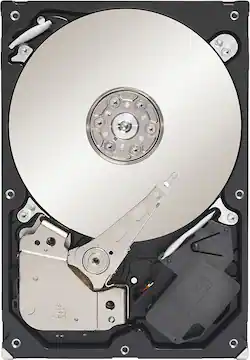
Seagate - 500GB Internal SATA Hard Drive for Desktops
- Key Specs
- Storage Drive Type: HDD (Traditional, mechanical hard disk drives are the most common type of storage because they're relatively inexpensive and offer huge capacities. However, they also generate both noise and heat. Solid state drives, also known as SSDs, are many times faster than hard disk drives and have no moving parts to wear out, but typically offer less capacity for the same price.)
- Rotational Speed: 7200 revolutions per minute (The rate at which the hard drive spins its platters. The higher the rotational speed, the faster the drive can read and write data.)
- Interface(s): SATA (Refers to the types of connections that devices use to interact and communicate with each other.)
- General
- Product Name: 500GB Internal SATA Hard Drive for Desktops
- Brand: Seagate
- Model Number: ST3500641AS-RK
- Performance
- Storage Drive Type: HDD (Traditional, mechanical hard disk drives are the most common type of storage because they're relatively inexpensive and offer huge capacities. However, they also generate both noise and heat. Solid state drives, also known as SSDs, are many times faster than hard disk drives and have no moving parts to wear out, but typically offer less capacity for the same price.)
- Rotational Speed: 7200 revolutions per minute (The rate at which the hard drive spins its platters. The higher the rotational speed, the faster the drive can read and write data.)
- Compatibility
- Internal Or External: Internal
- Interface(s): SATA (Refers to the types of connections that devices use to interact and communicate with each other.)
- Bare Drive: true (Drive is sold without any pre-installed software.)
- Minimum System Requirements: Windows 98 SE, 2000 Pro, ME, XP or NT; Linux; Apple Mac OS and Netware; ATA/IDE interface; available 3.5" bay or slot; 38-bit addressing is required to exceed the 137GB capacity limitation imposed by 28-bit addressing
- Features
- Security Features: None
- Usage: Everyday computing, Performance computing
- Memory
- Cache Buffer Size: 16 megabytes (The data capacity of the cache buffer (or disk buffer) that acts as temporary memory for the drive. The cache holds the most recently and frequently used data to save the drive the extra step of pulling it from permanent storage every time it's needed, which helps increase the drive's overall speed.)
- Dimension
- Product Height: 5.787 inches (The out of box height of the item. Height is measured as the vertical distance from the bottom of the item to the top as it would be primarily used or placed.)
- Product Width: 4 inches (The out of box width of the item. Width is measured as the horizontal distance from one side of the item to the other as it would be primarily used or placed.)
- Product Weight: 22.08 ounces (The out of box weight of the item.)
- Included
- Included Software: DiscWizard installation and SeaTools diagnostic
- Warranty
- Manufacturer's Warranty - Parts: 2 years
- Manufacturer's Warranty - Labor: 2 years
- Other
- UPC: 763649002346
Simply add this SATA hard drive to your computer and enjoy a whopping 500GB of storage space for all your movies, music, photos, documents and more.
Whats Included
- 500GB Internal SATA Hard Drive for Desktops
Q: can i make a bootable image of my primary hard drive using the seagate software included?
A: yes, I've done it multiple times. With the included software you can add a second hard drive to your computer or clone your existing one to replace it.
A: You should use the disks that came with your Dell. If you don't have them, ask around. Lot of people have Dells. Most Dells do not have a restore option. Just do the re-install and use the license stuck on the side of your Dell.
Q: Will this hard drive fit in my computer?
A: According to the information we found regarding your computer, this drive should be able to be installed into an available drive bay. SATA and PATA drives have different types of connectors, but your computer should have both connections. Gigabytes (GBs) determine the amount of storage space you have within your computer.
Q: Which hard drive is compatible with mine
A: Your hard drive only needs to be compatible to your system. To replace your failed drive all you need to do is get another SATA hard drive with same or more hard drive space. The only reason to look for similar compatible drive is if your drive crashed and you are having disaster recovery done on it, in which they are attempting to recover the data from the platters or repair the circuit board. In which case they will most likely want an identical drive (same brand and model).
Q: wil this hard drive work in my dell inspiron 580
A: Yes, this can be made to work with that PC.
Q: Will this hard drive work for me.
A: This drive will work. You can clone your existing hard drive to this drive with reputable hard drive cloning software. This is recommended of course, if you do not wish to lose your information and Windows installation on your failing/damaged hard drive.
A: Our Barracuda 500GB Internal Hard Drive for Desktops will work equally well with Vista or Windows 7 so you should be fine using this drive on a Desktop computer no matter what the operating system is.














