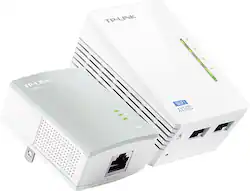
TP-Link - N300 Wi-Fi Extender Starter + AV500 Powerline Adapter Kit
- Key Specs
- Wireless Standard: N (The wireless networking protocol used by the device. Each iteration of the protocol is based on the 802.11 standard developed by the Institute of Electrical and Electronics Engineers (IEEE) Standards Association. Denoted by letters following 802.11 (802.11a, 802.11ac, etc.), each version, published in alphabetical order, encompasses all previous versions.)
- Form Factor: Plug-in (The size, arrangement, and physical configuration of the product.)
- Frequency Band: 2.4 GHz (Bands may be grouped into categories such as low- and high-band VHF (Very High Frequency), low- and high-band UHF (Ultra High Frequency), or certain frequency channels (measured in MHz or GHz). Generally, higher frequencies transmit information faster but have shorter range than lower frequencies.)
- Number of LAN Ports: 2 (Number of devices able to be connected to the Local Area Network (LAN). LAN ports allow wired connections to other networking devices (wireless access points, range extenders, etc.) in order to share the internet connection received through a WAN port.)
- General
- Product Name: N300 Wi-Fi Extender Starter + AV500 Powerline Adapter Kit
- Brand: TP-Link
- Model Number: TL-WPA4220KIT
- Network
- Attached Antenna: false
- Minimum Frequency: 2.4 megahertz (The lowest signal frequency that the device is able to amplify or transmit. The higher the frequency, the more data that can be transmitted and the more easily the signal is attenuated (weakened over distance/passing through buildings).)
- Maximum Frequency: 2.4835 gigahertz (The highest signal frequency that the device is able to amplify or transmit. Generally, the higher the frequency, the more data that can be transmitted and the more likely the signal is attenuated (weakened over distance/passing through buildings).)
- Maximum Coverage Area: 11000 square feet
- Features
- App Compatible: false (The product can be connected to a program or software application on a mobile device, which then receives collected data from the product.)
- Overload Protection: false (Features intended to protect the product from damage and overheating caused by overload.)
- Compatibility
- System Requirements: Windows 2000, XP, 2003, Vista, 7, 8; Mac; Linux (The software that a product must have for it to be able to integrate with another product.)
- Security
- Security Features: 64/128-bit WEP / WPA / WPA2,WPA-PSK / WPA2-PSK
- Dimensions
- Product Height: 1.6 inches (The out of box height of the item. Height is measured as the vertical distance from the bottom of the item to the top as it would be primarily used or placed.)
- Product Length: 2.1 inches (The out of box length of the item. Length is measured as the longest dimension of the item.)
- Product Width: 3.7 inches (The out of box width of the item. Width is measured as the horizontal distance from one side of the item to the other as it would be primarily used or placed.)
- Product Weight: 1.1 pounds (The out of box weight of the item.)
- Warranty
- Manufacturer's Warranty - Parts: 2 years limited
- Manufacturer's Warranty - Labor: None
- Other
- UPC: 845973032579
Get coverage in tough places with this TP-LINK AV500 TL-WPA4220KIT Wi-Fi powerline extender, which features up to 300 Mbps wireless speeds and up to 500 Mbps speeds over a powerline. Pair buttons help you quickly create a network with secure encryption.
- Compatible with HomePlug AV, 802.3, WEP802.3u and 802.11b/g/n: For a secure connection to your existing powerline.
- Up to 500 Mbps speeds: Over a powerline up to 300m long supports multiple devices on one network, including computers, game consoles, printers and more. Up to 300 Mbps data transfer over Wi-Fi.
- Coverage of up to 11,000 sq. ft.: To spread your network throughout your home or office.
- WPA/WPA2, WPA-PSK/WPA2-PSK encryption: Protects your data.
- Plug-and-play design: Helps you set up your network in minutes with the Pair buttons.
Whats Included
- Powerline Ethernet adapter (TL-WPA 4220)
- Powerline Ethernet adapter (TL-PA 4010)
- Resource CD, 6.5' Ethernet cable
- Owner's manual
Q: My PS4 lags on a WiFi connection. Will this help with the issue or am I wasting money
A: If your PS4's lag is due to poor WiFi connectivity, and not your Internet connection itself, using a Powerline WiFi kit may help improve WiFi connectivity an signal strength at your PS4's location. You can also use the Ethernet connection from the secondary Powerline unit if preferred, to provide a direct connection to your PS4. Regards, TP-Link Support
A: No, the Internet source for your Powerline network must be connected to the primary unit via Ethernet cable. Unless your hotspot has an Ethernet output to connect to the primary unit, this may not be the ideal solution for your needs. Please feel free to contact our support if you have any questions. Regards, TP-Link Support
A: Theoretically, as long as both outlets are on the same main circuit panel, it may be possible. However, please bear in mind that powerline connectivity and data transfer rates will vary due to network environment variables including: distance between adapters, network traffic, noise on electrical wires, building material and construction, quality of electrical installation and other adverse conditions. Regards, TP-Link Support
A: Yes, all of our Powerline products are compatible with each other via the HomePlug AV/AV2 standards. Regards, TP-Link Support
A: Theoretically yes; however we always recommend plugging directly into wall outlets for best results. Regards, TP-Link Support
Q: Can this allow me to pass a phone line from cable to another room
A: No, Powerline WiFi extenders are designed to expand WiFi coverage, as well as Ethernet (RJ45) connectivity, which are not the same as a traditional phone line cable (RJ11). Regards, TP-Link Support



















