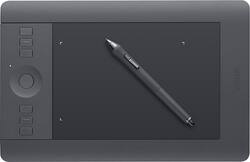
Wacom - Intuos Pro Small Pen and Touch Tablet - Black
- Key Specs
- Screen Size: 12.6 inches (Size of the screen, measured diagonally from corner to corner.)
- Active Area: 6.2 x 3.9 (The size of the screen area that a user interacts with, either by stylus and/or touch (if supported).)
- Total Storage Capacity: 5 gigabytes
- Battery Type: Lithium-polymer
- General
- Product Name: Intuos Pro Small Pen and Touch Tablet
- Brand: Wacom
- Model Number: PTH451
- Model Family: Wacom Intuos Pro
- Year of Release: 2013
- Display
- Screen Size: 12.6 inches (Size of the screen, measured diagonally from corner to corner.)
- Stylus Input: Active (Electromagnetic Resonance) (An active stylus/pen is able to communicate directly with a compatible device; active electromagnetic resonance (EMR) pens are powered via a device's screen and active electrostatic (AES) pens require an additional power source. A passive stylus does not have electronic features and is compatible with most capacitative touch screens.)
- High Dynamic Range (HDR): false (An HDR-compatible 4K TV or other HDR-compatible product displays HDR video content when it's available from sources like 4K Ultra HD Blu-ray Discs and 4K streaming services.)
- Active Area: 6.2 x 3.9 (The size of the screen area that a user interacts with, either by stylus and/or touch (if supported).)
- Aspect Ratio: 16:9 (The measurement of the width of a screen compared to the height of a screen, expressed as a ratio.)
- Processor
- Processor Brand: Intel
- Storage
- Total Storage Capacity: 5 gigabytes
- Memory
- System Memory (RAM): 8 gigabytes (Random-access memory (RAM) is a computing device's short-term data storage, which allows active information to be accessed quickly. The size and type of RAM determines how efficiently the device can handle large amounts of information at one time. For example, gaming or video editing requires more RAM for optimal performance.)
- Compatibility
- System Requirements: PC: Windows Vista (SP3), 7 (32- or 64-bit) or 8; Mac: Intel® processor; OS X v10.6.8 or later (The software that a product must have for it to be able to integrate with another product.)
- Connectivity
- Headphone Jack: false (The device features an interface that allows for the connection of headphones.)
- GPS Enabled: false
- Interface(s): USB (Refers to the types of connections that devices use to interact and communicate with each other.)
- Power
- Charging Interface(s): USB Type C (The connection for transmitting power to charge the device.)
- Battery Type: Lithium-polymer
- Camera
- Front-Facing Camera: false
- Rear-Facing Camera: false
- Dimension
- Product Height: 0.45 inches (The out of box height of the item. Height is measured as the vertical distance from the bottom of the item to the top as it would be primarily used or placed.)
- Product Width: 8.1 inches (The out of box width of the item. Width is measured as the horizontal distance from one side of the item to the other as it would be primarily used or placed.)
- Product Weight: 1.45 ounces (The out of box weight of the item.)
- Certifications & Listings
- ENERGY STAR Certified: true (Devices carrying the ENERGY STAR service mark, such as computer products and peripherals, kitchen appliances, and other products, generally use 20% to 30% less energy than required by federal standards.)
- Included
- Stylus Included: true
- Warranty
- Manufacturer's Warranty - Parts: 2 years
- Manufacturer's Warranty - Labor: 2 years
- Other
- UPC: 753218991027
Ideal for photography, art and design applications, this Wacom Intuos Professional PTH451 pen and tablet assist you in your creative process. The tablet's multitouch interface with gesture support allows simple navigation of on-screen content.
- Multitouch tablet: Ideal for individuals with a creative passion in photography, art or design features gesture support for simple, intuitive operation. The streamlined size helps conserve desktop space.
- ±60 levels of tilt recognition: Provide a responsive interface.
- Pen: With 2,048 levels of pressure sensitivity in both the pen's tip and eraser offers the accuracy and feel of traditional brushes and pens, so you can easily draw or edit on the tablet. Ambidextrous design enables right- or left-handed use.
- 6 customizable, application-specific ExpressKeys: Along with a finger-sensitive Touch Ring with 4 customizable functions provide quick and easy access to your favorite shortcuts.
- On-screen custom radial menus and an Express View heads-up display: Simplify operation and help you stay focused.
- Included wireless kit: Allows cord-free use for flexible placement options. USB interface enables easy wired connection to your PC or Mac via an included 6.6' USB cable.
Whats Included
- Color identification rings
- Installation CD-ROM with driver, software download instructions
- Owner's manual
- Pen stand, assorted replacement pen tips
- Wacom Intuos Pro Small Pen and Touch Tablet
- Wireless kit, 6.6' USB cable
Q: Does this tablet work with MediBang paint pro?
A: Any paint program that uses a mouse will surely work with the tablet and more precisely in drawing techniques. I use Adobe Illustrator and Photoshop and it works fantastic, makes my edits in photost and drawings more easy. When you draw using a mouse, it can never replace the feel of using an actual pen for drawing strokes which is more natural. Bestbuy has a great return policy, if for some reason it does not meet your expectations you can return it for a full refund.
Q: Compatability with Windows 10?
A: Fully compatible with windows 10
A: The small, Medium and large are all the same in regard to sensitivity. The only difference is the size. Taking that into consideration the size does matter depending on what you're using it for. I use it to touch up photos and make selection in Photoshop. If you're using it as a drawing tablet then you might want to use the bigger models to get the long sweeping strokes used in drawing or illustration. I would suggest trying the sizes if possible, which can be difficult since they don't have them on display usually. It is the best way to be sure of how it feel with your style of use. Good Luck!!
A: No, you cannot see what you are drawing directly on the tablet.
Q: Are you able to see what you are drawing on the tablet while it is hooked up to the computer?
A: No the tablet connects to your computer and shows what you are drawing. Windows 10 comes with a free sketch pad app that allows art tablet use. I would recommend adobe products very highly tho for any amount of use.
A: Try the medium. The small is a good starter but for heavy use medium would be great. No computer desktop or laptop are your options. They don't work with tablets or phones or iPods.
Q: What other software can go with this tablet? Specially in question Photoshop?
A: It's awesome for Photoshop.... the pressure sensitivity of the pen makes creating masks in Photoshop so much easier. As does the applications of paint, and brush tool.
A: Not one bit. Wacom has been around since 1983 and their products quickly became the industry standard for many industries , including photography and graphic design.



















