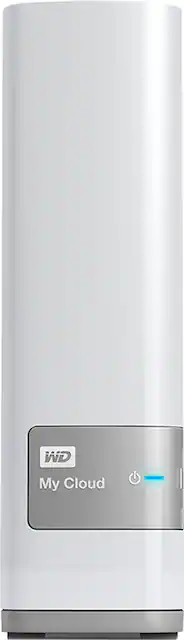
WD - My Cloud 3TB External Hard Drive (NAS) - White
- Key Specs
- Storage Drive Type: HDD (Traditional, mechanical hard disk drives are the most common type of storage because they're relatively inexpensive and offer huge capacities. However, they also generate both noise and heat. Solid state drives, also known as SSDs, are many times faster than hard disk drives and have no moving parts to wear out, but typically offer less capacity for the same price.)
- Interface(s): Ethernet (Refers to the types of connections that devices use to interact and communicate with each other.)
- General
- Product Name: My Cloud 3TB External Hard Drive (NAS)
- Brand: WD
- Model Number: WDBCTL0030HWT-NESN
- Performance
- Storage Drive Type: HDD (Traditional, mechanical hard disk drives are the most common type of storage because they're relatively inexpensive and offer huge capacities. However, they also generate both noise and heat. Solid state drives, also known as SSDs, are many times faster than hard disk drives and have no moving parts to wear out, but typically offer less capacity for the same price.)
- Compatibility
- Internal Or External: External
- External Hard Drive Type: Desktop (Physical characteristics of the hard drive, including size, weight and how you connect to your device.)
- Interface(s): Ethernet (Refers to the types of connections that devices use to interact and communicate with each other.)
- Minimum System Requirements: Windows 10, Windows 8, Windows 7, Windows Vista operating system, Mac OS X El Captitan, Yosemite, Mavericks, Mountain Lion, DLNA/UPnP devices for streaming, Rounter for Internet connections
- Features
- Security Features: Password Protection
- Dimensions
- Product Height: 6.7 inches (The out of box height of the item. Height is measured as the vertical distance from the bottom of the item to the top as it would be primarily used or placed.)
- Product Width: 1.9 inches (The out of box width of the item. Width is measured as the horizontal distance from one side of the item to the other as it would be primarily used or placed.)
- Product Weight: 33.6 ounces (The out of box weight of the item.)
- Included
- Included Software: WD Setup software, WD SmartWare Pro (3-user license), WD Quick View, WD My Cloud desktop add (available for PC and Mac), WD My Cloud mobile app, WD Photos app
- Other
- UPC: 718037811055
This 3TB WD My Cloud external network-attached storage device's Gigabit Ethernet interface allows connection to your existing network, so you can easily store and access files with compatible PC, Mac, mobile phones and tablets from anywhere in your home.
- 3TB capacity: Provides ample storage space for music, movies and other files, so you can easily centralize and organize your family's media in 1 secure location.
- Gigabit Ethernet interface: Enables simple connection to your existing network via an included Ethernet cable, making it easy to access stored files from multiple devices. USB 3.0 port lets you connect a USB hard drive for increased storage.
- Data transfer rates up to 10/100/1000 Mbps: Along with a dual-core processor deliver fast file transfers and quick response when accessing your files remotely.
- Allows direct file uploads from compatible mobile devices: Including select mobile phones and tablets to simplify the storage process.
- Automatically backs up files from your network-connected PC or Mac: For ease of use. Compatible with Apple® Time Machine backup software.
- Password protection: Helps protect your personal Cloud from unauthorized access with password protection available for every user.
- Lets you stream stored media: To most DLNA/UPnP connected TVs, media players and gaming consoles for flexible viewing and listening options. iTunes server makes it easy to stream your music collection to a PC or Mac with iTunes.
- WD My Cloud app (download required): Allows you to easily transfer files between your personal Cloud, Dropbox and other public Cloud accounts.
- Web-guided setup: Helps you get up and running within minutes. Auto detects your drive to simplify the setup process.
Whats Included
- My Cloud 3TB External Hard Drive (NAS)
- Ethernet cable, AC adapter
- Owner's manual
A: You can access this drive from virtually anywhere. In my case it is connected to my home network in Florida, and I have accessed it from California, New York, and other locations in Florida--both from a computer and from an iPad (there's a free app). You can also send links via email to others and they can download files you want to share with them.
Q: what are the plus and minus of My Cloud vs My Passport
A: My Cloud is a Nas that you can hook up to any router to back-up, upload, download and even stream file wireless over the internet. This means that you can back up multiple device to this storage over wifi without need of cables or being physically connected to the device. My passport is a portable drive that needs to be connected to your computer or laptop in order to back up your data. It would not allow to remote access to your data and you will need to be physically hooked up to the device to transfer data.
A: To access the data stored on the WD My Cloud 3TB Personal Cloud Storage External Hard Drive with your iPad you have to download and install the WD My Cloud app from the App Store onto your iPad. This allows you to access mp3 files or any other file types stored on the WD My Cloud 3TB Personal Cloud Storage External Hard Drive via the WD My Cloud App and for the mp3 files to be played with the built-in media player of that same app. They can also be stored onto the iPad but that folder is ony accessible through the WD My Cloud App itself due to limitations on iPad.
Q: Will this work with Windows 10 PC?
A: Yes, recommended to use Local accounts on the PCs.
Q: How can I load my BlueRays and DVDs into MyCloud
A: google handbrake and mkv decoder
Q: Is it possible to sabe photos from the app into the camera roll in IPad / IPhone?
A: Yes, with ease. If you have lots of photos it will take some time.
Q: Can I backup MyCloud to an Off-site Hard drive or MyCloud?
A: Yes all you have to do is plug in an external hard drive and set it up to do backups, if you want to look up instructions it is called WD snapshot.
A: Sure thing! Just create individual folders for each person. Next, send an email invite to each person. Once those emails added to your dashboard (using the included software with the device) you can then set permissions for each folder. Example; Person 1 can only save to Person 1's folder (and from their end, that's the only folder they see), Person 2 can only save to Person's 2 folder, and so forth. To network each path individually, just click on the folder icon in the taskbar (Windows Explorer). Under network you should see you MyCloud device. When you click on it, you will then see the "Public" folder (along with any other default folders from WD) AND you will now see you newly created folders for each person. Just right-click on the folder name you want to map, and click "Map Network Drive". Your computer will then automatically add that folder under the heading "Computer" in the menu on the left of Windows Explorer. Hope that helps!


















