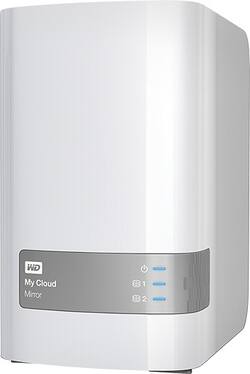
WD - My Cloud Mirror 4TB External Hard Drive (NAS) - White
- Key Specs
- Interface(s): USB 3.0, Ethernet (Refers to the types of connections that devices use to interact and communicate with each other.)
- General
- Product Name: My Cloud Mirror 4TB External Hard Drive (NAS)
- Brand: WD
- Model Number: WDBZVM0040JWT-NESN
- Compatibility
- Internal Or External: External
- External Hard Drive Type: Desktop (Physical characteristics of the hard drive, including size, weight and how you connect to your device.)
- Interface(s): USB 3.0, Ethernet (Refers to the types of connections that devices use to interact and communicate with each other.)
- Features
- Security Features: Password Protection
- Dimensions
- Product Height: 6.75 inches (The out of box height of the item. Height is measured as the vertical distance from the bottom of the item to the top as it would be primarily used or placed.)
- Product Width: 3.9 inches (The out of box width of the item. Width is measured as the horizontal distance from one side of the item to the other as it would be primarily used or placed.)
- Product Weight: 54.4 ounces (The out of box weight of the item.)
- Included
- Included Software: WD Setup, WD SmartWare Pro, WD Quick View, WD My Cloud, WD Photos
- Other
- UPC: 718037823171
Save up to 4TB of data on this WD My Cloud Mirror personal Cloud network-attached storage device, which features a Gigabit Ethernet interface for simple wired network connection. The 1.2GHz processor ensures rapid performance.
- 4TB capacity: Provides ample space for storing your media files, documents and other data, so you can easily centralize your family's media in 1 secure location.
- Gigabit Ethernet interface: Enables simple connection to your existing network via an included Ethernet cable, making it easy to access stored files from multiple network-connected devices. Two USB 3.0 ports offer flexible connection options.
- DLNA 1.5 and UPnP certified: So you can stream stored media to select devices.
- Multiple data management options: With Mirror Mode (RAID 1) as the default setting, the capacity is divided, with half being used to store your data and the other half used for data duplication, to help prevent loss of important files.
- WD My Cloud mobile app: Along with a WD Photos app allows enhanced functionality with select iOS and Android devices.
- Compatible with PC and Mac: For flexible use.
Whats Included
- AC adapter, Ethernet cable,
- My Cloud Mirror 4TB External Hard Drive (NAS)
- Owner's manual
- WD Quick View
- WD Setup software,
- WD SmartWare Pro (3-user license)
Q: What is the storage capacity? 4 TB, or 2 TB storage plus 2 TB mirror?
A: 2TB initially in RAID1 (mirror ), physically there 2 HDDs by 2TB each.
Q: Will it ever stop blinking?
A: Yes the blue lights in front stop blinking when the device is no longer being accessed. When idle, you should only see one light dimming on and off very slowly. You must be accessing this device from somewhere for it to be continuously running.
Q: Can this device be completely standalone?
A: no, RJ45 required
A: RAID 1 is mirroring, meaning that each drive in the array would be identical. If one drive goes down, it can be replaced, and initialized. In a nutshell, yes, they are hot-swapable. The whole point of RAID is to provide for redundancy. However, if you were using this device as a 4TB storage location, without utilizing RAID, if a drive went down, you would lose everything on it.
Q: How much pwer does it draw when idle?
A: No, but the drives go into sleep mode. However, if you transfer a large amount of data initially if could be active for up to several days. I transferred about 900+ GB and it ran for 2-3 days indexing and sync with the other drive. This should settle out and enter sleep mode, minimizing power.
A: This comes with usb3 and Ethernet. It comes already formatted with preinstalled software for backing up your desktop or laptop. If you use your router to format the external drive you will lose the preinstalled back up software. It is best hooked via the ethernet port directly connected to your router
Q: Compatable when Windows 10 installed?
A: It should work with Win 8 or 10














