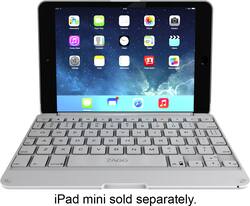
ZAGG - ZAGGfolio Keyboard Case for Apple® iPad® mini, iPad mini 2 and iPad mini 3 - White
- Key Specs
- Model Compatibility: Apple iPad mini (1st Generation), Apple iPad mini 2, Apple iPad mini 3
- General
- Product Name: ZAGGfolio Keyboard Case for Apple® iPad® mini, iPad mini 2 and iPad mini 3
- Brand: ZAGG
- Model Number: IM2ZFN-WWB
- Color: White
- Compatibility
- Brand Compatibility: Apple
- Model Compatibility: Apple iPad mini (1st Generation), Apple iPad mini 2, Apple iPad mini 3
- Design
- Case Style: Case
- Design: Solid
- Warranty
- Manufacturer's Warranty - Parts: 1 year
- Manufacturer's Warranty - Labor: 1 year limited
- Other
- UPC: 848467022377
This ZAGG ZAGGfolio IM2ZFN-WWB case's built-in Bluetooth keyboard features island-style keys for easy, comfortable use. The 950 mAh lithium-ion battery lasts up to 3 months on a full charge.
- Compatible with Apple iPad mini, iPad mini 2 and iPad mini 3: For a precise fit.
- Built-in Bluetooth keyboard: Features island-style keys for easy typing.
- Hinged design: Provides 135° of viewing angles.
- Sleep/wake function: Utilizes magnets to help preserve your device's battery life.
- 950 mAh lithium-ion battery: Allows you to use the keyboard for up to 3 months between charges.
Whats Included
- Charging cable
- Owner's manual
- ZAGGfolio Keyboard Case for Apple iPad mini, iPad mini 2 and iPad mini 3
A: This keyboard is not backlit.
Q: How does the keyboard connect to the iPad?
A: The iPad snaps into the top part which is a protective case then you connect through Bluetooth. When done simply close the iPad as if it were a laptop.
Q: Where's the backlight button?
A: Function or Fn Button plus Down arrow to turn them on and off. Fn Button plus Right arrow to cycle colors.
Q: Samsung Galaxy Tab 3 compatible?
A: Hello, no, it's not going to fit. I think the Galaxy 3 is 10mm wider than the iPad mini. Since it's a pressure fit it's not going to work I'm afraid. But when in doubt just stop by at a Best Buy and bring you tablet and try some out?
Q: Does this cover have backlit keys?
A: No, but the light from the iPad is enough to light the keyboard
Q: How do you turn on keyboard?
A: There is a button on the opposite end of the charging port. Push it towards yourself and you will see a red light. Press the other button that is in front of the previous button you pushed. A blue light will begin flashing. Once that light flashes, go to "Settings", then "Bluetooth", and turn the Bluetooth on. Once it is on, it will discover the device as "Zaggfolio". Press "Not Connected" and it should change to "Connected". Go to your "Notes" on your iPad and begin typing. I hope this helps!
Q: Will this fit an ipad mini 2
A: Yes, very difficult to remove but it fits like a tight glove. My keyboard keeps loosing the bluetooth connection if left idle for any length of time - royal PITA - have to go back into settings and turn off bluetooth and then re-pair the keyboard.