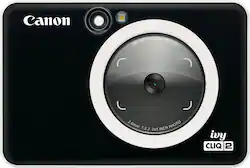
Canon - Ivy CLIQ2 Instant Film Camera - Black
- Key Specs
- Instant Film Compatibility: Zink print paper
- Autofocus: true (Allows the camera to automatically focus through the lens, rather than by adjusting the lens manually.)
- General
- Brand: Canon
- Model Number: 4520C004
- Product Name: Ivy CLIQ2 Instant Film Camera
- Color: Black
- Compatibility
- Instant Film Compatibility: Zink print paper
- Dimensions
- Product Width: 4.8 inches (The out of box width of the item. Width is measured as the horizontal distance from one side of the item to the other as it would be primarily used or placed.)
- Product Height: 3.2 inches (The out of box height of the item. Height is measured as the vertical distance from the bottom of the item to the top as it would be primarily used or placed.)
- Product Depth: 0.9 inches (The out of box depth of the item. Depth is measured as the distance from the front of the item to the back as it would be primarily used or placed.)
- Product Weight: 0.4 pounds (The out of box weight of the item.)
- Included
- Batteries Included: true (Indicates whether the product comes with the required batteries for its operation.)
- Film Included: true
- Exposure Control
- Flash Range: Not Available (The greatest distance or range of distances at which light from the flash can illuminate a subject.)
- Autofocus: true (Allows the camera to automatically focus through the lens, rather than by adjusting the lens manually.)
- Performance
- Instant Print: true
- Self Timer: false
- Shutter Speeds: Not Available (The length of time the shutter remains open when the shutter release is activated, expressed in fractions of seconds. The longer the shutter is open, the more light that is able to be captured by the camera sensor.)
- Power
- Battery Size: Battery pack (The battery size required for operation.)
- Features
- Automatic Flash: true
- Warranty
- Warranty - Parts: 1 year
- Warranty - Labor: 1 year
- Other
- UPC: 013803334951
Instantly shoot, print, and stick photos, from the IVY CLIQ2. The Canon IVY CLIQ2 is a simple and fun Instant Camera printer that is pocket-sized so you can take it with you on-the-go. Easily shoot and print 2”x3” photo stickers instantly, and place them almost anywhere thanks to a peel and stick backing. You can even get creative and print with a white border or filters with Built-in Frame & Filters. The IVY CLIQ2 also has a Large Selfie Mirror so you can take the perfect selfie and even a memory card slot to save your photos!1
- Photoshoot + Print + Stick 2"x3" photos: With the IVY Cliq2 simply shoot and print photos to instantly share your favorite moments. Stick your photos almost anywhere— each print is a sticker with an adhesive back!
- The perfect size, so you can take it on-the-go: Never miss a moment! The IVY CLIQ2 is ultra-compact and slips right into your pocket or bag so you can take it anywhere. Plus, it comes in four trendy color options with a matte finish: Turquoise, Petal Pink, Charcoal, or Black.
- Mix it up with Built-in Frame & Filters: Shoot and print your photo stickers with a white border frame and/or choice of vivid or B&W filter! The creative options are built-into the camera printer, simply select what you want with the buttons on the back so you can instantly print and share.
- Peel & Stick ZINK® Photo Paper: Print fun-sized 2” x 3” photo stickers that are smudge-proof, and tear and water-resistant. Simply peel off the backing and stick almost anywhere to help you remember and share good times with your besties.
- Perfect for selfies: The IVY CLIQ2’s large 2.0-inch selfie mirror and auto flash work together to help your photos stay on point — and keep your selfie game going strong.
- MicroSD card slot: Allows you to save your photos to a microSD card (sold separately) for later use.
Whats Included
- Canon IVY Cliq 2 Black
- ZINK Photo Paper Pack (10 Sheets & 1 SMART SHEET)
- Micro USB Charging & Data Cable (USB A to Micro),
- Wrist Strap
- Quick Start Guide & Warranty Sheet
Q: Can I connect it to my phone
A: No you can not ! Learned that the hard way lol
A: It is 8 megapixels. The “film” has nothing to do with the camera resolution. The built-in “printer” is like 300dpi. Great for the 2x3 prints..,
A: Based on the Canon Operation guide for IVY CLIQ 2 it looks like you can (below sentence taken from site): User can take photos with the device even with no paper if an SD card is inserted. Photos will be saved on the SD card.
A: Insta film means that when you take a photo the camera has the tools withing to print such photo instantly and you have access to it right there hope it answer your questio.
A: undefined
Q: Do all the pictures come out as stickers?
A: undefined
A: Comes out right away on the side of the camera.
Q: Can you use Zink paper with this camera?
A: Yes, this camera is intended for Zink paper
People also viewed
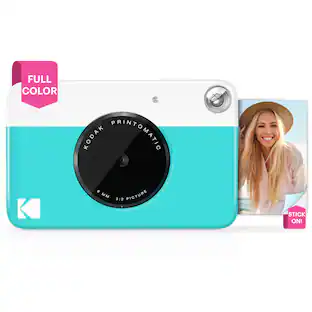 $64.99The price was $69.99
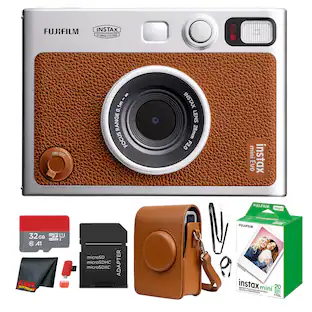 $336.95The price was $368.95




Today's top picks
 $299.99The price was $499.99
 $699.99The price was $999.99
 $1,099.99The price was $1,599.99
 $529.99The price was $749.99
 $1,099.99The price was $1,299.99
 $1,199.99The price was $1,299.99
 $999.99The price was $1,599.99
 $1,099.99The price was $1,649.99