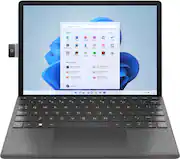
Rating 4 out of 5 stars with 141 reviews
4.0- Keyboard (33)
- Camera (18)
- Ease of use (17)
- Processor Speed (13)
- Size (10)
- RAM (24)
- Battery Life (18)
- Weight (7)
- Storage (6)
- USB Port (5)
Customer Images
The vast majority of our reviews come from verified purchases. Reviews from customers may include My Best Buy members, employees, and Tech Insider Network members (as tagged). Select reviewers may receive discounted products, promotional considerations or entries into drawings for honest, helpful reviews.
- Rated 4 out of 5 stars
Full-fledged W11 tablet.
Out of the box, I was immediately impressed by the aluminum built and design. It feels good holding it. The camera protrudes a bit more than I’d like and worry about it being hit or scratched. So, I am glad that HP included a quality twill back cover which attaches magnetically, that recesses the camera and protects the beautiful finish. The version I am using also included a keyboard that is also partly made of the same twill material. All put together, it’s a bit heavy for a small tablet at about 2lbs 5oz but remains highly portable. The keyboard also acts as a screen cover, and when closed or opened, activates the wake/sleep function. I do wish the cover was magnetic as well, as it can easily fling open and fall off when handling the tablet if not careful. In laptop mode, it feels like a notebook. The back stand allows for placing the tablet on a table at different angles. The keyboard can be angled for comfortable typing. However, I found it uncomfortable typing when the device was resting on my lap, as the keyboard extends too far out and the tablet itself is too top-heavy. Once, the tablet actually separated from the keyboard and I dropped the tablet when my legs were slightly angled downwards. Good thing I was on a rug! The back stand is quite versatile, allowing the tab let to be used both horizontally and vertically while still being connected to the keyboard. You can also lean the screen almost flat for note taking or drawing. I do wish the back stand would allow the screen to be placed a bit more forward. The 11” 2.1K (2160X1440, 236ppi apx.) display looks great. There is great contrast, and the pictures are vivid. I could not find the nit brightness, but I suspect between 250-300, which is good enough for bright settings. However, the brightness and glossy display may not be suitable in sunny environments. The 3.2 aspect ratio works well for both landscape and horizontal viewing, allowing for a bit of extra real state for web browsing. The bezels are a bit on the chunky side, but that is helpful when holding the device in tablet mode, so fingers will not obstruct the screen. There is good black and white definition. I did notice a little light leakage at the bottom in full black pictures though, but I don’t think it’s distracting at all. The sound coming from the 3 speakers are sufficiently loud and clear. But as it goes with 90% of tablets and laptops, there is no bass at all. When it comes to performance, one must keep in mind that this is first and foremost a tablet -not a laptop, PC, or even a notebook. The Pentium Silver N6000 processor does a decent job when it comes to keeping things speedy when switching apps, but I did notice that the CPU ran consistently at 100% when doing menial tasks. The NVMe M.2 SSD is super-fast as the OS and applications boot up right away. Yes, 128GB is not enough for PC use, such as content creation and gaming, especially if you are taking hi-res pics or videos, however this tablet features a micro-SDCX card slot (I added 512GB), and a USB-C port for external drives. At 4GB, I wish there was more memory. In the end, I noticed that the device occasionally struggled having a few web pages and apps open. Websites reloaded when switching back-and-forth. Port connectivity is limited to one USB-C port, which is also used to power the unit. If you want use peripherals such as mice, external drives, or headphones, you must do so via Bluetooth or a dongle, preferably one with power-through capabilities. Again, this is a tablet, and as such it is normal to have only one port. Reinforcing the tablet design is compatibility with pens. While I wish the official pen was included with the keyboard bundle, I was able to successfully use a cheap pen, as the official pen was out of stock at the moment. Speaking of peripherals, the keyboard is totally worth the higher price in my opinion. It is very well made, the keys have good spacing and excellent travel, and it is a joy to type on. My only critic, and it can be a big one for some, is that the keys are not backlit, making it difficult to use in dark settings, especially if you are not used to a mall keyboard (or can’t type like me). This tablet comes with Windows 11, which is nice, but it is the S Mode version. While this version is claimed to provide a more stable and secure system, it does not allow any app that does not come directly from the MS store. I find it quite limiting as I could not install web browsers, platforms, or games. Keeping in mind the limited 4GB RAM and 128GB of space, “upgrading” to normal W11 may not be worth it. While this device is certainly not intended for gaming, I still was able to enjoy AAA titles via Stadia and XB Cloud Gaming streaming. I simply connected a controller via Bluetooth when needed. The main feature is perhaps the webcam. The automated 13MP camera, which is very cool to see retract itself with the press of a side button, does an acceptable job under normal lighting conditions. However, in sunny conditions or when there is bright light behind, the camera sometimes struggles to readjust and focus. This is a bit distracting when recording and I had to re-record a few times. The auto-follow feature where the camera goes and zooms wherever the person is, can be very cool, but slow at times. Another interesting and useful feature is the HP QuickDrop and HP Duet, where this device can be used as a secondary monitor. By downloading an app to your phone, laptop, or any PC for that matter, you can seamlessly move files around and have a secondary screen. Is it worth the asking price? It depends on your expectations and how you plan to use the device. As a full laptop replacement, serious content creation, or for gaming, this may not be a good fit. However, as a full-fledged Windows 11 tablet, with smart and unique features to boost communication, collaboration, productivity, and media consumption, I think it covers all bases nicely.
Posted by Insomniak1
- Rated 4 out of 5 stars
Compelling Windows 11 Tablet
Initial Impressions: This is sharp looking Tablet. The build quality is outstanding. There is no cheap plastic here. The glass is Corning’s Gorilla Glass which is very smooth to the touch and should prove durable. The magnetically attached kickstand and optional keyboards are a soft touch tweed fabric. They complement the 11M beautifully. Walking into a meeting with the 11M will draw a few envious eyes. As nice as the system looks and feels it is evident that HP made some compromises. Setup: Setup was simple though time consuming. First, getting through the Windows 11 Wizard took me 20 minutes. Next, Windows Updates. It took about two hours to complete updates provided by Windows Update. This proved to be a good stress test for the 11M. The Intel Pentium Silver N6000 processor runs at 1 GHz when idle or performing low level tasks. The N6000 will turbo to 3.3 GHz under load. Windows Updates forced the system into a sustained turbo mode for the better part of two hours. The 3.8 GBs of available system memory remained constant at 90% utilized. Finally, the 128GB NVMe SSD ran around 10% to 20% utilization. This was most likely due to Windows 11 memory manager swapping data between the limited system ram and the swap file on the SSD. 4GB is not much for a modern Windows computer. Operating temperatures: Windows Update is probably the most stressful task I will have the 11M perform. Sustained 100% CPU for 2 hours produced some heat but not enough to concern me. The case got warm but not hot. Office 365: Office 365 comes pre-installed on the HP 11M. An Office 365 license is required to use Office 365. If you are not an Office 365 user then you can remove Office to free up some drive space. MS Word’s performance was on par with what I would expect from any computer. However, the system does suffer from the dreaded jumping cursor. It is exceedingly frustrating to constantly reposition the cursor because it suddenly jumps to a new space on the screen while typing. This happens with almost every laptop and type cover I have owned. And yet, wrist are up and off the touchpad. Pinch to Zoom on the touch screen is very responsive in Word and with MS Edge. Using the keyboards touchpad for the same activity does add latency. Sometimes it took two or three tires before the system responded to pinching on the touchpad. Excel was a different story. Most of my spreadsheets are tables with formulas and conditional formatting. Pinching worked without much issue. Moving around a worksheet and switching between worksheets in the same workbook revealed system pausing, stuttering, image redraws, and even graphic tearing. It was immediately evident that 3.8 GB of memory is tough to work with. Even with small workbooks. External Monitors: I was able to connect the 11M to an external 24” HP Omen monitor via USB-C and an external 65” TV via Bluetooth. Max resolution for both was 2160x1440. The Omen was 60 Hz and the TV was 30 Hz. Please see attached photos. Storage: The system ships with a 128 GB NVMe SSD. Only a portion of the SSD is available due to reserved space for recovery and pre-installed software such as Windows 11, Office, McAfee, and HP utilities. There is an SD expansion slot located next to the volume rocker. Battery Life: Maybe I can get a full 8-hour day out of a single charge. This depends on what I am doing. I also turn on some energy saving feature such as running MS Office in Dark Mode. This turns the screen black and text white. Battery life is less if I am streaming movies, music, or connecting to Bluetooth devices such as a wireless headset. Ports: The HP 11M has three ports: a single USB-C port and two keyboard interfaces. The USB-C port serves to power and charge the 11M. It is also used for external monitors and other USB devices with the appropriate cable or docking ports. Bluetooth devices may be connected as need but only if the device does not also require a dedicated adapter. Most wireless mice I have owned require an external USB adapter and will not be compatible with the 11M. Be sure to do your homework before purchasing a mouse for use with the 11M. Keyboard: The keyboard looks like it came straight from Microsoft. The physical interface with the tablet is the same thought the magnetic alignment is different. I own several Surface keyboards that I tried, and failed, to attach to the 11M. The keyboard can also lay flat on the table or be raised slightly and attached to the 11M just like the MS Surface Keyboard does with the Surface tablet. However, the 11M’s keyboard lacks backlit keys. What a letdown… The keyboard is comfortable to type on. The chiclet keys are smaller than a standard size keyboard but still comfortable to use. The keyboard is stiff enough but does have some flex in the middle. The keys also make an audible click when depressed. I found this odd for a membrane keyboard. What’s unique with the 11M is that there is a physical keyboard connection for both landscape and portrait modes. There is none of this silly Bluetooth connectivity going on here. Transition from landscape to portrait and back is instantaneous. So, boo no backlighting but yeah on the flexibility. Better yet, the kickstand is designed to support the 11M at a comfortable angle while in portrait mode. HP thought this one through. Good job. Camera: The camera is cute, has a well-constructed metal housing, and comes with some unique software that gives the camera more flexibility than any other built-in camera I have used. The HP GlamCam Widget allows for low light adjustments, camera positions, zoom levels, orientation from 0 Degrees to 235 Degrees around its range of motion, and the ability to create presets for different presentation situations. For example, the Teams preset moves the camera to 200 Degrees where the table setting moves the camera to 235 degrees to focus on the table space directly in front of the HP 11M. Of course, these presets are designed for the when the tablet is in portrait mode. The 13 MP camera is good enough for video conferencing. And that’s about it. Images are grainy, there is no flash, and the 11M can take many seconds to snap a photo or switch to video mode. My 7yr old iPhone 6s does a better job on its worst day. Finally, HP needs to work on the orientation of video between landscape and portrait mode. In MS Teams, my image is 90 Degrees off from the alignment of the camera. Landscape mode works just fine. I do like pressing the button that makes the camera pop out. Sound: Sound is good enough. I spent two days streaming news. Voices were clear and concise. I also streamed Netflix and YouTube. The 11M is compatible with USB-C speakers, headphones, and Bluetooth devices. Kick Stand: The kickstand magnetically attaches to the back of the 11M. The bottom half of the kickstand swings out and in smoothly along its hinge. The kickstand also has the same range of motion as the MS Surface tablet. The hinge is still enough to keep the tablet at your desired position. Pushing down on the top of the table will force the kickstand to adjust outwards. The kickstand does add some springiness to the tablet when it is fully extended. This may be something to experiment with if you plan on using the kickstand in conjunction with drawing or writing with a stylus. The 11M does not come with a stylus so I was unable to test. Also, the kickstand has a cut out for portrait mode. This keeps the screen at a comfortable angle while working in Portrait mode. Good idea. Fingerprint Reader: Junk. Difficult to setup. Almost never works. Windows Hello not compatible with camera. Final thoughts: Good job overall. The system is fast and flexible enough for most mobile computing activity. S mode in Windows can be disabled if you don’t like it. Personally, it is not going to impact how my tablet will be used. I am disappointed with performance in Excel and the lack of back lighting on the keyboard. The camera is fun but has limited uses due to the software support and overall system performance. The build quality is fantastic and screams “quality build”. In my opinion, this is a solid mobile platform good for lite office work and streaming entertainment.
Posted by ITJim
- Rated 2 out of 5 stars
Tablet Not Working
I purchased the tablet last April. I used it over the summer and early fall. It hadn't been charged since then. I charged it and it wont turn on. Truly Disappointed
Posted by York
- Rated 5 out of 5 stars
Sleek & Snappy Windows 11 Tablet
I really like this HP 11" 11m-be0023dx Windows 11 tablet and frankly I was very skeptical about this product. I’m thrilled that I was wrong. The main source of my skepticism were the specifications. The HP 11m-be0023dx has a Quad-core Intel® Pentium® Silver N6000 processor with 4GB LPDDR4x-2133 MHz RAM. Storage is a 128GB PCIe NVMe M.2 SSD. With that processor RAM combination I wrongly assumed this tablet would be disappointingly sluggish. Not so. It’s perfectly snappy enough for me! Right out of the box I was taken by the design with its sleek aluminum build. The kickstand comes in the box and attaches to the back magnetically. I’m has a nice twill fabric look to it but seems to be some more durable plastic composite like material. It looks great. The included keyboard is of the same material and also attaches magnetically to the tablet in both landscape and portrait modes. The tablet itself weighs in at 1.45 lbs and with the keyboard it’s 2 lbs. it’s maybe slightly thicker and heavier than I’d prefer but neither really bother me. This HP is pretty minimalist when it comes to ports. You’ll only find 1 Superspeed 5Gbps USB Type-C port which does double duty as the charging port. This is somewhat limiting and could be a bit awkward. It also support video out which is a nice option. For connectivity you get Wi-Fi 6 (2x2) and Bluetooth 5. At home I have a gigabit internet connection and on wifi I get well over 500 Mbps. Starting up for the first time you’re greeted with a standard Windows 11 setup. The power button doubles as a fingerprint reader so along the way you’ll setup Windows fingerprint login which makes login painless and a breeze. Upon reaching the desktop I jumped right to Windows update and got a bunch of updates including a new BIOS version which installed upon restart. I was next eager to check the HP 11m-be0023dx display out. You get a beautiful 11 inch 2160 x 1440 pixel IPS LCD display. It’s Gorilla glass 5 so you’re protected against scratches. 4K videos look amazing but sound is somewhat lacking. In terms of general usability I’m been completely pleased with this HP tablet. It runs Windows 11 in S Mode which is a streamlined for performance and security. You are limited to apps available on the Microsoft app store so you cannot just install every program you want. In S Mode you’re also locked into Edge as your browser. This doesn’t bother me at all. Performance wise all apps really snap open instantly without delay. You can take the tablet out of S Mode but you can’t undo it once you do. You may take a performance hit if you do. I intend to use this tablet for work so I’m perfectly content staying in S Mode for now. I have Office 365 installed and it works great. The hard drive is a fast 128GB PCIe NVMe M.2 SSD which size wise is a bit limiting but I’m also using One Drive for cloud storage. For even more onboard storage this tablet includes a microSD card slot so I added a 256gb card. Just add a bigger card if you need even more storage. For Zoom meetings I’m very pleased with the 13 megapixel camera. This cam is truly unique. It’s is motorized to move from rear to front cam and almost every angle in between. It’s a little weird but I love it. I do wish the HP Tilt Pen came included. I normally haul a laptop along with me for work when I’m out on the road. I have quickly transitioned to toting the HP 11m-be0023dx along instead. I just find it so much more enjoyable using a tablet instead of a laptop. I like slapping on the keyboard when working at a desk and popping it off when in a more casual setting. I love this flexibility. Overall I’m a big fan of this product. I think you will be too.
Posted by PG460
- Rated 3 out of 5 stars
Has some shortcomings
I will start with the reasons I gave this tablet only 3 stars. It is very heavy for it's size. It weighs just under 2.5 pounds which doesn't seem like much but my 14" dell laptop weighs 3.5 pounds. It would be very heavy if you plan to carry this in a purse or bag. It is also very laggy when streaming. I have high speed internet and no other device (laptop, TV etc.) has difficulty streaming movies and TV but the tablet is very slow. It also takes a while to load pages which becomes frustrating. I have also found that the fingerprint scanner only recognizes my finger about 25% of the time. I have plenty of devices that scan fingerprints to unlock so I am familiar with how to scan and this just doesn't work smoothly. Some positives- I do like the case and stand. It makes it easy to angle at a large number of different angles. It is a nice size (despite the weight) so using it in places that don't have a lot of space is nice- I put it on my kitchen counter to watch TV while I cook (but the lagging is annoying!). I am hoping to use it on my deck this summer rather than take my larger laptop outside. If it doesn't stream smoothly though, that will be an issue. I do like the keyboard that came with this model. It is responsive and a nice addition. It works with the tablet in either landscape or portrait mode depending on your preference. It snaps in quickly and is ready to go. I have not had a chance to use the camera yet but I do like that is pops up to use and slides back in when not in use. The set up was very quick and it was immediately loaded with all my settings and bookmarks through Edge.
Posted by CTMom