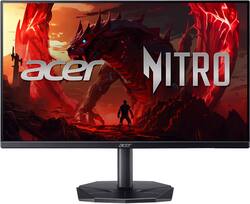
Acer - Nitro KG270 27" Full HD IPS Up to 144Hz 1ms AMD FreeSync Gaming Monitor (HDMI, VGA) - Black
- Key Specs
- Refresh Rate: 144Hz (The number of frames per second the device can produce natively without enhancement. Higher rates help produce smooth, seamless pictures.)
- Maximum Resolution: 1920 x 1080 (Maximum resolution refers to the highest number of pixels that a screen can process and display. Higher resolution signals produce more detailed images.)
- Response Time: 1 milliseconds (The speed at which pixels can change colors is called response time. It is measured in milliseconds (ms).)
- Panel Type: IPS (Technology that affects response time and image quality.)
- Synchronization Technology: FreeSync (AMD Adaptive Sync) (Generally, these technologies allow syncing between a computer/console game's frame rate and the device's refresh rate for a smoother display without tearing.)
- Screen Size: 27 inches (Size of the screen, measured diagonally from corner to corner.)
- Display Connector(s): 1 x HDMI 1.4, 1 x VGA (The number and type of connectors used to connect to an external display.)
- General
- Brand: Acer
- Model Number: KG270 P6bi
- Product Name: Nitro KG270 27" Full HD IPS Up to 144Hz 1ms AMD FreeSync Gaming Monitor (HDMI, VGA)
- Color: Black
- Operating System Compatibility: Not Applicable
- Display
- Refresh Rate: 144Hz (The number of frames per second the device can produce natively without enhancement. Higher rates help produce smooth, seamless pictures.)
- Maximum Resolution: 1920 x 1080 (Maximum resolution refers to the highest number of pixels that a screen can process and display. Higher resolution signals produce more detailed images.)
- Contrast Ratio: 100,000,000:1 (Measured difference between a displayed image's brightest whites and darkest blacks. The larger the first number, the more detail and color that can be displayed.)
- Response Time: 1 milliseconds (The speed at which pixels can change colors is called response time. It is measured in milliseconds (ms).)
- Display Type: LCD
- Panel Type: IPS (Technology that affects response time and image quality.)
- Synchronization Technology: FreeSync (AMD Adaptive Sync) (Generally, these technologies allow syncing between a computer/console game's frame rate and the device's refresh rate for a smoother display without tearing.)
- Aspect Ratio: 16:9 (The measurement of the width of a screen compared to the height of a screen, expressed as a ratio.)
- Curved Screen: false
- Brightness: 250 candela per square meter (A measure of the total light output.)
- Screen Size: 27 inches (Size of the screen, measured diagonally from corner to corner.)
- High Dynamic Range (HDR): false (An HDR-compatible 4K TV or other HDR-compatible product displays HDR video content when it's available from sources like 4K Ultra HD Blu-ray Discs and 4K streaming services.)
- Horizontal Viewing Angle: 178 degrees (The maximum angle at which the display can be viewed with acceptable visual performance from either side.)
- Vertical Viewing Angle: 178 degrees (The maximum angle at which the display can be viewed with acceptable visual performance from above or below.)
- Touch Screen: false (Touch-screen devices make navigating more intuitive. Using a touch-screen display, you can do things such as tap to select, hold and drag to move items, swipe to scroll, and pinch to zoom.)
- Display Surface: Anti-glare
- Color Gamut (Standard RGB): 99 percent
- Connectivity
- Number of HDMI Inputs (Total): 1
- Number of VGA Ports: 1 (VGA (Video Graphics Adapter or Video Graphics Array) is a display standard that transmits via analog signals. This type of interface is typically used to connect a computer to a display device such as a monitor, projector, or TV.)
- Display Connector(s): 1 x HDMI 1.4, 1 x VGA (The number and type of connectors used to connect to an external display.)
- Compatibility
- Wall Mountable: true (The product is able to be secured to a wall. Some products are designed ready to mount, while others may require additional hardware/accessories for installation.)
- VESA Wall Mount Standard: 100mm x 100mm (VESA wall mount standards refer to the spacing of screw holes built into a TV in order to fit with standard TV wall mounts. These standards are implemented into most TVs and monitors.)
- Features
- Tiltable: true
- Adjustable Stand Height: false
- Anti-Glare: true (Product has features, such as a matte finish, that reduce the likelihood for screen glare.)
- Eye Relief Features: Low blue light
- Built-In Webcam: false
- Integrated Speaker(s): false
- Dimensions
- Product Height With Stand: 18.14 inches
- Product Width: 24.2 inches (The out of box width of the item. Width is measured as the horizontal distance from one side of the item to the other as it would be primarily used or placed.)
- Product Depth (With Stand): 8.28 inches
- Product Weight: 9.15 pounds (The out of box weight of the item.)
- Stand Included: true
- Certifications Listings & Approvals
- ENERGY STAR Certified: false (Devices carrying the ENERGY STAR service mark, such as computer products and peripherals, kitchen appliances, and other products, generally use 20% to 30% less energy than required by federal standards.)
- EPEAT Qualified: false (The Electronic Product Environmental Assessment Tool (EPEAT) was designed to provide an environmental assessment tool for purchasers. In order to qualify for EPEAT, a product must meet all 23 required criteria.)
- Warranty
- Warranty - Parts: 3 years
- Warranty - Labor: 3 years
- Other
- UPC: 195133305419
In competitive gaming, every frame matters. Introducing Acer's KG270 gaming monitor - the Full HD resolution monitor that can keep up with your game play. Through AMD FreeSync technology, the game’s frame rate is determined by your graphics card, not the fixed refresh rate of the monitor, giving you a serious competitive edge. Plus, users can enjoy comfortable viewing experience while gaming via flicker-less, low dimming and ComfyView display. The design saves space on your desk and lets you place multiple monitors side by side to build a seamless big-screen display.
- Quality Visuals: The KG270 27" IPS monitor with 1920 x 1080 Full HD resolution in a 16:9 aspect ratio presents stunning, high quality images with excellent detail. The zero frame design does away with the thick frames found on conventional monitors freeing up precious screen space.
- AMD FreeSync Technology: Say “goodbye” to stuttering and tearing. With AMD FreeSync, the monitor’s frames are synced with the graphics card’s frames, which eliminates screen tearing and provide the smoothest gaming experience.
- ZeroFrame Design: With a Nitro KG270 monitor, you’ll want to see as much of the display as possible. Get more monitor real estate with the near bezel-less design, allowing you to see more and do more. The ZeroFrame design lets you place multiple monitors next to each other for a seamless, almost uninterrupted view.
- Quick Refresh Rate: The 144Hz refresh rate speeds up the frames per second to deliver an ultra smooth 2D motion scenes. With a rapid refresh rate of 144Hz, Acer Monitors shorten the time it takes for frame rendering, lower input lag and provide gamers an excellent in-game experience.
- Responsive: Fast response time of 1ms enhanced gamers’ in-game experience. No matter the fast-moving action or any dramatic transitions will be all rendered smoothly without the annoying effects of smearing or ghosting.
- Game View Technology: Acer Game Mode has eight pre-set display modes to optimize the visuals for different types of content: Action, Racing, Sport, User, Standard, ECO, Graphic and Movie. This unique feature can be easily accessed through a hotkey or the On Screen Display (OSD) settings menu.
- Quality Visuals: The KG270 27" IPS monitor with 1920 x 1080 Full HD resolution in a 16:9 aspect ratio presents stunning, high quality images with excellent detail. The zero frame design does away with the thick frames found on conventional monitors freeing up precious screen space.
- AMD FreeSync Technology: Say “goodbye” to stuttering and tearing. With AMD FreeSync, the monitor’s frames are synced with the graphics card’s frames, which eliminates screen tearing and provide the smoothest gaming experience.
- ZeroFrame Design: With a Nitro KG270 monitor, you’ll want to see as much of the display as possible. Get more monitor real estate with the near bezel-less design, allowing you to see more and do more. The ZeroFrame design lets you place multiple monitors next to each other for a seamless, almost uninterrupted view.
- Quick Refresh Rate: The 144Hz refresh rate speeds up the frames per second to deliver an ultra smooth 2D motion scenes. With a rapid refresh rate of 144Hz, Acer Monitors shorten the time it takes for frame rendering, lower input lag and provide gamers an excellent in-game experience.
- Responsive: Fast response time of 1ms enhanced gamers’ in-game experience. No matter the fast-moving action or any dramatic transitions will be all rendered smoothly without the annoying effects of smearing or ghosting.
- Game View Technology: Acer Game Mode has eight pre-set display modes to optimize the visuals for different types of content: Action, Racing, Sport, User, Standard, ECO, Graphic and Movie. This unique feature can be easily accessed through a hotkey or the On Screen Display (OSD) settings menu.
Whats Included
- Display
- Stand
- Power Cord
- HDMI cable
- Display
- Stand
- Power Cord
- HDMI cable
Q: Can I run USB to USB port on my sound bar for audio? Otherwise he has no audio out for his PS4
A: USB to USB (A) generally does not support direct audio input. We suggest you check with the sound bar manufacturer to see if there is an alternate way to get audio from the sound bar when using the monitor.
Q: Does this monitor have built-in speakers? What about 3.5mm jack sound output?
A: No built in speakers, no 3.5mm jack sound output
Q: Can this monitor run 120 frames on ps5 light
A: Yes, this monitor can run 120fps with a PS5 console.
A: In actuality, the power button functions to adjust brightness as well. I discovered this by accident when powering the monitor off. I noticed a bit of 'wiggle' in the power button and moved it to one side which, ultimately, displayed the brightness menu onto the monitor's screen. It's ridiculous that this simple information is not included with the provided usage instructions nor on the manufacturer's website. Obviously, the support staff doesn't know either. Hopefully, this help everyone.
Q: I know that the screen tilts up and down, but does it tilt very much or only a little bit?
A: It can tilt a lot up it seems, but it can't tilt down very far because of the stand.
A: This is a display device only so you will need a laptop/PC/gaming console in order to use this monitor.
A: This monitor does not support pivoting to portrait mode.
Q: Is this monitor Mac mini compatible
A: Yes, the Acer KG270 monitor will work with a Mac Mini, as this and most monitors are plug-and-play with Macs, but you'll need the right cable (USB-C to DisplayPort or HDMI) and may need adapters depending on your Mac Mini's ports.














