
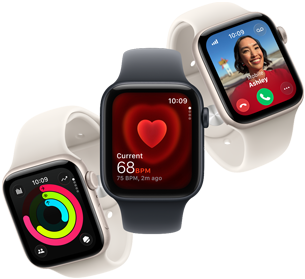

Walk it. Talk it.
Track it. Love it.
Walk it. Talk it.
Track it. Love it.
Walk it. Talk it.
Track it. Love it.


Walk it. Talk it.
Track it. Love it.
Walk it. Talk it.
Track it. Love it.
Walk it. Talk it.
Track it. Love it.
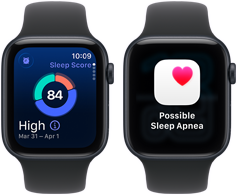
Track the quality of your zzz’s with sleep score. And get sleep apnea notifications.* Refer to legal disclaimers.
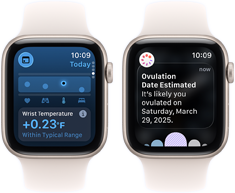
Wrist temperature sensing enables richer health insights in the Vitals app* Refer to legal disclaimers. and retrospective ovulation estimates.* Refer to legal disclaimers.
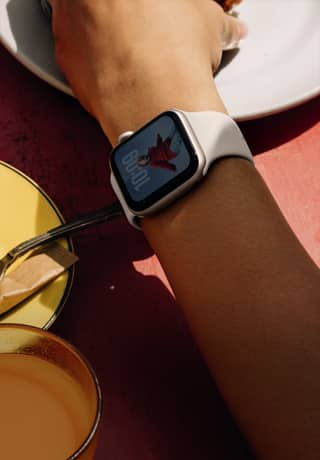
The Always-On display lets you read the time and more without raising your wrist.
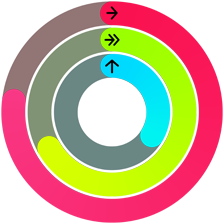
Motivation? Count on it. Apple Watch SE 3 encourages you to close your Activity rings daily.
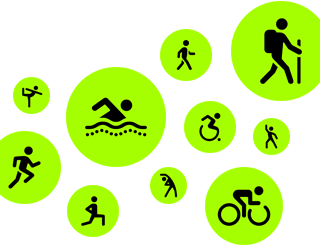
Ready. Set. Whoa. It’s so easy to track all your favorite workouts.
Add a cellular plan to text, call, stream, and download on the go. Now available with 5G speeds.* Refer to legal disclaimers.
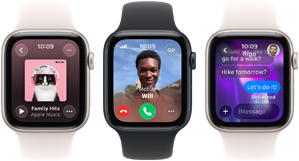
Enjoy all-day, 18-hour battery life.* Refer to legal disclaimers. Then recharge up to 2x as quickly with fast charging.* Refer to legal disclaimers.

Safety features like Crash Detection and Fall Detection can get you help in an emergency.* Refer to legal disclaimers.
Set up Apple Watch For Your Kids, even if they don’t have their own iPhone.* Refer to legal disclaimers.



Sleep apnea notifications:
*Sleep apnea notifications are available on Apple Watch Series 9 and later, Ultra 2 and later, and SE 3. The feature is intended to detect signs of moderate to severe sleep apnea for people 18 years old or older without a diagnosis of sleep apnea.
Vitals app:
*The Vitals app is for wellness purposes only and not for medical use.
Cycle tracking app:
*The Cycle Tracking app should not be used for birth control or to diagnose a health condition.
5G cellular and wireless:
*Data plan required. 5G is available in select markets and through select carriers. Speeds vary based on site conditions and carrier. For details on 5G support, contact your carrier and see apple.com/watch/cellular.
Power and battery:
*Battery life varies by use and configuration. See apple.com/watch/battery for more information.
Emergency SOS:
*Emergency SOS requires a cellular connection or Wi‑Fi calling with an internet connection from your Apple Watch or nearby iPhone. You can use cellular models of Apple Watch to make an emergency call in many locations, provided that cellular service is available. Some cellular networks may not accept an emergency call from your Apple Watch if your Apple Watch isn’t activated, if it isn’t compatible with or configured to operate on a particular cellular network, or if it isn’t set up for cellular service, or if the cellular network does not support emergency calling over IMS. See support.apple.com/108374 and apple.com/watch/cellular for more information.
Apple Watch For Your Kids:
*Not all features will be available if the Apple Watch is set up through Apple Watch For Your Kids. Check support.apple.com/109036 for details. Wireless service plan required for cellular service. Check apple.com/watch/cellular for participating wireless carriers and eligibility.
Hypertension notifications:
*Hypertension notifications are not intended for use by people under 22 years old, those who have been previously diagnosed with hypertension, or pregnant persons.
ECG:
*The ECG app is available on Apple Watch Series 4 and later (excluding Apple Watch SE models) and can generate an ECG similar to a single‑lead electrocardiogram. Intended for use by people 22 years old or over.
IRN (irregular rhythm notification):
*Irregular rhythm notification requires the latest version of watchOS and iOS. It is not intended for use by people under 22 years old or those who have been previously diagnosed with atrial fibrillation (AFib).
Blood Oxygen app:
*The Blood Oxygen app is for wellness purposes only and not for medical use. Measurements are calculated and viewed on iPhone in the Health app.
Temperature sensing:
*The temperature sensing feature is not intended for medical use. Temperature sensing is available only on Apple Watch Series 8 and later and all Apple Watch Ultra models.
Emergency SOS via satellite:
*Emergency SOS requires a satellite connection, cellular connection, or Wi-Fi calling with an internet connection from your Apple Watch or nearby iPhone. You can use cellular models of Apple Watch to make an emergency call in many locations, provided that cellular service is available. Some cellular networks may not accept an emergency call from your Apple Watch if your Apple Watch isn’t activated, if it isn’t compatible with or configured to operate on a particular cellular network, or if it isn’t set up for cellular service, or if the cellular network does not support emergency calling over IMS. See support.apple.com/108374 and apple.com/watch/cellular for more information.
International emergency calling:
*Requires Apple Watch Series 7, SE, Ultra, or later. For a list of supported countries and regions, see apple.com/watchos/feature‑availability.
Water and dust resistance:
*Apple Watch SE 3 and Apple Watch Series 11 have a water resistance rating of 50 meters under ISO standard 22810:2010. This means that they may be used for shallow‑water activities like swimming in a pool or ocean. Apple Watch SE 3 and Apple Watch Series 11 should not be used for scuba diving, waterskiing, or other activities involving high‑velocity water. Apple Watch Ultra 3 has a water resistance rating of 100 meters under ISO standard 22810:2010 and may be used for high‑speed water sports and recreational scuba diving (with compatible third‑party app from the App Store) to 40 meters. It should not be used for diving below 40 meters. Water resistance is not a permanent condition and can diminish over time. For additional information, see support.apple.com/109522. Apple Watch Series 8, Series 9, Series 10, and Series 11 and Apple Watch Ultra, Ultra 2, and Ultra 3 are rated IP6X dust resistant.
Cellular and wireless:
*Wireless service plan required for cellular service. Contact your service provider for more details. Connection may vary based on network availability. Check apple.com/watch/cellular for participating wireless carriers and eligibility. See support.apple.com/HT207578 for additional setup instructions.
Satellite:
*Emergency SOS, Find My, and Messages via satellite are included for free for two years with the activation of Apple Watch Ultra 3. Connection and response times vary based on location, site conditions, and other factors. Find My and Messages via satellite require a carrier plan. To send and receive SMS/MMS from cellular models of Apple Watch over satellite, your paired iPhone must be powered on and connected to Wi‑Fi or an active cellular network, but your iPhone doesn’t need to be nearby. SMS message rates may apply. Satellite connectivity provided by Globalstar and its affiliates. See support.apple.com/123924 for more information.
Precision Finding for iPhone:
Requires an iPhone and Apple Watch with second‑generation Ultra Wideband chip. Ultra Wideband availability varies by region.
Fast charging:
*Fast charging is compatible with Apple Watch Series 7 and later, any Apple Watch Ultra model, and Apple Watch SE 3.
Bands:
*Bands shown for illustrative purposes only and subject to availability.
Compatibility:
*Apple Watch Ultra 3, Apple Watch Series 11, and Apple Watch SE 3 require iPhone 11 or later with iOS 26 or later.
Feature availability:
*Features are subject to change. Some features, applications, and services may not be available in all regions or all languages. See apple.com/watchos/feature‑availability for complete list.