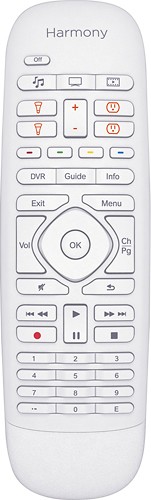

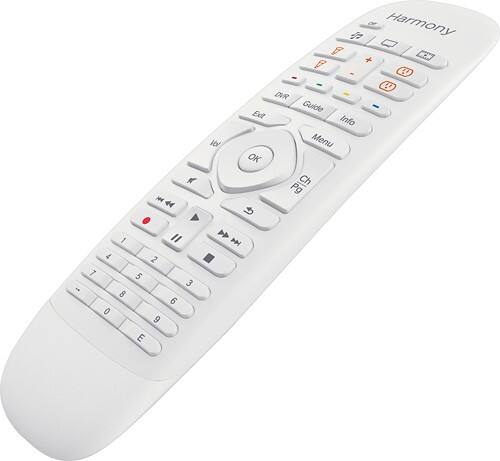
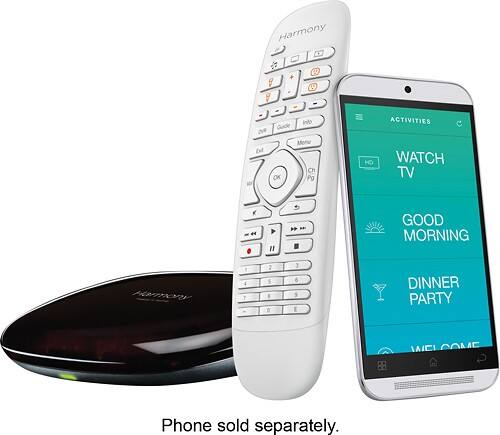
Logitech - Harmony Home Control - White
This item is no longer available in new condition.
See similar items below.
Description

Features
Compatible with a variety of home entertainment and automation devices
Including Philips hue and Lutron Caseta Bridge lights, August smart lock, Nest learning thermostat and Honeywell Wi-Fi thermostat, PEQ and SmartThings sensors and more.
Works with Nest
So you can adjust the temperature on the Nest thermostat from your Harmony Home Control remote.
Remote
Allows you to control compatible home entertainment and home automation devices directly from the remote.
Bluetooth, IR and Wi-Fi transmission capabilities
Offer flexible connectivity, as well as compatibility with gaming consoles and devices behind closed cabinets.
Hub
Relays commands from the remote for simple control.
Also compatible with select Sonos, Samsung, LG, Sony, Apple® TV, Roku and other devices.
Apple, the Apple logo and iTunes are trademarks of Apple Computer, Inc., registered in the U.S. and other countries. iPod is a trademark of Apple Computer, Inc.
Downloadable Harmony app
Lets you use your smartphone as a remote.
What's Included
Logitech Harmony Home Control remote with battery, Logitech Harmony Home Control hub
IR mini blaster, USB cable, AC adapter
Owner's manual
Other
- Number of Devices Controlled8
- UPC097855108760
Customer reviews
Rating 4.3 out of 5 stars with 1750 reviews
(1,750 customer reviews)Rating by feature
- Value4.1
Rating 4.1 out of 5 stars
- Quality4.4
Rating 4.4 out of 5 stars
- Ease of Use3.9
Rating 3.9 out of 5 stars
to a friend
Rated 5 out of 5 stars
Full RF and IR control, best feeling remote ever
||Posted . Owned for less than 1 week when reviewed.This reviewer received promo considerations or sweepstakes entry for writing a review.TL/DR: Gave me fully integrated RF and IR control of Amazon Fire TV, Roku, Xfinity X1, Windows Media Center, AV receiver, HDTV, standalone HDMI switcher, and Wink/IFTTT controlled lighting, with one of the nicest feeling remotes I've ever held in hand, plus seamless Google Assistant voice control. I sure hope Companion has won both technical and design awards, because it addressed everything I needed to solve in my family room, and then some. Wish I'd discovered this years ago. If you're using multiple remotes to watch TV, or still needing to point remotes at their devices, you should move up to this, if only to gain the convenience of RF-based control (no more arm lifting!). First off, Companion is one of the nicest feeling remotes I've held in hand, ideal size, weight, and matte feel, well balanced and contoured. Much better than bulkier universal remotes, incl. larger Harmony models. Another physical advantage is that it doesn't use a charging cradle (instead, lithium battery), so can always stay right by your favorite seat. BUT: A tradeoff is no backlighting, so this isn't an ideal remote for dark home theater usage. I was pleasantly surprised the Harmony hub directly supports all of my RF and IR controlled devices, including Amazon Fire TV and Roku streaming sticks (RF), Xfinity X1 set top box (IR), and even a $10 IR controlled HDMI switcher, which was surprisingly listed by exact make and model # in the Harmony database. Lastly, even though Harmony doesn't directly interface to my Wink smart hub service, Companion's home control buttons can trigger my Wink lighting routines via IFTTT using SmartThings virtual buttons (no separate SmartThings hub is needed). The Harmony mobile app was all I needed to set up all of above, with the basics working in under an hour. I'm a past user of the legacy Harmony desktop app, and this mobile app is a welcome improvement, though takes some time to figure out its menus. Even though every media control button is customizable for short and long presses, I've only made one minor adjustment to Harmony's defaults, i.e. swapping skip fwd/back to short press, and FF/RW long press. Otherwise, all button mappings have been logical and usable. "Hey Google, turn on Roku" (or Fire TV, or Media Center) through my phone or smart display is handy for having everything powered on and ready to watch by the time I reach the sofa. :) Well done, Logitech!
This review is from Logitech - Harmony Companion (Remote Control and Smart Hub) - Black
I would recommend this to a friendBrand response from Logitech
Posted .Hello Keith, wow!! Thank you so much for the 5-star review! We are so grateful for the honest feedback. At Logitech, it is our goal to ensure you are completely satisfied with your Logitech purchase. We take pride in the products and services we offer, and want our customers to enjoy them just as much as we do. We are so happy to hear that the Companion units are treating you well. Thanks for being part of the Logitech family. Have a great day and an even better 2021! -Ricky from Logitech
Rated 5 out of 5 stars
My favorite remote control
||Posted . Owned for 4 months when reviewed.This reviewer received promo considerations or sweepstakes entry for writing a review.You can control all of your components include smart lights and plugs with this remote control! The software is very smart mostly compatible with %99.99 of devices. You don’t need to worry about your components which is placed inside the cabinet! The smart hub will help to transfer all commands to the devices smoothly! Be patient at the first time when you’re programming the remote.
This review is from Logitech - Harmony Companion (Remote Control and Smart Hub) - Black
I would recommend this to a friendBrand response from Logitech
Posted .Hello, I am so glad to hear you are satisfied with the product! Thank you for being a Logitech customer, and taking the time to write this review!
Rated 3 out of 5 stars
Complex remote
||Posted . Owned for 1 month when reviewed.This reviewer received promo considerations or sweepstakes entry for writing a review.I bought this remote to complement my 75 inch tv and my Klipsch stereo system, however, I can only utilize 50% of the remote. Two, I cannot recommend spending $100 plus for this remote because I still have to use my 3 other remotes in addition to this Logitech Finally, it is not user friendly with the Amazon Fire stick.
This review is from Logitech - Harmony Companion (Remote Control and Smart Hub) - Black
No, I would not recommend this to a friendRated 1 out of 5 stars
PURE TRASH!!!!
||Posted . Owned for 1 year when reviewed.This reviewer received promo considerations or sweepstakes entry for writing a review.This remote is pure trash. It’s not intuitive to use. It has driven me to tears and I have tried like heck to have this thing returned but my husband won’t listen, and the Geek guys keep telling me it’s fine. Do not waste your money on this piece of trash. I wish we had never bought it. The app is a joke and I’m a very technical minded person! It has been the absolute worst thing programmed ever! I wish I had done my own homework rather than listen to some high school kid tell us this was the “best” for our TV & surround sound system.
This review is from Logitech - Harmony Companion (Remote Control and Smart Hub) - Black
No, I would not recommend this to a friendRated 3 out of 5 stars
Third times the charm
||Posted .This reviewer received promo considerations or sweepstakes entry for writing a review.This is the third time I purchase a Harmony remote in the last year. I returned the previous two purchases because I was frustrated. The Harmony product line is initially confusing to setup. How the process works for customizing the remote is not intuitive. I read a review that had a good explanation of the top tier model on Anandtech. It helped me understand this product, so I decided to give this thing another try. Unfortunately it doesn't have much competition, but ultimately I think Logitech did a good job. It takes a little while to setup with the custom macros I need. I have a small theater in my house with a projector, surround sound, and many different input devices. I also have a Philips Hue lighting system in the room. My setup is complicated, which is why I suspect I was so frustrated the first two times with this product line. Once it is all configured though, it works flawlessly. My wife was considering going back to school to learn how to use our theater, but actually she was able to control our gear with this remote after one explanation. The product is far too dependent on a smart phone. And it's not the most stable app. You can do things on a computer, but then it expects you to connect the hub directly to your PC to synchronize, or start the phone app and synchronize changes from your account to the hub even though you used a PC to make the changes. Honestly this makes little sense given the hub connects to the same wifi network as my PC and phone. I would recommend this device to anybody, but some may need help with custom setup (I'm talking about the people who need to do more than add devices and create activities). I was pretty harsh in my product rating even though I am insanely happy with this remote, but such a great product really needs better customization features. Like a central pool of macros that I can assign to any activity that uses all of the devices in the macro. Also, its price is reasonable, but no back light in a MSRP $150 remote is unforgivable. Pros +Reduces need for so many remotes +Easy to use; it actually works! And it's fast +Controls practically everything; the supported products are truly endless (even controls my Emotiva DAC) +Price (it's reasonable) +Uses a standard replaceable button-style battery +Feels really nice in hand; even better than top tier model +Nice textured finish on remote; won't slip out of your hands; No glossy finishes that attracts finger prints and scratches Cons -No back light in a $150 remote [-1 star] (this is where competition would help...) -Setup and customization changes -No unified customization; requires creating the same macro once per activity [-1 star] -High dependency on smart phone or tablet -All Off button is way too close to activity buttons, which are too close to lighting buttons -Setup power cycles every component; refuses to complete setup without power cycle (Epson says not to power cycle my projector; Logitech should know better; at least it only happens once) -No network jack on hub to bypass wifi Wishlist ~I would love to be able to use this thing as a pointing device for my HTPC ~Microphone for converting voice to text ~A small base to highlight this product in my theater would be nice
This review is from Logitech - Harmony Companion (Remote Control and Smart Hub) - Black
I would recommend this to a friendRated 5 out of 5 stars
Amazing Remote
||Posted .This reviewer received promo considerations or sweepstakes entry for writing a review.I never thought I'd love a remote as much as I love this one. I used to have anywhere from 3-4 remotes out on the coffee table at any given time and the Harmony remote has replaced all of them perfectly. The box includes the hub and remote, as well as cables and a mini IR blaster. The hub goes where your devices are and is the device that sends the IR signals out. I have a Comcast X1 box, Apple TV, and a Blu-ray player all behind the TV. Direct line of site is not necessary according to Logitech and my hub works without any problems sitting on top of the Blu-ray player. The mini IR blaster is only needed if there's a device the hub can't reach. The remote has a nice weight to it and feels comfortable to hold. It is also wirelessly paired with the hub, so you don't have to worry about having line of site for that either. The setup process was long, but it was super easy. The app will ask you for the manufacturer and model number of all the devices you have and as long as it's in Logitech's database the commands will automatically be programmed. Logitech seems to have every device known to man and I didn't have a problem looking up any of my things, but anything else can be programmed manually. The steps in the setup process were very granular and I think that is to make sure everything is setup correctly, but it did get a little tedious. After the devices are set the last thing to do is program the 'activity' buttons. There are 3 of them on this remote and each button can be set for two activities via a short press or a long press. The 'Watch TV' activity for me turns on my TV, cable box, switches the TV input to cable, and maps the buttons on the remote for controlling the cable box. The setup is similar for my other devices. As long you're not using anything else for control this works like magic. If you were to switch the TV input with a different remote and start using something else the remote still thinks it's on whatever the last activity button you pressed. It's fairly easy to recover from this in the remote app, but not so much on the remote itself. It does such a good job at controlling everything that I've rarely encountered that issue, but it's something to be aware of. It's also worth noting that the voice features on the Comcast X1 and Apple TV do not work on the Harmony remote either. Except for maybe the Harmony Elite I don't think you can do better than this remote. It's probably the best money I've spent on my home theater setup.
This review is from Logitech - Harmony Companion (Remote Control and Smart Hub) - Black
I would recommend this to a friendRated 5 out of 5 stars
Great Remote
||Posted .This reviewer received promo considerations or sweepstakes entry for writing a review.I needed a replacement remote for my Harmony 1 as the battery wouldn't hold a charge any longer. After reading all the reviews on my options I settled on the Harmony Home Control. I was't looking for anything fancy and I didn't want to pay the money for the higher end units. My requirements were simple, turn all my devices on and off with one button and be able to control those devices that were stored in an enclosed cabinet. I have a Samsung TV, Sony DVD, Yamaha Receiver, DirectTV unit, and 5 speakers plus sub. The Harmony Home control works flawlessly and met all my requirements. It was very easy to set up and as an added bonus the HUB works well with the installed APP which I use from my iPhone. The set up was easy for me because I simply unplugged the outgoing Logitech equipment and replaced it with the new. I did connect the equipment to my Apple MAC first to download the latest firmware, register, and program my equipment. That was easy as I already had a Logitech account. The Hub unit only came with one IR Blaster but there is input for two. So i used one of the IR Blasters from the old unit and it seems to work well with the new. The only thing you have to get used to is the small numeric keys but that really hasn't been an issue for me. Also, note, there is no backlight so the keys do not light up in the dark. Because there is no backlight nor a touch screen, you don't have to keep the remote charged which I like. That means no returning back to a base for charging. Bottom line, simple to set up, simple use, and it looks and feels pretty good to.
This review is from Logitech - Harmony Companion (Remote Control and Smart Hub) - Black
I would recommend this to a friendRated 4 out of 5 stars
Best Remote For The Money
||Posted . Owned for 3 weeks when reviewed.This reviewer received promo considerations or sweepstakes entry for writing a review.This remote is easy to program and does a great job. Works as advertised. I especially like not having to point the remote at my devices as the RF transmitter and hub solve that problem. I did have to use the included IR extender to get a consistent signal to my receiver. All my devices are located inside a cabinet and the hub is located on top of the cabinet. The lack of a display screen is not much of a factor and results in much longer battery life. I have larger hands so wish the keys were a little larger, but that’s not a deal breaker. Same for the lack of back-lighting, although this could be a factor if using the remote in a very dark room. I also didn’t like that the fast forward/reverse and the jump forward/back use the same two keys, requiring a short press and a long press to differentiate. I like to fast forward thru commercials and then hit the jump back key so as to not miss programming. The double use reverse key was bothersome, but I was able to assign the jump-back function to another key (the blue key, in my case). This solved that problem. Overall, a very good remote for a decent price.
This review is from Logitech - Harmony Companion (Remote Control and Smart Hub) - Black
I would recommend this to a friend
Q: QuestionCan the remote connect via IR and WiFi simultaneously?I have my components in a nearby closet, so would like the hub to control those devices via WiFi from the remote, but also control the tv via IR. Is that possible to do simultaneously?
Asked by Anonymous.
- A:Answer It depends on your setup. The remotes that come with the hub only talk to the hub and do not send any IR signal themselves (although some can if so configured) and they talk to the hub wirelessly. Therefore you can put the hub anywhere within wireless range, or if using wifi (iPhone, android) to control the hub anywhere within wifi range, and the hub will control anything that IT can sen IR signals to. Since the hub can use two (or four with splitters) IR blasters and the hub has an IR blaster built in you can control IR devices in three (or 5) separate enclosed areas. Typically this is the main room, and the shelves inside a closed cabinet, but a closet and other areas would work.
Answered by Homer
Q: QuestionHas anyone had trouble getting the remote to consistently work with the LG 4K Smart Televisions Model 70UH6350?
Asked by LGcompatability.
- A:Answer I have had trouble getting it to stay linked to 2 different TV sets. I set it up - it works fine for a day or two - then it no longer controls the TV and I have to reprogram from scratch.
Answered by Michal
Q: QuestionTV DVD remoteCan this unit be programed to control a Sony TV (Comcast provider) and two Sony (2) DVD's ?
Asked by Anonymous.
- A:Answer Pretty much controls everything, and any issues we've had are promptly handled by the Harmony support team.
Answered by Stryprod
Q: QuestionDoes this remote and hub work with Amazon Firestick?
Asked by Anonymous.
- A:Answer Yes, this model is Fire Stick compatible.
Answered by CommunityAnswer
Q: QuestionCan I copy my current programming from my Harmony Model 915 to this one, or do I have to re-enter everything?
Asked by Patti.
- A:Answer The setup app does have functionality to migrate programming.
Answered by MarloweWDC
Q: QuestionCan the Harmony hub control Directv genies that are rf control?
Asked by steven.
- A:Answer Yes, I needed it to do the same as previous devices would not work with the genie, this one does.
Answered by GKVA
Q: QuestionWhen you pick up the remote does the backlight go on? Or do you need to press a button first? I want the keys to light up when you pick it up like a comcast remote. Also, is every button backlit or just a few?
Asked by ChrisW.
- A:Answer The Harmony companion remote does not have a backlight. It's fairly plain actually.
Answered by Quicksilver76
Q: QuestionWill this also control my Apple TV?
Asked by Hammerd2h.
- A:Answer Yes,and Roku,Netflix and any other streaming network you might want
Answered by Coach4joe