“How do I turn this lamp on? What are the steps besides plugging it in.....Thank you for your help.”
Answer This Question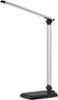
1-7 of 7 Answers
There is a power button on the front of the base. You need to push that.
Sorry, there was a problem. Please try again later.The base is touch-sensitive. The spots where you should touch are marked in white. There is a row of rectangular boxes. The larger the box, the bright the light will be. Beneath that row are two buttons, The one on the left is power, and the one on the right controls the 'warmth' or color of the LED.
Sorry, there was a problem. Please try again later.To turn on the lamp there is a small button on the base and to control the brightness levels you slide your finger across the different levels.
Sorry, there was a problem. Please try again later.Touch the markings on the base. There are no buttons and no switches.
Sorry, there was a problem. Please try again later.there isn't a switch there is a touch control on the bottom area that you swipe your finger right or left which makes the lighting dim or bright.
Sorry, there was a problem. Please try again later.On the front edge of the base are touch switches one of "on/off" and several for light settings. Yes, they are a little hard to see.
Sorry, there was a problem. Please try again later.There is a touch sensitive On/Off button on the base as well as an adjustable dimmer and color temperature changer. Very nice lamp.
Sorry, there was a problem. Please try again later.
